
machine learning +
Zero-Shot vs Few-Shot Prompting: Complete Guide
Simple RAG Explained: A Beginner’s Guide to Retrieval-Augmented Generation (RAG)
Discover how Simple RAG (Retrieval-Augmented Generation) works. This beginner’s guide breaks down how RAG works step by step with Python code implementation.
I’m going to walk you through creating a Simple RAG system. But what exactly is RAG?
RAG stands for Retrieval-Augmented Generation.
Think of it as giving your AI a specific relevant documents (or chunks) that it can quickly scan through to find relevant information before answering your questions.
So, instead of searching the entire database (which might not fit in the LLM model’s context window, or even if it fits it will consume a lot of tokens to answers) we give the LLM only the relevant documents (chunks) that it needs to look up in order to answer user question.
What we’ll do today:
By the end of this guide, you’ll have a working system that can:
- Read any PDF document ( the same can apply for any other source)
- Answer questions about its content
- Show you exactly where it found the information
- Evaluate how good its answers are
Let’s dive in!
1. Understanding RAG: The Big Picture
Picture this scenario. You ask an AI about quantum physics, but it was trained months ago. It might give you outdated information or make educated guesses.
Now imagine the same AI, but this time it can search through current research papers before answering. Much better, right?
That’s RAG in action. Here’s how it works:
- You ask a question about your document
- The system searches for relevant chunks in your document
- It finds the most relevant parts using smart similarity matching
- The AI reads those parts and crafts an answer based on what it found
- You get an accurate, grounded response with sources
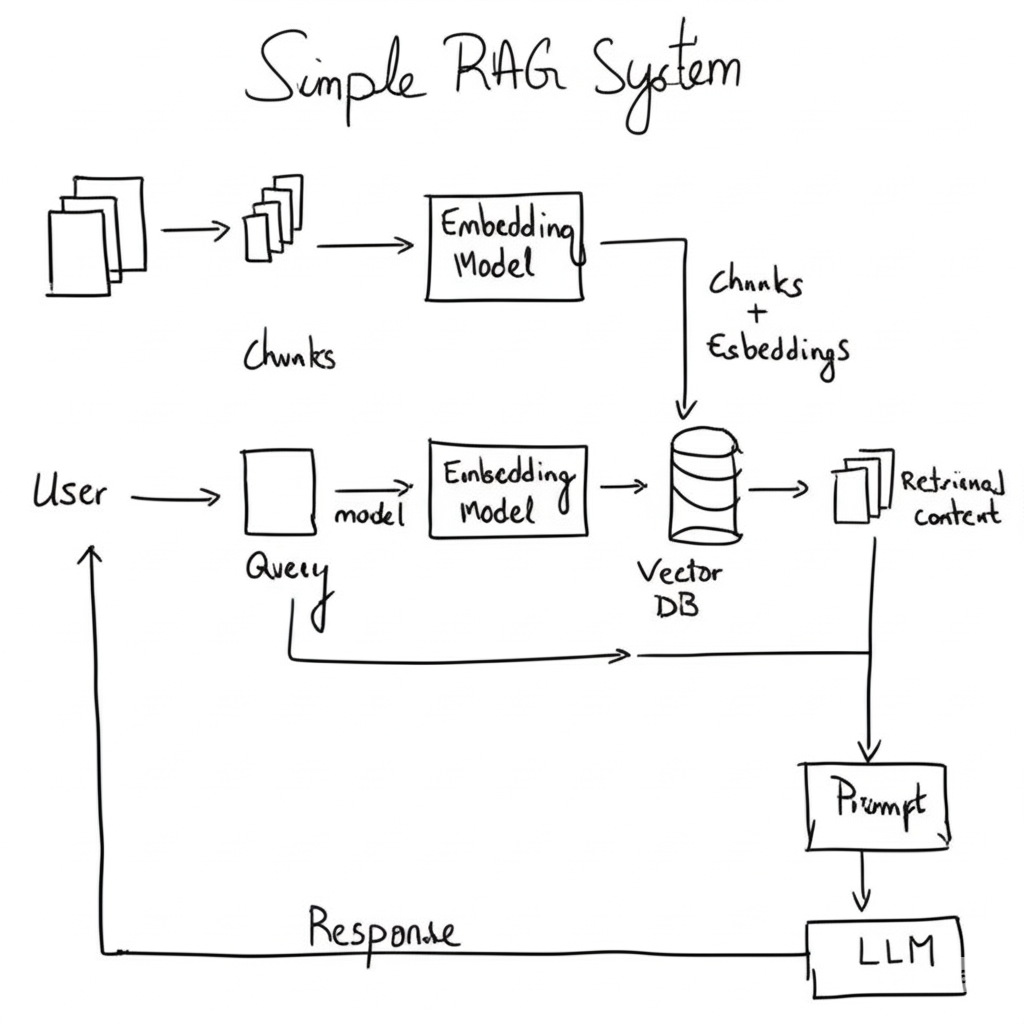
Why Not Just Feed the Entire Document to AI?
Great question! Here’s why chunking works better:
- Token limits: AI models can only process so much text at once
- Cost: Processing smaller chunks costs less than entire documents
- Focus: The AI concentrates on relevant information instead of getting distracted
- Speed: Finding specific chunks first is much faster
1. Setting Up Your Environment
Before we start coding, let’s get all our tools ready. You’ll need these libraries installed in your Python environment.
bash
conda create -p rag python==3.12
conda activate rag
pip install ipykernel
pip install -r requirements.txt
Let’s now import the pacakages.
python
# Core Python libraries
import os
import re
from typing import List

# PDF processing - we'll use pypdf instead of fitz
from pypdf import PdfReader

# LangChain components for our RAG system
from langchain_community.vectorstores import FAISS
from langchain_openai import OpenAIEmbeddings, ChatOpenAI
from langchain.schema import Document
from langchain.text_splitter import RecursiveCharacterTextSplitter
from langchain_core.prompts import ChatPromptTemplate
from langchain_core.output_parsers import StrOutputParser
from langchain_core.runnables import RunnablePassthrough

# Environment management
from dotenv import load_dotenv

# Load your API keys
load_dotenv()
OPENAI_API_KEY = os.getenv("OPENAI_API_KEY")
PDF_PATH = os.getenv("PDF_PATH")  # Path to your PDF file

print("✅ All libraries loaded successfully!")
python
✅ All libraries loaded successfully!
We imported all the tools we need. PyPDF will read our PDF files, LangChain will handle the AI magic, and FAISS will store our searchable vectors. Think of these as your toolbox for building the RAG system.
2. Reading Your PDF Documents
Now, let’s tackle the first challenge: extracting text from PDF files. PDFs are tricky because they’re designed for viewing, not for machines to easily read. We need to convert them into plain text.
Why this step matters: Your AI can’t understand PDF formatting, fonts, or layouts. It needs clean, readable text. That’s what we’re doing here.
python
# Read the PDF and extract all text
pdf_reader = PdfReader(PDF_PATH)
print(f"📄 PDF loaded with {len(pdf_reader.pages)} pages")

# Extract text from all pages
raw_text = ""
for page_num, page in enumerate(pdf_reader.pages):
    page_text = page.extract_text()
    raw_text += page_text

print(f"📊 Extracted {len(raw_text)} characters total")
python
📄 PDF loaded with 46 pages
📊 Extracted 132988 characters total
Now let’s clean up this text. PDFs often have weird spacing and control characters that can confuse our AI.
python
# Clean the extracted text
def clean_extracted_text(text: str) -> str:
    # Replace multiple whitespace with single spaces
    cleaned = re.sub(r'\s+', ' ', text)
    # Remove control characters
    cleaned = re.sub(r'[\x00-\x1F\x7F]', '', cleaned)
    # Strip leading/trailing whitespace
    return cleaned.strip()

document_text = clean_extracted_text(raw_text)
print(f"🧹 Cleaned text: {len(document_text)} characters")
print(f"📝 Preview: {document_text[:200]}...")
python
🧹 Cleaned text: 132802 characters
📝 Preview: Mac hine Learning /1 Thomas G/. Dietteric h Departmen t of Computer Science Oregon State Univ ersit y Corv allis/, OR /9/7/3/3/1/-/3/9/0/2 August /2/9/, /1/9/9/4 /1 T o app ear in A nnual R eview of C...
We opened your PDF file, went through each page, extracted the text, and cleaned it up. The cleaning step removes weird characters and normalizes spacing so our AI can work with it better.
3. Breaking Text into Chunks
Here’s where things get interesting. We can’t feed the entire document to our AI at once. We need to break it into smaller, digestible pieces called “chunks.”
Why chunking matters
Imagine trying to find a recipe in a cookbook by reading the whole book every time. Instead, you’d want it organized by chapters or individual recipes. Same idea here.
python
chunk_size = 1000
chunk_overlap=200

# Set up our text splitter
text_splitter = RecursiveCharacterTextSplitter(
    chunk_size=chunk_size,
    chunk_overlap=chunk_overlap,
    length_function=len,
    separators=["\n\n", "\n", ". ", " ", ""]
)

print("🔪 Creating text chunks...")
text_chunks = text_splitter.split_text(document_text)
print(f"📋 Created {len(text_chunks)} chunks")
python
🔪 Creating text chunks...
📋 Created 169 chunks
Let’s see what we created:
python
# Show info about our chunks
total_chars = sum(len(chunk) for chunk in text_chunks)
avg_chunk_size = total_chars / len(text_chunks) if text_chunks else 0

print(f"📈 Chunk Statistics:")
print(f"   Total chunks: {len(text_chunks)}")
print(f"   Average size: {avg_chunk_size:.0f} characters")
print(f"   Chunk size range: {chunk_size} characters max")
print(f"   Overlap: {chunk_overlap} characters")

# Preview the first chunk
print(f"\n📖 First chunk preview:")
print(f"{text_chunks[0][:300]}...")
python
📈 Chunk Statistics:
   Total chunks: 169
   Average size: 897 characters
   Chunk size range: 1000 characters max
   Overlap: 200 characters

📖 First chunk preview:
Mac hine Learning /1 Thomas G/...
We used LangChain’s smart text splitter that tries to break text at natural boundaries (like paragraphs or sentences).
The overlap means each chunk shares some text with its neighbors, so we don’t lose important information that might span across boundaries.
4. Converting Text to Searchable Vectors
This is where the magic starts. We need to convert our text chunks into numbers that capture their meaning. This process is called “embedding.”
Why embeddings matter
Computers can’t understand meaning from words directly. But they can compare numbers. Embeddings convert “car” and “automobile” into similar numbers because they have similar meanings.
python
# Set up the embedding model
print("🧠 Setting up embeddings model...")
embeddings_model = OpenAIEmbeddings(
    model="text-embedding-3-small"  # OpenAI's latest embedding model
)
print("✅ Embeddings model ready!")
python
🧠 Setting up embeddings model...
✅ Embeddings model ready!
Now let’s convert our chunks into documents that LangChain can work with:
python
# Convert chunks to LangChain documents
print("📄 Converting chunks to documents...")
documents = []

for i, chunk in enumerate(text_chunks):
    doc = Document(
        page_content=chunk,
        metadata={
            "chunk_id": i,
            "chunk_length": len(chunk),
            "source": "pdf_document"
        }
    )
    documents.append(doc)

print(f"✅ Created {len(documents)} document objects")

# Show a sample document
sample_doc = documents[0]
print(f"\n📋 Sample document:")
print(f"   Content length: {len(sample_doc.page_content)}")
print(f"   Metadata: {sample_doc.metadata}")
print(f"   Preview: {sample_doc.page_content[:150]}...")
python
📄 Converting chunks to documents...
✅ Created 169 document objects

📋 Sample document:
   Content length: 30
   Metadata: {'chunk_id': 0, 'chunk_length': 30, 'source': 'pdf_document'}
   Preview: Mac hine Learning /1 Thomas G/...
We wrapped each text chunk in a Document object that includes the text and some metadata (information about the chunk). This gives us a structured way to work with our text pieces.
5. Building Your Searchable Knowledge Base
Now we’re going to create a vector database. Think of it as a super-smart filing system that can find similar content instantly.
Why FAISS? FAISS (Facebook AI Similarity Search) is like a librarian who can instantly find the most relevant books for your question, even if you don’t know the exact title.
python
# Create the vector database
print("🔍 Building searchable vector database...")
print("⏳ This might take a few minutes...")

vector_store = FAISS.from_documents(
    documents=documents,
    embedding=embeddings_model
)

print("✅ Vector database created successfully!")
print(f"📊 Indexed {len(documents)} document chunks")
python
🔍 Building searchable vector database...
⏳ This might take a few minutes...
✅ Vector database created successfully!
📊 Indexed 169 document chunks
Let’s test our search system:
python
# Test the search functionality
def test_vector_search(query: str, num_results: int = 3):
    print(f"🔍 Searching for: '{query}'")

    # Perform similarity search
    search_results = vector_store.similarity_search(
        query=query,
        k=num_results
    )

    print(f"📋 Found {len(search_results)} relevant chunks:")

    for i, doc in enumerate(search_results, 1):
        print(f"\n📄 Result {i}:")
        print(f"   Chunk ID: {doc.metadata.get('chunk_id', 'unknown')}")
        print(f"   Preview: {doc.page_content[:200]}...")

    return search_results

# Test with a sample question
test_query = "What is machine learning?"
search_results = test_vector_search(test_query)
python
🔍 Searching for: 'What is machine learning?'
📋 Found 3 relevant chunks:

📄 Result 1:
   Chunk ID: 5
   Preview: . This progress has tak en man y directions/. First/, in the area of inductiv e learning/, a new formal de/ nition of learning in tro duced b y Leslie V alian t has pro vided the foundation for sev er...

📄 Result 2:
   Chunk ID: 95
   Preview: . The metho ds can learn concepts suc h as decision trees /(ID/3/)/, disjunctiv e/-normal/-form Bo olean expressions /(F ringe/)/, and disjunctions of linear threshold units /(P erceptron trees/) in r...

📄 Result 3:
   Chunk ID: 154
   Preview: . S/./, Dietteric h/, T/. G/. /1/9/8/9/. Induction o v er explanations/: a metho d that exploits domain kno wledge to learn from examples/. Machine L e arning /. In press /4/1Gold/, E/. M/. /1/9/7/8/....
We created a searchable database of all our document chunks. When you ask a question, it converts your question into the same type of numbers (vectors) and finds the chunks with the most similar numbers.
It’s like finding documents that “think” the same way as your question.
6. Creating Your AI Question-Answering System
Now for the exciting part – building the system that actually answers your questions! We’ll combine our search system with OpenAI’s language model.
The RAG magic: Instead of just guessing, our AI will first search your documents for relevant information, then use that information to generate accurate answers.
python
# Set up the language model
print("🤖 Setting up AI language model...")
llm = ChatOpenAI(
    model="gpt-4",
    temperature=0.0  # Low temperature for consistent, factual answers
)
print("✅ Language model ready!")
python
🤖 Setting up AI language model...
✅ Language model ready!
Now let’s create the prompt template that tells our AI how to behave:
python
# Create the prompt template using LCEL
system_prompt = """
You are a helpful AI assistant that answers questions based on the provided context.

Rules:
1. Only use information from the provided context to answer questions
2. If the context doesn't contain enough information, say so honestly
3. Be specific and cite relevant parts of the context
4. Keep your answers clear and concise
5. If you're unsure, admit it rather than guessing

Context:
{context}

Question: {input}

Answer based on the context above:
"""

prompt_template = ChatPromptTemplate.from_template(system_prompt)
print("✅ Prompt template created!")
python
✅ Prompt template created!
Let’s build the complete RAG chain using LCEL (LangChain Expression Language):
python
# Import LCEL components
from langchain_core.output_parsers import StrOutputParser
from langchain_core.runnables import RunnablePassthrough

# Create retriever from our vector store
retriever = vector_store.as_retriever(
    search_kwargs={"k": 4}  # Retrieve top 4 most relevant chunks
)

# Define a function to format retrieved documents
def format_docs(docs):
    return "\n\n".join(doc.page_content for doc in docs)

# Build the RAG chain using LCEL pipe syntax
rag_chain = (
    {
        "context": retriever | format_docs,  # Retrieve docs and format them
        "input": RunnablePassthrough()       # Pass the question through
    }
    | prompt_template                        # Format the prompt with context and question
    | llm                                   # Send to language model
    | StrOutputParser()                     # Parse the output to a string
)

print("🎯 Complete RAG system ready!")
print("💡 You can now ask questions about your document!")
python
🎯 Complete RAG system ready!
💡 You can now ask questions about your document!
Now we’re using LCEL syntax. The pipe operator (|) chains components together. Here’s the flow:
- The input gets split into
context(retrieved docs) andinput(the question) - Documents are retrieved and formatted into a single string
- The question passes through unchanged via
RunnablePassthrough() - Both go into the prompt template to create the final prompt
- The prompt goes to the LLM, and the output gets parsed to a string
This is the modern, functional way to build LangChain applications.
7. Asking Questions and Getting Answers
Time to put our system to work! Let’s ask it some questions and see how it performs.
python
def ask_document_question(question: str):
    print(f"❓ Question: {question}")
    print("🤔 Thinking...")

    # Get the answer from our RAG system
    # With LCEL, we pass the question directly as a string
    response = rag_chain.invoke(question)

    # Display the answer
    print(f"\n🎯 Answer:")
    print(f"{response}")

    # To see source documents, we need to get them separately
    source_docs = retriever.invoke(question)
    print(f"\n📚 Based on {len(source_docs)} source chunks:")

    for i, doc in enumerate(source_docs, 1):
        chunk_id = doc.metadata.get('chunk_id', 'unknown')
        print(f"\n📄 Source {i} (Chunk {chunk_id}):")
        print(f"   {doc.page_content[:200]}...")

    print("\n" + "="*80)
    return response

# Test with some questions
questions = [
    "What is the main topic of this document?",
    "What are the key concepts discussed?",
    "Can you summarize the most important points?"
]

for question in questions:
    answer = ask_document_question(question)
    print()  # Add some space between questions
python
❓ Question: What is the main topic of this document?
🤔 Thinking...

🎯 Answer:
The main topic of this document is machine learning. It discusses various aspects of machine learning including inductive learning, new learning algorithms, explanation-based learning, and the philosophical foundations of machine learning. The goal of the article is to present major results in each of these areas.

📚 Based on 4 source chunks:

📄 Source 1 (Chunk 147):
   . There are man y topics that ha v e b een omitted/|three of the most imp ortan t require men tion/. First/, there are man y applications where the task is to disco v er new concepts /(or patterns/) i...

📄 Source 2 (Chunk 3):
   /: /: /: /: /: /: /: /2/5 /5 EXPLANA TION/-BASED LEARNING /2/5 /5/./1 The Basic EBL Pro cedure /: /: /: /: /: /: /: /: /: /: /: /: /: /: /: /: /: /: /: /: /: /: /: /: /: /: /: /: /: /: /: /: /: /2/5 /...

📄 Source 3 (Chunk 1):
   . Dietteric h Departmen t of Computer Science Oregon State Univ ersit y Corv allis/, OR /9/7/3/3/1/-/3/9/0/2 August /2/9/, /1/9/9/4 /1 T o app ear in A nnual R eview of Computer Scienc e /, V olume /4...

📄 Source 4 (Chunk 5):
   . This progress has tak en man y directions/. First/, in the area of inductiv e learning/, a new formal de/ nition of learning in tro duced b y Leslie V alian t has pro vided the foundation for sev er...

================================================================================

❓ Question: What are the key concepts discussed?
🤔 Thinking...

🎯 Answer:
The key concepts discussed in the context include the philosophical foundations of learning, theoretical results, practical inductive learning algorithms, explanation-based learning, the task of discovering new concepts or patterns in a collection of training examples (termed as clustering), case-based reasoning, and the concept of learning represented as deterministic finite state automata.

📚 Based on 4 source chunks:

📄 Source 1 (Chunk 6):
   . W e b egin with a discussion of the philosophical foundations/, since these will pro vide a framew ork for the remainder of the article/. This is follo w ed b y sections that describ e /(a/) theoret...

📄 Source 2 (Chunk 147):
   . There are man y topics that ha v e b een omitted/|three of the most imp ortan t require men tion/. First/, there are man y applications where the task is to disco v er new concepts /(or patterns/) i...

📄 Source 3 (Chunk 156):
   . T ec h/. Rep/. /1/4/-/8/8/, Aik en Computation Lab oratory /, Harv ard Univ ersit y /, Cam bridge MA Kearns/, M/./, V alian t/, L/. G/. /1/9/8/9/. Cryptographic limitations on learning b o olean for...

📄 Source 4 (Chunk 49):
   . The question of whether ev ery concept in k /-/3NN can b e learned b y / nding /(in p olynomial time/) a concept in k /0 /-/3NN /(where k /0 / p /( k /) for some p olynomial p /) is op en/. Ho w ev ...

================================================================================

❓ Question: Can you summarize the most important points?
🤔 Thinking...

🎯 Answer:
1. The task of discovering new concepts or patterns in a collection of training examples is often termed "clustering". An example of this is a program called Auto class which discovered a new class of stars.
2. Case-based reasoning is another important concept that has been omitted. It involves storing previous problem-solving experiences and then solving future problems by retrieving stored solutions to similar problems.
3. Abductive theory completion is a technique for generating plausible new rules to extend an incomplete domain theory. These rules must be tested typically by performing statistical tests on a collection of examples.
4. Induction over explanations is a technique for refining a promiscuous domain theory by finding a maximally specific shared explanation.
5. The best explanation for Explanation-Based Learning (EBL) is the shortest, most general one that can be found. Some form of post-optimization of the learned rules is critical.
6. In Prodigy, three techniques are applied to simplify learned rules: partial evaluation, condition ordering, and simplification via domain theorems.

📚 Based on 4 source chunks:

📄 Source 1 (Chunk 147):
   . There are man y topics that ha v e b een omitted/|three of the most imp ortan t require men tion/. First/, there are man y applications where the task is to disco v er new concepts /(or patterns/) i...

📄 Source 2 (Chunk 146):
   . Ab ductiv e theory completion is a tec hnique for generating plausible new rules to extend an incomplete domain theory /. Once generated/, the rules m ust b e tested/|t ypically b y p erforming stat...

📄 Source 3 (Chunk 1):
   . Dietteric h Departmen t of Computer Science Oregon State Univ ersit y Corv allis/, OR /9/7/3/3/1/-/3/9/0/2 August /2/9/, /1/9/9/4 /1 T o app ear in A nnual R eview of Computer Scienc e /, V olume /4...

📄 Source 4 (Chunk 129):
   . In general/, the b est explanation for EBL is the shortest/, most general one that can b e found/. Explanations exploiting sp ecial/-case rules will result in learned rules that are also only applic...

================================================================================
Our RAG system is now working!
For each question, it searches your document, finds the most relevant chunks, and generates an answer based on that information. You can see exactly which parts of your document were used to create each answer.
Free Course
Master Core Python — Your First Step into AI/ML
Build a strong Python foundation with hands-on exercises designed for aspiring Data Scientists and AI/ML Engineers.
Start Free Course →Trusted by 50,000+ learners

Related Course
Master Gen AI — Hands-On
Join 5,000+ students at edu.machinelearningplus.com
Explore Course


