
machine learning +
Build an AI Chatbot with Memory in Python (Step-by-Step)
Build a Python AI Chatbot with Memory (Step-by-Step)
Learn to build a Python AI chatbot with memory using LangChain. Master 5 memory types, add a Streamlit UI, and persist conversations across sessions.
Every chatbot you build with the OpenAI API has a hidden flaw — it loses all context the instant you send your next message. This guide walks you through the fix. By the end, you’ll have a Python chatbot that tracks your full chat, recalls your name, and resumes right where things left off.
What Is Chat Memory and Why Does Your Chatbot Need It?
LLMs like GPT-4 don’t hold state between calls. Every request to the API lands in a fresh, empty room. The model can’t tell what you said just moments ago.
Imagine telling the bot “My name is Alice” and then asking “What’s my name?” in the next turn. The bot won’t know. For the model, your second message is the start of a brand new talk with someone it has never met.
Chat memory is the fix. You store each message and feed the whole list back with every new request. The model scans all the past turns and responds as though it tracked the full exchange.
Let me walk you through how the pieces fit:
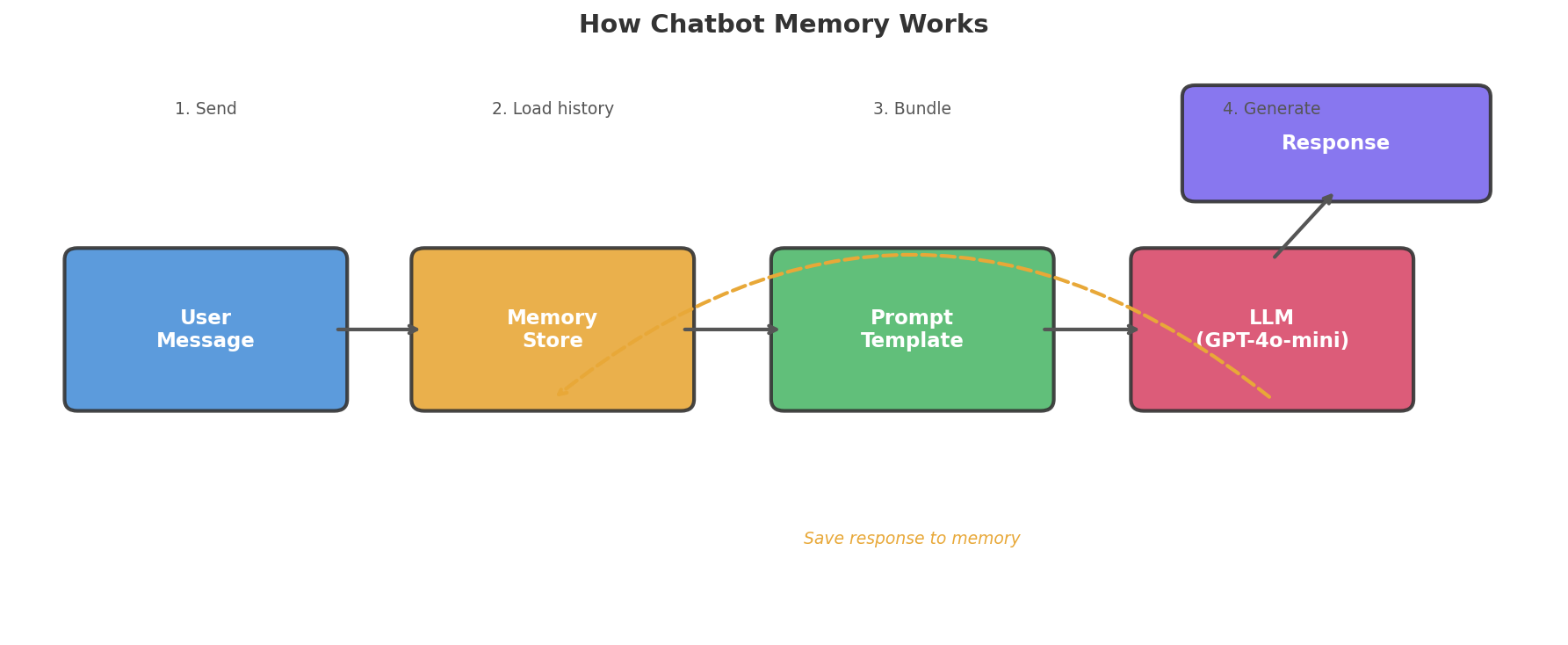
Here is the step-by-step flow:
- You type a new message.
- The memory store pulls up all past messages.
- Your app bundles the old and new messages into one prompt.
- The LLM reads that full prompt and writes a reply.
- Your app saves both your message and the AI reply back to memory.
Take away step 2, and the model only sees what you just typed. Put it back, and the model sees your whole talk.
Key Insight: Chat memory isn’t some hidden brain state — it’s a plain Python list that you attach to every API call. The model never truly “recalls” a thing. It reads the full chat log fresh each time.
How to Set Up Your Python Workspace
Four packages power the chatbot we’re going to build. Grab them in one shot.
bash
pip install openai langchain langchain-openai python-dotenv streamlit
After that, drop a .env file into your project root. Put your OpenAI API key inside it.
python
# .env
OPENAI_API_KEY=sk-your-api-key-here
Warning: Don’t paste your API key straight into a Python file. Bots scan GitHub repos around the clock and will find exposed keys in minutes. Stick to `.env` files and add `.env` to your `.gitignore` right away.
At the top of your script, pull in the key with python-dotenv. Calling load_dotenv() reads the .env file and drops its values into your system’s env vars.
python
import os
from dotenv import load_dotenv

load_dotenv()
api_key = os.getenv("OPENAI_API_KEY")
print("API key loaded:", "Yes" if api_key else "No")
Output:
python
API key loaded: Yes
Seeing No? Double-check the file name and make sure the key is spelled right.
What Happens When a Chatbot Has No Memory?
Let’s prove the problem. Below is a bare-bones chatbot built on the OpenAI API — with no memory at all.
The openai.chat.completions.create() call expects a list of messages. If you hand it only the newest message, the model sees nothing from past turns.
python
from openai import OpenAI

client = OpenAI()

def chat_no_memory(user_message):
    """Send a single message with no conversation history."""
    response = client.chat.completions.create(
        model="gpt-4o-mini",
        messages=[
            {"role": "system", "content": "You are a helpful assistant."},
            {"role": "user", "content": user_message}
        ]
    )
    return response.choices[0].message.content

# Conversation attempt
print(chat_no_memory("Hi! My name is Alice."))
print("---")
print(chat_no_memory("What's my name?"))
Output:
python
Hello Alice! Nice to meet you. How can I help you today?
---
I don't have access to your personal information, so I don't know your name. Could you tell me?
First call? No problem — it greets Alice by name. Second call? Total blank. It has no clue who Alice is. Both calls land in that empty room we talked about.
That gap is what chat memory fills. Let’s prove it with a pure-Python demo you can run right here. The no_memory function ignores history, while with_memory sends the full list every time:
# Simulate a chatbot with and without memory — no API needed
responses = {
    "Hi! My name is Alice.": "Hello Alice! Nice to meet you.",
    "What's my name?": "I don't know your name. Could you tell me?",
}

def no_memory(msg):
    """Stateless: only sees the current message."""
    return responses.get(msg, "I'm not sure how to respond.")

print("=== No Memory ===")
print("User: Hi! My name is Alice.")
print("Bot:", no_memory("Hi! My name is Alice."))
print("User: What's my name?")
print("Bot:", no_memory("What's my name?"))

# --- Now with memory ---
history = []

def with_memory(msg):
    """Stateful: checks full history for context."""
    history.append({"role": "user", "content": msg})
    # Look through history for name
    name = None
    for m in history:
        if "My name is" in m["content"]:
            name = m["content"].split("My name is")[-1].strip().rstrip(".")
    if "what" in msg.lower() and "name" in msg.lower() and name:
        reply = f"Your name is {name}!"
    elif "My name is" in msg:
        reply = f"Hello {name}! Nice to meet you."
    else:
        reply = "Tell me more!"
    history.append({"role": "assistant", "content": reply})
    return reply

print("\n=== With Memory ===")
print("User: Hi! My name is Alice.")
print("Bot:", with_memory("Hi! My name is Alice."))
print("User: What's my name?")
print("Bot:", with_memory("What's my name?"))
How to Add Memory with a Plain Python List
The most basic memory is a Python list that holds every message. You send the whole list to the API each time you call it.
The trick is simple. The messages field in the OpenAI API accepts a list of old messages alongside the new one. Keep pushing items onto that list, and the model can read the entire talk.
python
from openai import OpenAI

client = OpenAI()
conversation_history = [
    {"role": "system", "content": "You are a helpful assistant."}
]

def chat_with_memory(user_message):
    """Send a message with full conversation history."""
    conversation_history.append({"role": "user", "content": user_message})

    response = client.chat.completions.create(
        model="gpt-4o-mini",
        messages=conversation_history
    )

    assistant_message = response.choices[0].message.content
    conversation_history.append({"role": "assistant", "content": assistant_message})
    return assistant_message

# Now the chatbot remembers
print(chat_with_memory("Hi! My name is Alice."))
print("---")
print(chat_with_memory("What's my name?"))
print("---")
print(chat_with_memory("What was the first thing I said to you?"))
Output:
python
Hello Alice! Great to meet you! How can I help you today?
---
Your name is Alice!
---
The first thing you said was "Hi! My name is Alice."
Just like that, the chatbot knows Alice by name and can even quote her opening line.
Key Insight: Memory is nothing more than a list. Push each message in, send the full list on every call, and the model behaves as if it recalls everything. No hidden state exists — it reads the whole log fresh each time.
There is a catch, though. Every LLM has a context window — a cap on how many tokens (think: chunks of words) it can take in at once. GPT-4o-mini allows 128K tokens, which sounds big. But a lengthy chat with detailed replies will eat through that budget.
Once the history blows past the window, the API call breaks. You need a smarter plan for handling memory. That’s the role LangChain plays.
What Are the 5 Memory Types in LangChain?
LangChain ships with five memory types. Each trades off between keeping everything and saving tokens. Picture five ways to jot down notes in a long work meeting.
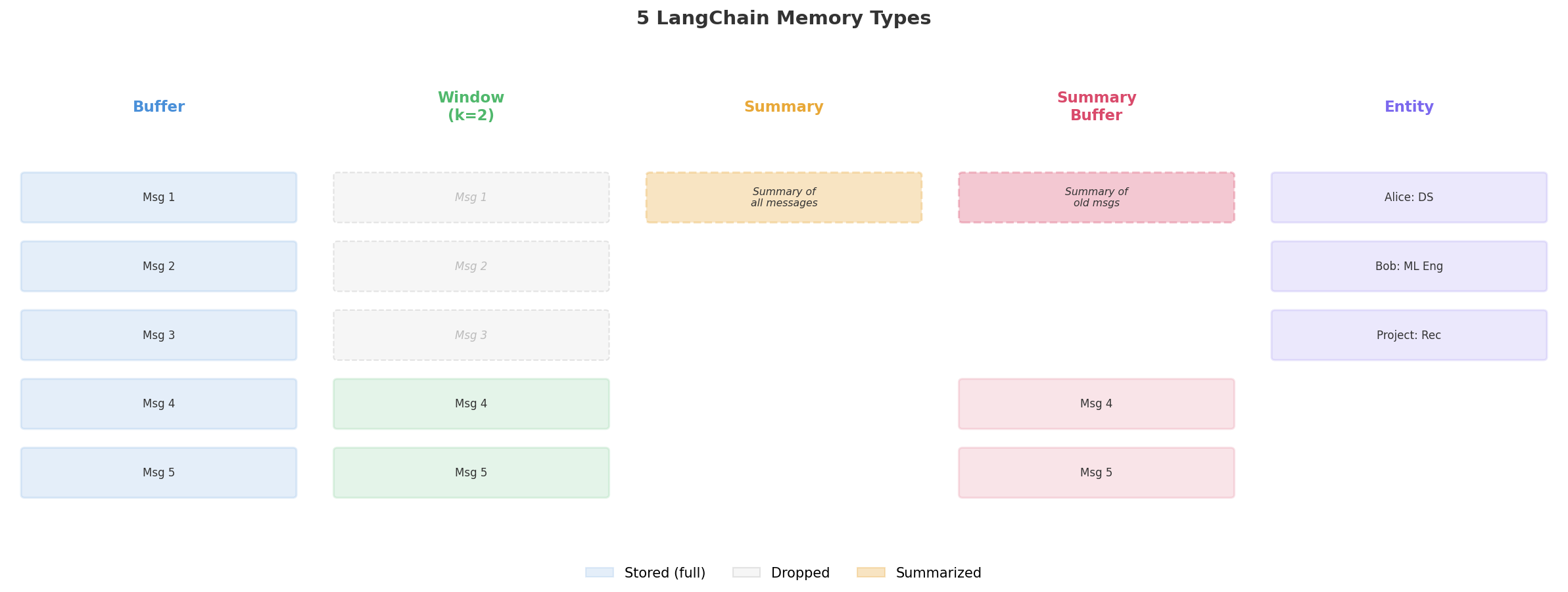
1. ConversationBufferMemory — Keep Every Word
This one is as basic as it gets. It holds every message, word for word — just like the Python list we coded above.
The ConversationBufferMemory class sits on top of a message list. Call save_context to log a user-AI pair. Call load_memory_variables to read all logged messages.
python
from langchain.memory import ConversationBufferMemory

memory = ConversationBufferMemory(return_messages=True)

# Simulate a conversation
memory.save_context(
    {"input": "Hi, my name is Alice"},
    {"output": "Hello Alice! How can I help you?"}
)
memory.save_context(
    {"input": "What's the capital of France?"},
    {"output": "The capital of France is Paris."}
)

# Retrieve all stored messages
print(memory.load_memory_variables({}))
Output:
python
{'history': [HumanMessage(content='Hi, my name is Alice'),
             AIMessage(content='Hello Alice! How can I help you?'),
             HumanMessage(content="What's the capital of France?"),
             AIMessage(content='The capital of France is Paris.')]}
Good for: Quick chats (under 20 turns) where you want zero info loss.
Downside: Token cost climbs with each new message. A long chat will bust through the context window.
Try this pure-Python version of buffer memory — it works the same way under the hood:
# Pure Python buffer memory — same idea as ConversationBufferMemory
class BufferMemory:
    def __init__(self):
        self.messages = []

    def save_context(self, user_msg, ai_msg):
        self.messages.append({"role": "user", "content": user_msg})
        self.messages.append({"role": "assistant", "content": ai_msg})

    def load_history(self):
        return self.messages.copy()

memory = BufferMemory()
memory.save_context("Hi, my name is Alice", "Hello Alice! How can I help?")
memory.save_context("What's the capital of France?", "The capital of France is Paris.")

print("Stored messages:")
for msg in memory.load_history():
    print(f"  {msg['role']}: {msg['content']}")
print(f"\nTotal messages: {len(memory.load_history())}")
2. ConversationBufferWindowMemory — Remember the Last K Turns
Window memory hangs on to only the most recent k pairs of messages. Anything older than that gets silently erased.
It works like a CCTV that records over itself. You always have the last hour of footage, but the tape from three days ago no longer exists.
python
from langchain.memory import ConversationBufferWindowMemory

memory = ConversationBufferWindowMemory(k=2, return_messages=True)

# Simulate 3 exchanges
memory.save_context(
    {"input": "My name is Alice"},
    {"output": "Hi Alice!"}
)
memory.save_context(
    {"input": "I live in New York"},
    {"output": "Nice city!"}
)
memory.save_context(
    {"input": "What's the weather like?"},
    {"output": "I can't check weather, sorry!"}
)

# Only the last 2 exchanges remain
messages = memory.load_memory_variables({})
print(f"Messages stored: {len(messages['history'])}")
for msg in messages['history']:
    print(f"  {msg.type}: {msg.content}")
Output:
python
Messages stored: 4
  human: I live in New York
  ai: Nice city!
  human: What's the weather like?
  ai: I can't check weather, sorry!
That very first pair (“My name is Alice” / “Hi Alice!”) is now wiped. The bot can’t say who Alice is any more.
Good for: Task-driven chats where recent context is all that matters — help desks, code debug sessions, quick Q&A.
Downside: Key early facts (like a user’s name) vanish for good.
Run this to see the window in action — watch how the first message gets dropped:
# Pure Python window memory — keeps only the last k pairs
class WindowMemory:
    def __init__(self, k=2):
        self.k = k
        self.messages = []

    def save_context(self, user_msg, ai_msg):
        self.messages.append({"role": "user", "content": user_msg})
        self.messages.append({"role": "assistant", "content": ai_msg})
        # Trim to last k pairs (k*2 messages)
        self.messages = self.messages[-(self.k * 2):]

    def load_history(self):
        return self.messages.copy()

memory = WindowMemory(k=2)
memory.save_context("My name is Alice", "Hi Alice!")
memory.save_context("I live in New York", "Nice city!")
memory.save_context("What's the weather?", "I can't check weather, sorry!")

print("Messages in memory (only last 2 pairs):")
for msg in memory.load_history():
    print(f"  {msg['role']}: {msg['content']}")

print(f"\nNotice: 'My name is Alice' is gone — the window dropped it!")
3. ConversationSummaryMemory — Compress Old Turns into Notes
Rather than keeping raw messages, this type asks an LLM to write a running summary. Each new turn updates the summary instead of piling onto the list.
Think of a coworker who jots meeting notes rather than hitting “Record” on the entire call.
python
from langchain.memory import ConversationSummaryMemory
from langchain_openai import ChatOpenAI

llm = ChatOpenAI(model="gpt-4o-mini", temperature=0)
memory = ConversationSummaryMemory(llm=llm, return_messages=True)

# Simulate a detailed conversation
memory.save_context(
    {"input": "I'm building a recommendation engine for my e-commerce store. We have 50K products and 2M users."},
    {"output": "Great project! With that scale, I'd suggest collaborative filtering using matrix factorization."}
)
memory.save_context(
    {"input": "We tried that, but cold-start is killing us for new products."},
    {"output": "For cold-start, try a hybrid approach: content-based features for new items, collaborative filtering for established ones."}
)

# The memory stores a summary, not raw messages
print(memory.load_memory_variables({}))
Output:
python
{'history': [SystemMessage(content="The human is building a recommendation engine for an e-commerce store with 50K products and 2M users. The AI suggested collaborative filtering with matrix factorization. The human raised cold-start issues with new products. The AI recommended a hybrid approach combining content-based features for new items with collaborative filtering for established ones.")]}
Everything boils down to one tight summary. Token use stays low even after dozens of turns.
Good for: Extended chats where the big picture matters more than word-for-word recall.
Downside: Details get lost during the squeeze. A name or number the model deemed minor might vanish. On top of that, each summary step costs its own API tokens.
4. ConversationSummaryBufferMemory — A Mix of Both Styles
This hybrid keeps the newest messages in full while boiling older ones into a summary. You get the best of raw recall AND compressed history.
Imagine meeting notes that cover the first hour (condensed) and a live transcript of the last ten minutes (full text).
python
from langchain.memory import ConversationSummaryBufferMemory
from langchain_openai import ChatOpenAI

llm = ChatOpenAI(model="gpt-4o-mini", temperature=0)
memory = ConversationSummaryBufferMemory(
    llm=llm,
    max_token_limit=100,  # Summarize when tokens exceed this
    return_messages=True
)

memory.save_context(
    {"input": "I need help designing a data pipeline for real-time analytics."},
    {"output": "Sure! Are you using streaming data from Kafka, or batch processing?"}
)
memory.save_context(
    {"input": "Streaming from Kafka. About 10K events per second."},
    {"output": "For 10K events/sec, Apache Flink or Spark Structured Streaming would work well."}
)
memory.save_context(
    {"input": "Which one do you recommend for a small team?"},
    {"output": "For a small team, Spark Structured Streaming is easier to manage and has better docs."}
)

print(memory.load_memory_variables({}))
Output:
python
{'history': [SystemMessage(content='The human needs help designing a real-time analytics data pipeline using Kafka streaming at 10K events per second.'),
             HumanMessage(content='Which one do you recommend for a small team?'),
             AIMessage(content='For a small team, Spark Structured Streaming is easier to manage and has better docs.')]}
Older turns get squeezed into a note. The freshest exchange stays word for word.
Good for: Live chatbots that need both long-range context and crisp recent detail.
5. ConversationEntityMemory — File Away Facts by Name
Entity memory watches for named things — people, places, projects — and files away facts about each one in a small lookup table.
python
from langchain.memory import ConversationEntityMemory
from langchain_openai import ChatOpenAI

llm = ChatOpenAI(model="gpt-4o-mini", temperature=0)
memory = ConversationEntityMemory(llm=llm)

memory.save_context(
    {"input": "Alice is our lead data scientist. She works on the search team and specializes in NLP."},
    {"output": "Got it! Alice sounds like a great asset to the team."}
)
memory.save_context(
    {"input": "Bob just joined as a junior ML engineer. He's learning PyTorch."},
    {"output": "Welcome Bob! PyTorch is a great framework to learn."}
)

# Query entity information
print("Alice:", memory.entity_store.get("Alice"))
print("Bob:", memory.entity_store.get("Bob"))
Output:
python
Alice: Alice is the lead data scientist who specializes in NLP and works on the search team.
Bob: Bob is a junior ML engineer who recently joined and is learning PyTorch.
The memory plucks out key facts and pins them to each name. This shines when a bot needs to track team members, clients, or ongoing projects.
Good for: Helpers that need to log facts about people, deals, or ventures across many turns.
Downside: Each fact-pull needs its own API call. The model might miss a name or file a wrong detail.
Side-by-Side Look at All Five Types
Here’s a quick view of how they stack up:
| Memory Type | Token Cost | Recall | Ideal Use Case | Scales? |
|---|---|---|---|---|
| Buffer | High (grows) | Perfect | Short chats | No |
| Buffer Window | Low (fixed) | Recent only | Task chats | Yes |
| Summary | Medium (slow growth) | Rough | Long chats | Yes |
| Summary Buffer | Medium | Good (recent = exact) | Live bots | Yes |
| Entity | Medium | Fact-based | Fact tracking | Yes |
Tip: Kick off with `ConversationBufferMemory` while you test, then move to `ConversationSummaryBufferMemory` once you go live. Buffer is the easiest to debug. Summary-buffer strikes the best balance between context and cost.
typescript
{
  type: 'exercise',
  id: 'memory-window-ex1',
  title: 'Exercise 1: Build a Sliding Window Memory',
  difficulty: 'beginner',
  exerciseType: 'write',
  instructions: 'Implement a `WindowMemory` class that stores conversation messages but only keeps the last `k` pairs (each pair = one user message + one assistant message). Complete the `add_message` and `get_history` methods.\n\nThe `add_message` method should append a dict `{"role": role, "content": content}` to `self.messages`. After appending, if the total number of messages exceeds `k * 2`, keep only the last `k * 2` messages.\n\nThe `get_history` method should return a copy of `self.messages`.',
  starterCode: 'class WindowMemory:\n    def __init__(self, k=3):\n        self.k = k\n        self.messages = []\n    \n    def add_message(self, role, content):\n        # Add message and trim to window size\n        pass\n    \n    def get_history(self):\n        # Return current messages\n        pass\n\n# Test it\nmem = WindowMemory(k=2)\nmem.add_message("user", "Hi")\nmem.add_message("assistant", "Hello!")\nmem.add_message("user", "My name is Alice")\nmem.add_message("assistant", "Nice to meet you, Alice!")\nmem.add_message("user", "What is 2+2?")\nmem.add_message("assistant", "4")\n\nfor msg in mem.get_history():\n    print(f"{msg[\"role\"]}: {msg[\"content\"]}")',
  testCases: [
    { id: 'tc1', input: '', expectedOutput: 'user: My name is Alice\nassistant: Nice to meet you, Alice!\nuser: What is 2+2?\nassistant: 4', description: 'Window should keep only last 2 pairs (4 messages)' }
  ],
  hints: [
    'Append {"role": role, "content": content} to self.messages, then slice: self.messages = self.messages[-(self.k * 2):]',
    'Full solution:\ndef add_message(self, role, content):\n    self.messages.append({"role": role, "content": content})\n    self.messages = self.messages[-(self.k * 2):]\n\ndef get_history(self):\n    return self.messages.copy()'
  ],
  solution: 'class WindowMemory:\n    def __init__(self, k=3):\n        self.k = k\n        self.messages = []\n    \n    def add_message(self, role, content):\n        self.messages.append({"role": role, "content": content})\n        self.messages = self.messages[-(self.k * 2):]\n    \n    def get_history(self):\n        return self.messages.copy()\n\nmem = WindowMemory(k=2)\nmem.add_message("user", "Hi")\nmem.add_message("assistant", "Hello!")\nmem.add_message("user", "My name is Alice")\nmem.add_message("assistant", "Nice to meet you, Alice!")\nmem.add_message("user", "What is 2+2?")\nmem.add_message("assistant", "4")\n\nfor msg in mem.get_history():\n    print(f\'{msg["role"]}: {msg["content"]}\')',
  solutionExplanation: 'The sliding window works by trimming the list after each addition. The slice `[-(k*2):]` keeps only the last k pairs. This gives constant memory usage no matter how long the conversation runs.',
  xpReward: 15
}
How to Wire Up a Full Chatbot with LangChain Memory
Time to pull everything into one working bot. We’ll use LangChain’s modern API — the RunnableWithMessageHistory wrapper.
This wrapper is the go-to pattern in LangChain v0.3+. It sits around your chain and takes care of memory behind the scenes. You never push messages by hand — the wrapper logs them for you.
Start by building the chain itself. ChatPromptTemplate lays out the system message, a slot for history, and the user’s input. The pipe (|) glues the prompt to the model — that’s LCEL, LangChain’s way of chaining parts.
python
from langchain_openai import ChatOpenAI
from langchain_core.prompts import ChatPromptTemplate, MessagesPlaceholder
from langchain_core.chat_history import InMemoryChatMessageHistory
from langchain_core.runnables.history import RunnableWithMessageHistory

# 1. Create the language model
llm = ChatOpenAI(model="gpt-4o-mini", temperature=0.7)

# 2. Create a prompt with a placeholder for chat history
prompt = ChatPromptTemplate.from_messages([
    ("system", "You are a friendly AI assistant named Nova. You remember everything the user tells you and reference it naturally."),
    MessagesPlaceholder(variable_name="history"),
    ("human", "{input}")
])

# 3. Chain the prompt to the model with LCEL
chain = prompt | llm
Next, wrap the chain with memory. The helper function below returns a fresh (or existing) history object for each session ID. That’s the trick that lets LangChain juggle many users.
python
# 4. Create a session store (one memory per user)
session_store = {}

def get_session_history(session_id: str):
    """Get or create chat history for a session."""
    if session_id not in session_store:
        session_store[session_id] = InMemoryChatMessageHistory()
    return session_store[session_id]

# 5. Wrap the chain with message history
chatbot = RunnableWithMessageHistory(
    chain,
    get_session_history,
    input_messages_key="input",
    history_messages_key="history"
)
On every call, the wrapper does three things for you:
– Pulls in past messages before the call runs
– Tacks on the user’s latest input
– Stashes the AI’s reply after the call ends
Let’s put it through a three-turn test. Watch how we pass a config dict that holds a session_id — this tells the wrapper whose chat to load.
python
# Specify which session to use
config = {"configurable": {"session_id": "user_alice"}}

# Turn 1
response = chatbot.invoke({"input": "Hi! I'm Alice and I'm a data scientist."}, config=config)
print("Nova:", response.content)

# Turn 2
response = chatbot.invoke({"input": "I'm working on a recommendation system."}, config=config)
print("Nova:", response.content)

# Turn 3 — Nova should remember everything
response = chatbot.invoke({"input": "Can you remind me what I told you about myself?"}, config=config)
print("Nova:", response.content)
Output:
python
Nova: Hi Alice! Great to meet a data scientist. What kind of data science work are you focused on?
Nova: A recommendation system — fun project! Are you using collaborative filtering, content-based methods, or a hybrid?
Nova: Of course! You're Alice, a data scientist, and you're building a recommendation system. Want help with any specific part?
Nova nailed it. She cited Alice’s name, role, and current project — all from memory. The logging happened in the background without a single manual step.
Note: Session IDs act as fences between chats. Each ID gets its own memory store. Tag one user as `”user_alice”` and another as `”user_bob”`, and their chats will never cross.
Serving Many Users at Once
The session store scales to any number of users. Each one lands in a walled-off space.
python
# Alice's conversation
config_alice = {"configurable": {"session_id": "alice"}}
chatbot.invoke({"input": "I prefer PyTorch over TensorFlow."}, config=config_alice)

# Bob's conversation (completely separate)
config_bob = {"configurable": {"session_id": "bob"}}
chatbot.invoke({"input": "I'm learning scikit-learn."}, config=config_bob)

# Alice asks a follow-up
response = chatbot.invoke(
    {"input": "Which framework did I say I prefer?"},
    config=config_alice
)
print("Nova (to Alice):", response.content)

# Bob asks a follow-up
response = chatbot.invoke(
    {"input": "What am I learning?"},
    config=config_bob
)
print("Nova (to Bob):", response.content)
Output:
python
Nova (to Alice): You said you prefer PyTorch over TensorFlow!
Nova (to Bob): You mentioned you're learning scikit-learn. How's it going so far?
Nothing from Alice’s chat leaks into Bob’s, and vice versa. The session ID keeps each world apart.
Try this pure-Python demo to see session isolation in action:
# Session isolation — each user gets their own memory
session_store = {}

def get_memory(session_id):
    if session_id not in session_store:
        session_store[session_id] = []
    return session_store[session_id]

def chat(session_id, message):
    memory = get_memory(session_id)
    memory.append(message)
    return memory

# Alice's session
chat("alice", "I prefer PyTorch")
chat("alice", "I work at Google")

# Bob's session (completely separate)
chat("bob", "I'm learning pandas")

print("Alice's memory:", get_memory("alice"))
print("Bob's memory:", get_memory("bob"))
print(f"\nAlice has {len(get_memory('alice'))} messages")
print(f"Bob has {len(get_memory('bob'))} messages")
print("No cross-contamination!")
typescript
{
  type: 'exercise',
  id: 'format-history-ex2',
  title: 'Exercise 2: Format Chat History for an API Call',
  difficulty: 'beginner',
  exerciseType: 'write',
  instructions: 'Write a function `format_for_api(messages, system_prompt, new_message)` that takes a list of message dicts (the conversation history), a system prompt string, and a new user message string. It should return a list of dicts formatted for the OpenAI Chat API.\n\nThe output list should:\n1. Start with `{"role": "system", "content": system_prompt}`\n2. Include all messages from the `messages` list (in order)\n3. End with `{"role": "user", "content": new_message}`\n\nPrint each message\'s role and content.',
  starterCode: 'def format_for_api(messages, system_prompt, new_message):\n    # Build the API-ready message list\n    pass\n\n# Test\nhistory = [\n    {"role": "user", "content": "Hi, I am Alice"},\n    {"role": "assistant", "content": "Hello Alice!"}\n]\n\napi_messages = format_for_api(history, "You are helpful.", "What is my name?")\nfor msg in api_messages:\n    print(f\'{msg["role"]}: {msg["content"]}\')',
  testCases: [
    { id: 'tc1', input: '', expectedOutput: 'system: You are helpful.\nuser: Hi, I am Alice\nassistant: Hello Alice!\nuser: What is my name?', description: 'Should format system + history + new message correctly' }
  ],
  hints: [
    'Build a new list: start with the system dict, extend with history, append the new user dict.',
    'Full answer:\napi_messages = [{"role": "system", "content": system_prompt}]\napi_messages.extend(messages)\napi_messages.append({"role": "user", "content": new_message})\nreturn api_messages'
  ],
  solution: 'def format_for_api(messages, system_prompt, new_message):\n    api_messages = [{"role": "system", "content": system_prompt}]\n    api_messages.extend(messages)\n    api_messages.append({"role": "user", "content": new_message})\n    return api_messages\n\nhistory = [\n    {"role": "user", "content": "Hi, I am Alice"},\n    {"role": "assistant", "content": "Hello Alice!"}\n]\n\napi_messages = format_for_api(history, "You are helpful.", "What is my name?")\nfor msg in api_messages:\n    print(f\'{msg["role"]}: {msg["content"]}\')',
  solutionExplanation: 'The function builds a list in the exact order the OpenAI API expects: system message first (sets behavior), then history (provides context), and the new user message last. This is the core pattern behind every chatbot with memory.',
  xpReward: 15
}
How to Bolt On a Chat UI with Streamlit
Terminal bots are great for quick tests, but real users want a polished chat screen. Streamlit ships with ready-made parts that handle this for you.
Two widgets do the heavy lifting. st.chat_message() draws messages inside styled bubbles. st.chat_input() pins a text field to the bottom of the page. Pair both with st.session_state to track the log, and you have a working chat app.
Here is a full Streamlit bot wired up to LangChain memory. Save the code as app.py, then launch it with streamlit run app.py.
python
# app.py — Run with: streamlit run app.py
import streamlit as st
from langchain_openai import ChatOpenAI
from langchain_core.prompts import ChatPromptTemplate, MessagesPlaceholder
from langchain_core.chat_history import InMemoryChatMessageHistory
from langchain_core.runnables.history import RunnableWithMessageHistory

st.title("Nova — AI Assistant with Memory")

@st.cache_resource
def create_chatbot():
    """Create and cache the chatbot (persists across Streamlit reruns)."""
    llm = ChatOpenAI(model="gpt-4o-mini", temperature=0.7)
    prompt = ChatPromptTemplate.from_messages([
        ("system", "You are Nova, a friendly and knowledgeable AI assistant."),
        MessagesPlaceholder(variable_name="history"),
        ("human", "{input}")
    ])
    chain = prompt | llm
    store = {}

    def get_history(session_id):
        if session_id not in store:
            store[session_id] = InMemoryChatMessageHistory()
        return store[session_id]

    return RunnableWithMessageHistory(
        chain, get_history,
        input_messages_key="input",
        history_messages_key="history"
    )

chatbot = create_chatbot()

# Initialize display messages in session state
if "messages" not in st.session_state:
    st.session_state.messages = []

# Render existing chat messages
for message in st.session_state.messages:
    with st.chat_message(message["role"]):
        st.markdown(message["content"])

# Handle new user input
if user_input := st.chat_input("Type your message..."):
    # Show user message
    with st.chat_message("user"):
        st.markdown(user_input)
    st.session_state.messages.append({"role": "user", "content": user_input})

    # Get AI response
    config = {"configurable": {"session_id": "streamlit_user"}}
    response = chatbot.invoke({"input": user_input}, config=config)

    # Show AI response
    with st.chat_message("assistant"):
        st.markdown(response.content)
    st.session_state.messages.append({"role": "assistant", "content": response.content})
The @st.cache_resource tag tells Streamlit to build the bot only once. Skip that tag and Streamlit would spin up a brand-new chain on every click, wiping the memory each time.
Tip: Drop a “Clear Chat” button into the sidebar. Call `st.sidebar.button(“Clear Chat”)` to wipe `st.session_state.messages` and spin up a fresh session ID. Users get a clean slate without closing the tab.
How to Keep Memory After a Restart
Every memory flavor covered so far sits in RAM. Kill the script, and every message is gone.
A real-world bot needs data that lasts. Below, I’ll show you how to write each chat to a JSON file using a custom class.
Saving to JSON Files
The lightest option writes one JSON file per session. Our class inherits from LangChain’s BaseChatMessageHistory, so it slots right into RunnableWithMessageHistory with no extra glue.
python
import json
import os
from langchain_core.chat_history import BaseChatMessageHistory
from langchain_core.messages import HumanMessage, AIMessage

class FileChatHistory(BaseChatMessageHistory):
    """Chat history that saves to a JSON file."""

    def __init__(self, session_id: str, storage_dir: str = "chat_history"):
        self.file_path = os.path.join(storage_dir, f"{session_id}.json")
        os.makedirs(storage_dir, exist_ok=True)
        self._messages = self._load()

    def _load(self):
        """Load messages from disk."""
        if os.path.exists(self.file_path):
            with open(self.file_path, "r") as f:
                data = json.load(f)
            return [
                HumanMessage(content=m["content"]) if m["role"] == "user"
                else AIMessage(content=m["content"])
                for m in data
            ]
        return []

    def _save(self):
        """Write messages to disk."""
        data = [
            {"role": "user" if isinstance(m, HumanMessage) else "assistant",
             "content": m.content}
            for m in self._messages
        ]
        with open(self.file_path, "w") as f:
            json.dump(data, f, indent=2)

    @property
    def messages(self):
        return self._messages

    def add_message(self, message):
        self._messages.append(message)
        self._save()

    def clear(self):
        self._messages = []
        self._save()
Swap this class into the chatbot. All you touch is the function that returns a history object.
python
def get_persistent_history(session_id: str):
    """Return file-backed chat history."""
    return FileChatHistory(session_id)

chatbot = RunnableWithMessageHistory(
    chain,
    get_persistent_history,
    input_messages_key="input",
    history_messages_key="history"
)

# This conversation survives restarts
config = {"configurable": {"session_id": "alice_persistent"}}
response = chatbot.invoke({"input": "Remember: my favorite color is blue."}, config=config)
print(response.content)
Output:
python
I'll remember that! Your favorite color is blue.
Now restart Python entirely and run this:
python
# After restart — memory is loaded from disk
response = chatbot.invoke({"input": "What's my favorite color?"}, config=config)
print(response.content)
Output:
python
Your favorite color is blue!
The chat stayed alive through a full process restart because it was written to chat_history/alice_persistent.json.
Note: Running a multi-user app? Switch to a database. The `langchain-community` package ships `SQLChatMessageHistory`, which stores turns in SQLite or PostgreSQL. It handles many writers at once and scales far better than flat JSON files. Grab it with `pip install langchain-community`.
typescript
{
  type: 'exercise',
  id: 'token-counter-ex3',
  title: 'Exercise 3: Token-Aware Memory Trimmer',
  difficulty: 'intermediate',
  exerciseType: 'write',
  instructions: 'Build a function `trim_to_token_budget(messages, max_tokens)` that takes a list of message dicts and a token budget. It should keep as many recent messages as possible without exceeding the budget.\n\nUse this rule for token counting: each message uses `len(content.split())` tokens (word count as a rough estimate).\n\nReturn the trimmed list. Keep messages from the end (most recent first). If a single message exceeds the budget, still return that one message.',
  starterCode: 'def trim_to_token_budget(messages, max_tokens):\n    # Keep recent messages within token budget\n    pass\n\n# Test\nmessages = [\n    {"role": "user", "content": "Hello my name is Alice"},\n    {"role": "assistant", "content": "Hi Alice nice to meet you"},\n    {"role": "user", "content": "I work at Google"},\n    {"role": "assistant", "content": "Cool"},\n    {"role": "user", "content": "What do you know about me"}\n]\n\ntrimmed = trim_to_token_budget(messages, 12)\nfor msg in trimmed:\n    print(f\'{msg["role"]}: {msg["content"]}\')',
  testCases: [
    { id: 'tc1', input: '', expectedOutput: 'assistant: Cool\nuser: What do you know about me', description: 'Should keep last messages within 12-token budget' }
  ],
  hints: [
    'Work backwards from the end. Keep a running token count. Stop adding when the next message would exceed the budget.',
    'Full approach:\nresult = []\ntokens_used = 0\nfor msg in reversed(messages):\n    msg_tokens = len(msg["content"].split())\n    if tokens_used + msg_tokens > max_tokens and result:\n        break\n    result.append(msg)\n    tokens_used += msg_tokens\nreturn list(reversed(result))'
  ],
  solution: 'def trim_to_token_budget(messages, max_tokens):\n    result = []\n    tokens_used = 0\n    for msg in reversed(messages):\n        msg_tokens = len(msg["content"].split())\n        if tokens_used + msg_tokens > max_tokens and result:\n            break\n        result.append(msg)\n        tokens_used += msg_tokens\n    return list(reversed(result))\n\nmessages = [\n    {"role": "user", "content": "Hello my name is Alice"},\n    {"role": "assistant", "content": "Hi Alice nice to meet you"},\n    {"role": "user", "content": "I work at Google"},\n    {"role": "assistant", "content": "Cool"},\n    {"role": "user", "content": "What do you know about me"}\n]\n\ntrimmed = trim_to_token_budget(messages, 12)\nfor msg in trimmed:\n    print(f\'{msg["role"]}: {msg["content"]}\')',
  solutionExplanation: 'The function walks the list in reverse, stacking up messages while the token count stays within budget. The moment one more message would bust the cap, it stops. Then it flips the stack back into the right time order. This is the same core logic that real token-aware memory tools use.',
  xpReward: 20
}
Which Memory Type Should You Pick?
The right choice hinges on what your bot does and how long its chats run.
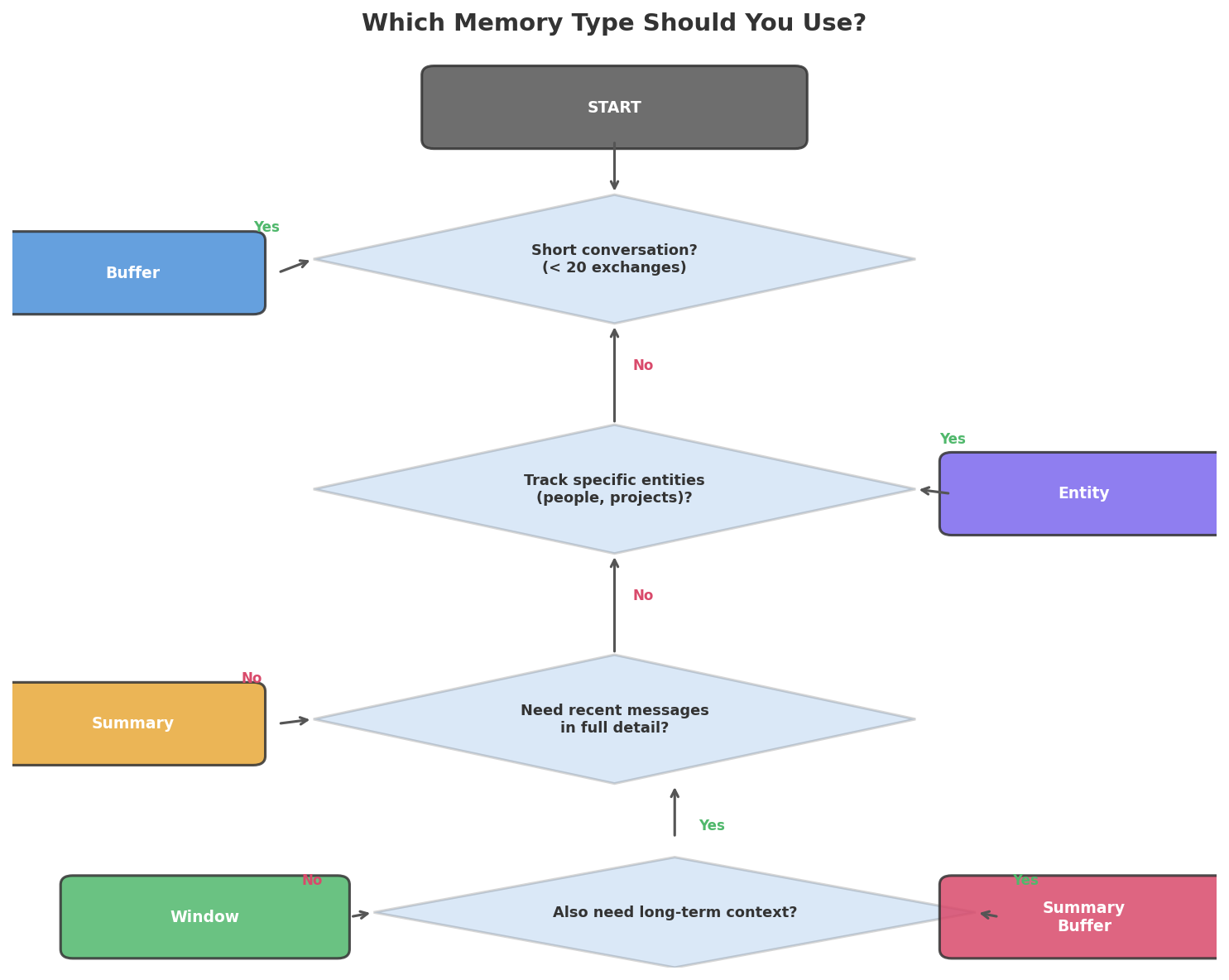
Use this cheat sheet:
| Your Scenario | Best Pick | Why |
|---|---|---|
| Rapid testing or demos | Buffer | Simplest, full recall |
| Help desk or support bot | Buffer Window (k=10) | Only recent context counts |
| Coaching or tutoring over hours | Summary Buffer | Needs both old and new context |
| Helper that learns user likes | Entity | Pulls and files facts per user |
| Cost-tight live app | Summary | Slashes token spend per call |
| Multi-user app with stored data | Summary Buffer + SQLite | Best blend of quality and reach |
Key Insight: No single memory type wins in every case. The right pick rests on chat length, token budget, and which facts matter most. A help desk bot and a personal journal bot call for very different setups.
For most live bots, start with ConversationSummaryBufferMemory. It holds fresh turns in full (so replies sound sharp) while it boils down old ones (so the big picture stays in view).
Common Mistakes and How to Fix Them
Mistake 1: Leaving Out the Config Dict
❌ Wrong:
python
# Missing config — no session_id specified
response = chatbot.invoke({"input": "Hello"})
Why it breaks: The wrapper needs a session_id inside config to know whose history to pull. Skip it, and you’ll see a KeyError — or worse, a shared default that mixes every user into one pool.
✅ Correct:
python
config = {"configurable": {"session_id": "user_123"}}
response = chatbot.invoke({"input": "Hello"}, config=config)
Mistake 2: Sharing a Single Session ID Across All Users
❌ Wrong:
python
# One session for everyone — conversations bleed together
config = {"configurable": {"session_id": "global"}}
Why it breaks: Alice says “I’m vegan” in her chat. Bob asks “What should I eat?” in his. Because both share a session, the bot may tell Bob to go vegan — it read Alice’s message as if Bob wrote it.
✅ Correct:
python
# Unique session per user
config = {"configurable": {"session_id": f"user_{user.id}"}}
Mistake 3: Ignoring the Context Window Cap
❌ Wrong:
python
# Unlimited buffer — will eventually crash
memory = ConversationBufferMemory(return_messages=True)
# After 100+ long exchanges, the API call exceeds the token limit
Why it breaks: GPT-4o-mini allows 128K tokens. A chat with 200 long replies can blow past that cap. Once it does, the API throws an error and the bot dies on the spot.
✅ Correct:
python
# Summary buffer with a token cap
memory = ConversationSummaryBufferMemory(
    llm=llm,
    max_token_limit=2000,
    return_messages=True
)
Mistake 4: Letting Private Data Sit in Memory
❌ Wrong:
python
# User shares credit card — now it's sent to the API every turn
memory.save_context(
    {"input": "My card number is 4111-1111-1111-1111"},
    {"output": "Got your card number."}
)
Why it breaks: Each message in memory rides along on every future API call. Private info crosses the wire over and over. If you write memory to disk, those details land in a plain-text file anyone can open.
✅ Correct — strip sensitive data before saving:
import re

def sanitize_message(text):
    """Strip sensitive patterns before storing in memory."""
    # Credit card numbers (16 digits with optional dashes/spaces)
    text = re.sub(r'\b\d{4}[-\s]?\d{4}[-\s]?\d{4}[-\s]?\d{4}\b', '[REDACTED]', text)
    # Social security numbers (XXX-XX-XXXX)
    text = re.sub(r'\b\d{3}-\d{2}-\d{4}\b', '[REDACTED]', text)
    return text

# Test it
test_messages = [
    "My card number is 4111-1111-1111-1111",
    "My SSN is 123-45-6789",
    "I live in New York",  # No sensitive data — stays unchanged
]

for msg in test_messages:
    print(f"Original:  {msg}")
    print(f"Sanitized: {sanitize_message(msg)}")
    print()
Complete Code
Frequently Asked Questions
Can I swap in a free LLM instead of OpenAI?
Yes — LangChain plugs into dozens of providers. Trade ChatOpenAI for ChatOllama (runs Llama 3 on your own machine) or ChatAnthropic (talks to Claude). The memory layer works the same no matter which model sits behind it. Just run pip install langchain-ollama and drop in ChatOllama(model="llama3").
How much does storing chat history cost in tokens?
Every logged message rides along on each API call. A 20-turn chat where each turn runs about 50 words adds roughly 1,000 extra tokens per request. With GPT-4o-mini at $0.15 per million input tokens, that works out to about $0.00015 a pop. Switch to ConversationSummaryBufferMemory when long chats start piling up costs.
Will the bot recall facts from a past session?
Not out of the box. Each session ID owns a walled-off memory. If you want data to carry over, use lasting storage — our FileChatHistory class is one way. Load the same session ID next time the user drops by, and the bot picks up where things ended.
What if the chat outgrows the model’s context window?
The API call fails with a token cap error. Head this off with ConversationSummaryBufferMemory and a max_token_limit, or wire in the trim_to_token_budget function from Exercise 3. Either path keeps your chat inside the fence.
Do I need LangChain to build a chatbot with memory?
Not at all. The first half of this guide built memory with nothing but a Python list and the bare OpenAI API. LangChain adds useful gear — session routing, five memory flavors, disk storage, and pluggable chains. For a toy bot, a list does the job. For a live product with many users, LangChain shaves off real work.
References
- LangChain documentation — How to add memory to chatbots. Link
- OpenAI API documentation — Chat Completions. Link
- LangChain documentation — RunnableWithMessageHistory. Link
- LangChain documentation — Memory types. Link
- Pinecone — Conversational Memory for LLMs with LangChain. Link
- Streamlit documentation — Build conversational apps. Link
- OpenAI — Models and pricing. Link
[SCHEMA HINTS]
– Article type: Tutorial
– Primary technology: LangChain 0.3.x, OpenAI GPT-4o-mini
– Programming language: Python
– Difficulty: Beginner
– Keywords: python ai chatbot, chatbot with memory, langchain memory, conversational memory, langchain chatbot tutorial, build chatbot python, conversation history python
Free Course
Master Core Python — Your First Step into AI/ML
Build a strong Python foundation with hands-on exercises designed for aspiring Data Scientists and AI/ML Engineers.
Start Free Course →Trusted by 50,000+ learners

Related Course
Master Gen AI — Hands-On
Join 5,000+ students at edu.machinelearningplus.com
Explore Course


