
machine learning +
LLM Temperature, Top-P, and Top-K Explained — With Python Simulations
OpenAI API Python Tutorial — Chat Completions, Streaming & Error Handling
Learn to use the OpenAI API in Python. Master chat completions, streaming responses, error handling, retries, and async calls with runnable examples.
Everything you need to build AI-powered Python apps — from your first API call to production-ready error handling.
OpenAI’s API lets you add GPT to any Python application in just five lines of code. But going from a quick demo to a production-ready system means you need streaming for real-time UX, proper error handling for reliability, and retry logic for resilience.
This tutorial walks you through every step. You’ll make your first chat completion call, stream responses token-by-token, handle errors gracefully, and build async pipelines — all with runnable code you can copy and test immediately.
What Is the OpenAI API?
The OpenAI API is a cloud service that gives your Python code access to GPT models. Instead of downloading and running a massive model on your machine, you send a request over the internet and get a response back in seconds.
Think of it like a restaurant. You don’t need a kitchen (GPU hardware) or a chef (model weights). You just place an order (API request) and receive your meal (generated text).
The API supports much more than text generation. Here’s what you can do with it:
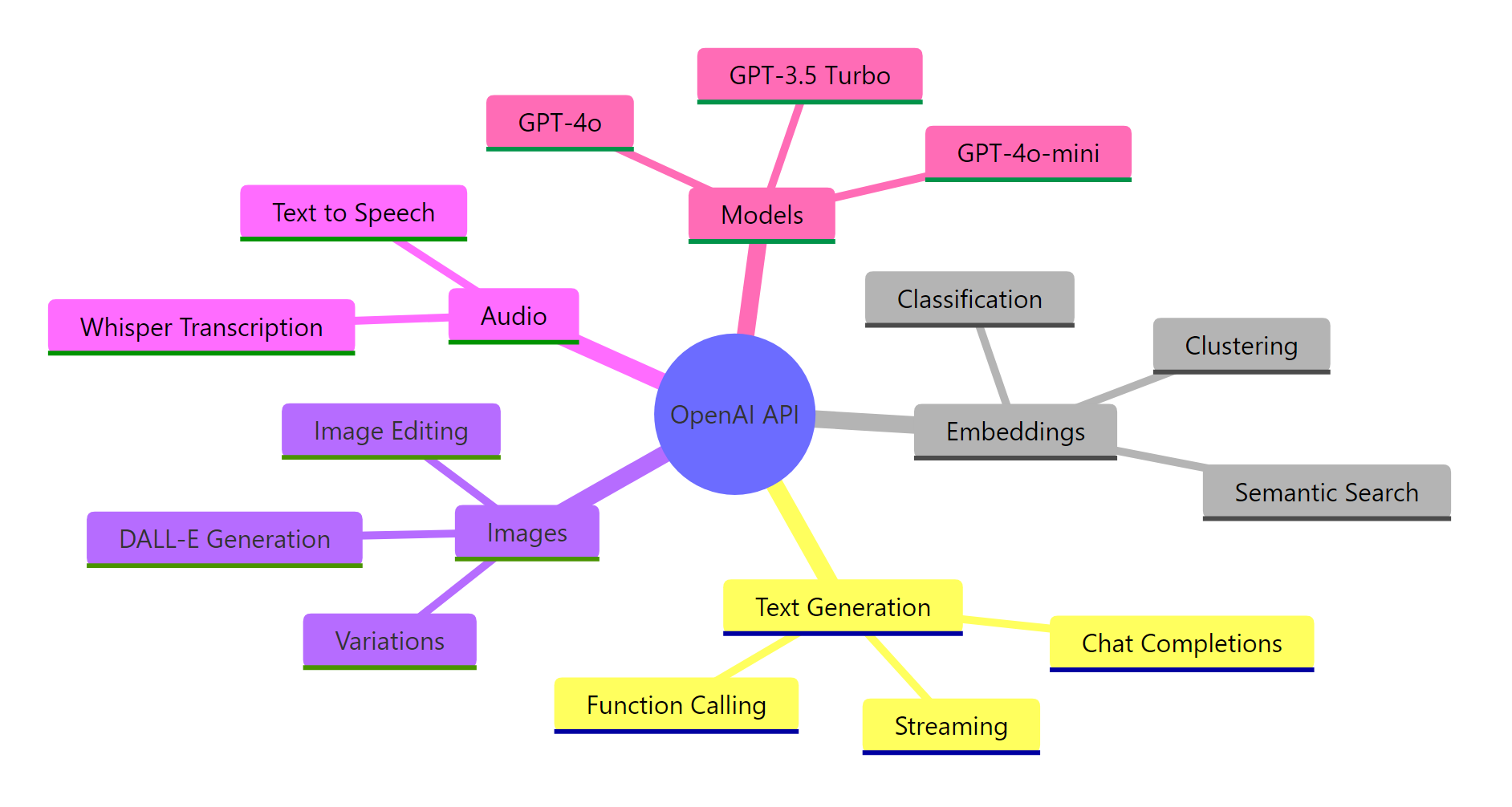
Figure 1: The OpenAI API covers text generation, embeddings, image creation, and audio processing — all accessible through the same Python SDK.
In this tutorial, we focus on the Chat Completions API — the endpoint that powers conversational AI. It’s the most commonly used endpoint and the foundation for chatbots, content generators, code assistants, and more.
Key Insight: The OpenAI API is a stateless service — it doesn’t remember previous requests. Every API call is independent. If you want a multi-turn conversation, you must send the entire conversation history with each request. We’ll cover exactly how to do this later.
Setup — Install the SDK and Get Your API Key
Before writing any code, you need two things: the OpenAI Python package and an API key.
Let’s install the SDK first. Open your terminal and run:
bash
pip install openai python-dotenv
We also install python-dotenv to load your API key from a file instead of hardcoding it.
Get Your API Key
Head to platform.openai.com/api-keys and create a new secret key. Copy it immediately — OpenAI won’t show it again.
Now create a .env file in your project root:
python
OPENAI_API_KEY=sk-proj-your-key-here
Warning: Never hardcode your API key in Python files or commit it to Git. A leaked key can rack up thousands of dollars in charges. Always use environment variables or a `.env` file, and add `.env` to your `.gitignore`.
Initialize the Client
Here’s how to set up the OpenAI client safely. The load_dotenv() function reads your .env file and makes the key available as an environment variable. The OpenAI() client picks it up automatically.
import os
from openai import OpenAI

# Replace "your-key-here" with your actual OpenAI API key
OPENAI_API_KEY = os.getenv("OPENAI_API_KEY", "your-key-here")

client = OpenAI(api_key=OPENAI_API_KEY)
print("Client ready:", type(client))
Output:
python
Client ready: <class 'openai.OpenAI'>
That’s it. The client is your gateway to every OpenAI endpoint. You’ll use it for every API call in this tutorial.
Tip: You can also pass the key explicitly: `client = OpenAI(api_key=”sk-…”)`. But environment variables are safer and more portable across development, staging, and production environments.
Your First Chat Completion
Let’s make your first API call. The chat.completions.create() method sends a message to GPT and returns the model’s response.
Here’s what happens under the hood: your Python code sends a POST request to OpenAI’s servers, GPT processes your message, and the response comes back as a structured object.
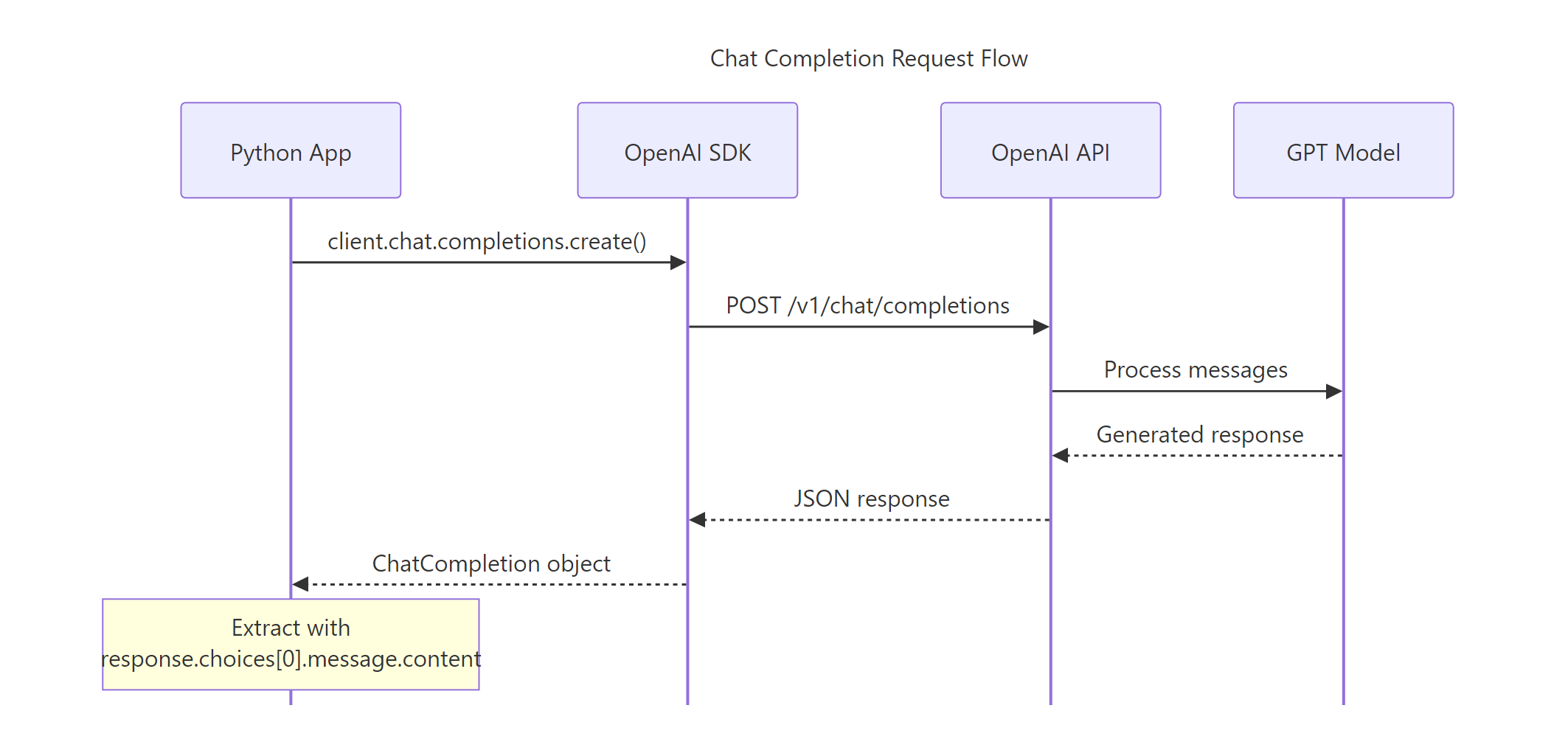
Figure 2: A chat completion request flows from your Python app through the SDK to the API, then to the GPT model and back.
The code below sends a simple question to GPT-4o-mini (the most cost-effective model) and prints the response. Watch how we access the response content through choices[0].message.content.
import os
from openai import OpenAI

client = OpenAI(api_key=os.getenv("OPENAI_API_KEY", "your-key-here"))

response = client.chat.completions.create(
    model="gpt-4o-mini",
    messages=[
        {"role": "user", "content": "What is machine learning in one sentence?"}
    ]
)

print(response.choices[0].message.content)
Output:
python
Machine learning is a branch of artificial intelligence where computers learn patterns from data to make predictions or decisions without being explicitly programmed for each task.
That’s a complete API call in four lines. But the response object contains much more than just the text. Let’s explore it.
Exploring the Response Object
The response is a ChatCompletion object with metadata about token usage, the model used, and the finish reason. Understanding this object helps you debug issues and manage costs.
import os
from openai import OpenAI

client = OpenAI(api_key=os.getenv("OPENAI_API_KEY", "your-key-here"))

response = client.chat.completions.create(
    model="gpt-4o-mini",
    messages=[
        {"role": "user", "content": "What is machine learning in one sentence?"}
    ]
)

print(f"Model: {response.model}")
print(f"Finish reason: {response.choices[0].finish_reason}")
print(f"Prompt tokens: {response.usage.prompt_tokens}")
print(f"Completion tokens: {response.usage.completion_tokens}")
print(f"Total tokens: {response.usage.total_tokens}")
Output:
python
Model: gpt-4o-mini-2025-07-18
Finish reason: stop
Prompt tokens: 14
Completion tokens: 32
Total tokens: 46
The finish_reason tells you why the model stopped generating. "stop" means it finished naturally. If you see "length", the model hit the token limit and was cut off mid-sentence — a sign you need to increase max_tokens.
The usage field shows exactly how many tokens were consumed. This is critical for cost management since you pay per token.
Understanding Messages and Roles
Every chat completion request takes a messages list. Each message has a role and content. The three roles control how the model interprets each message.
| Role | Purpose | Example |
|---|---|---|
system | Sets the model’s behavior and personality | “You are a helpful Python tutor” |
user | The human’s input or question | “How do I read a CSV file?” |
assistant | The model’s previous responses (for multi-turn) | “Use pd.read_csv()…” |
The system message is your most powerful tool for shaping the model’s behavior. It goes first in the messages list and tells the model how to act. The user message is your actual question. The assistant role is used to include previous model responses in multi-turn conversations.
Let’s see how a system message changes the model’s response. We’ll ask the same question twice — once with no system prompt, and once with a system prompt that asks for concise answers.
import os
from openai import OpenAI

client = OpenAI(api_key=os.getenv("OPENAI_API_KEY", "your-key-here"))

# Without system prompt
response_default = client.chat.completions.create(
    model="gpt-4o-mini",
    messages=[
        {"role": "user", "content": "Explain what an API is."}
    ]
)

# With system prompt
response_concise = client.chat.completions.create(
    model="gpt-4o-mini",
    messages=[
        {"role": "system", "content": "You are a concise technical writer. Answer in 2 sentences max."},
        {"role": "user", "content": "Explain what an API is."}
    ]
)

print("Default:", response_default.choices[0].message.content[:100], "...")
print(f"\nConcise: {response_concise.choices[0].message.content}")
Output:
python
Default: An API (Application Programming Interface) is a set of rules and protocols that allows different softw ...

Concise: An API (Application Programming Interface) is a set of rules that lets different software applications communicate with each other. It defines how requests and responses are structured, enabling developers to integrate external services into their applications.
Notice the difference. The default response tends to be long and detailed. The system-prompted version stays within two sentences. This is why system prompts matter — they give you control over the model’s behavior without changing your question.
Key Insight: The messages array IS the conversation. The model has no memory between API calls. Every request must include the full conversation history — system prompt, all user messages, and all assistant responses — for the model to understand the context.
Key Parameters That Control Output
The chat.completions.create() method accepts several parameters that change how the model generates text. Understanding these gives you fine-grained control over creativity, length, and output diversity.
Temperature — The Creativity Dial
Temperature controls the randomness of the model’s output. Lower values make the model more focused and deterministic. Higher values make it more creative and unpredictable.
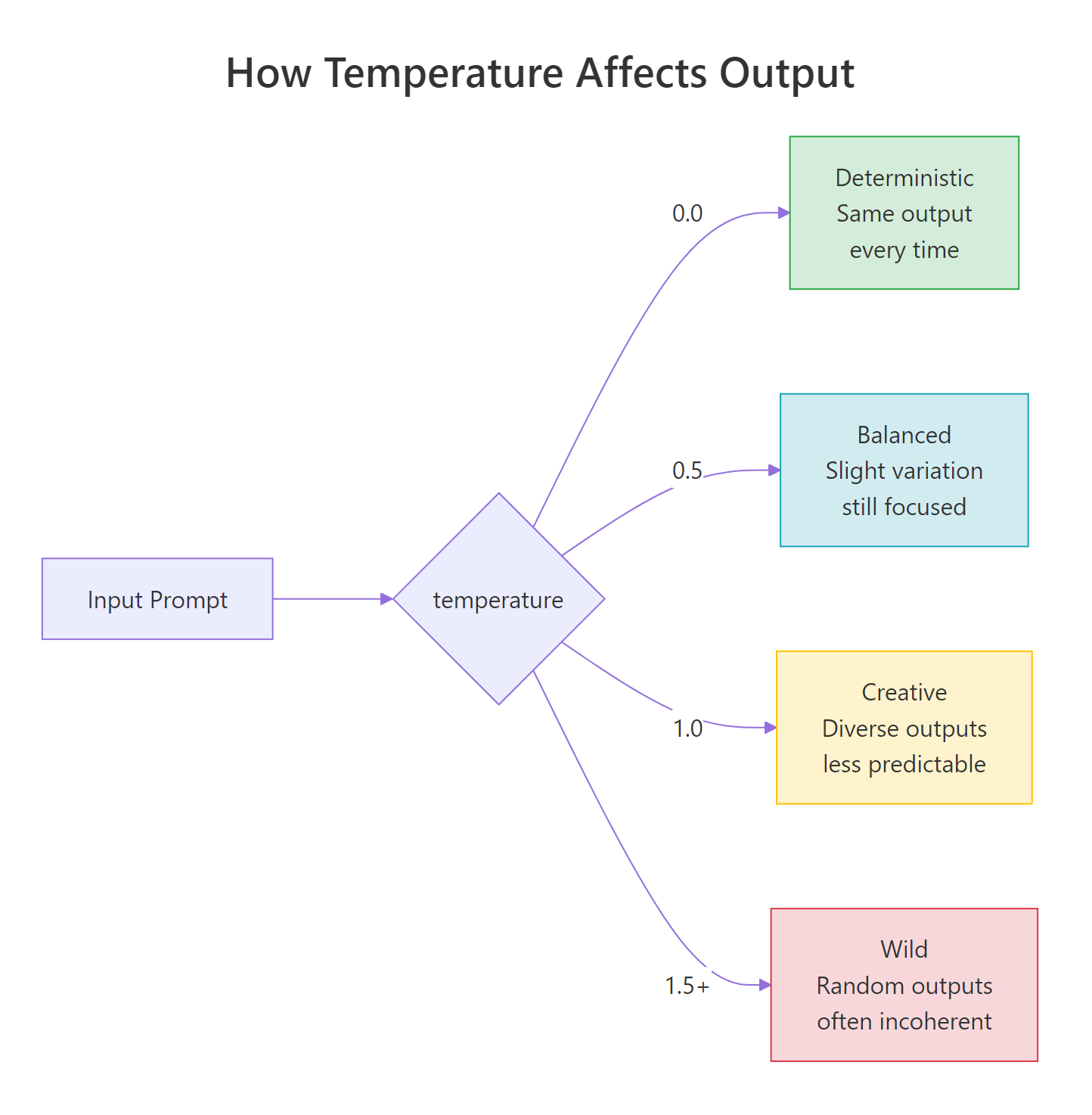
Figure 3: Temperature ranges from deterministic (0.0) to creative (1.0) to chaotic (1.5+). Most applications work best between 0.0 and 1.0.
Let’s compare the same prompt at two different temperatures. We’ll ask the model for a creative sentence at temperature=0.0 (fully deterministic) and temperature=1.0 (creative). Notice how the low-temperature output is almost identical every time, while the high-temperature output varies.
import os
from openai import OpenAI

client = OpenAI(api_key=os.getenv("OPENAI_API_KEY", "your-key-here"))

for temp in [0.0, 1.0]:
    response = client.chat.completions.create(
        model="gpt-4o-mini",
        messages=[
            {"role": "user", "content": "Write one creative sentence about robots."}
        ],
        temperature=temp
    )
    print(f"Temperature {temp}: {response.choices[0].message.content}")
Output:
python
Temperature 0.0: In a world where circuits hum with dreams, a lone robot paints sunsets on the walls of an abandoned factory, each stroke a memory of the humans it once served.
Temperature 1.0: Beneath the flickering neon of a forgotten arcade, a tiny robot composed symphonies from the static of broken screens, finding beauty in what others had discarded.
At temperature=0.0, running this code multiple times gives you nearly identical output. At temperature=1.0, each run produces a different creative response. Use 0.0 for factual tasks (code generation, data extraction) and 0.5-0.7 for balanced tasks (writing, summarization).
Max Tokens — Output Length Limit
The max_tokens parameter caps the number of tokens in the model’s response. If the model hasn’t finished its thought by this limit, it stops mid-sentence. The code below shows what happens when you set a very low limit.
import os
from openai import OpenAI

client = OpenAI(api_key=os.getenv("OPENAI_API_KEY", "your-key-here"))

response = client.chat.completions.create(
    model="gpt-4o-mini",
    messages=[
        {"role": "user", "content": "Explain gradient descent in detail."}
    ],
    max_tokens=20
)

print(f"Response: {response.choices[0].message.content}")
print(f"Finish reason: {response.choices[0].finish_reason}")
Output:
python
Response: Gradient descent is an optimization algorithm used to minimize a function by iteratively moving toward the
Finish reason: length
The response was cut off mid-sentence, and finish_reason is "length" instead of "stop". Always check the finish reason in production to detect truncated responses.
Warning: A `finish_reason` of `”length”` means the response was truncated. In production, always check this field. If you see `”length”`, either increase `max_tokens` or handle the incomplete response gracefully.
Parameter Reference
Here’s a quick reference for the most commonly used parameters:
| Parameter | Type | Default | What It Does |
|---|---|---|---|
model | string | required | Which GPT model to use |
temperature | float | 1.0 | Randomness (0.0 = deterministic, 2.0 = max random) |
max_tokens | int | model limit | Maximum tokens in the response |
top_p | float | 1.0 | Nucleus sampling — alternative to temperature |
n | int | 1 | Number of response choices to generate |
stop | list | None | Sequences where the model stops generating |
frequency_penalty | float | 0.0 | Penalizes repeated tokens (-2.0 to 2.0) |
presence_penalty | float | 0.0 | Encourages new topics (-2.0 to 2.0) |
Tip: Use either `temperature` OR `top_p`, not both at the same time. They both control randomness, and combining them produces unpredictable results. The OpenAI documentation recommends adjusting one and leaving the other at its default.
Streaming Responses
By default, the API waits until the entire response is generated before returning it. For short answers, this is fine. But for longer responses, the user stares at a blank screen for several seconds.
Streaming fixes this. With stream=True, the API sends tokens back one by one as they’re generated. The user sees words appearing in real-time — just like ChatGPT’s typing effect.
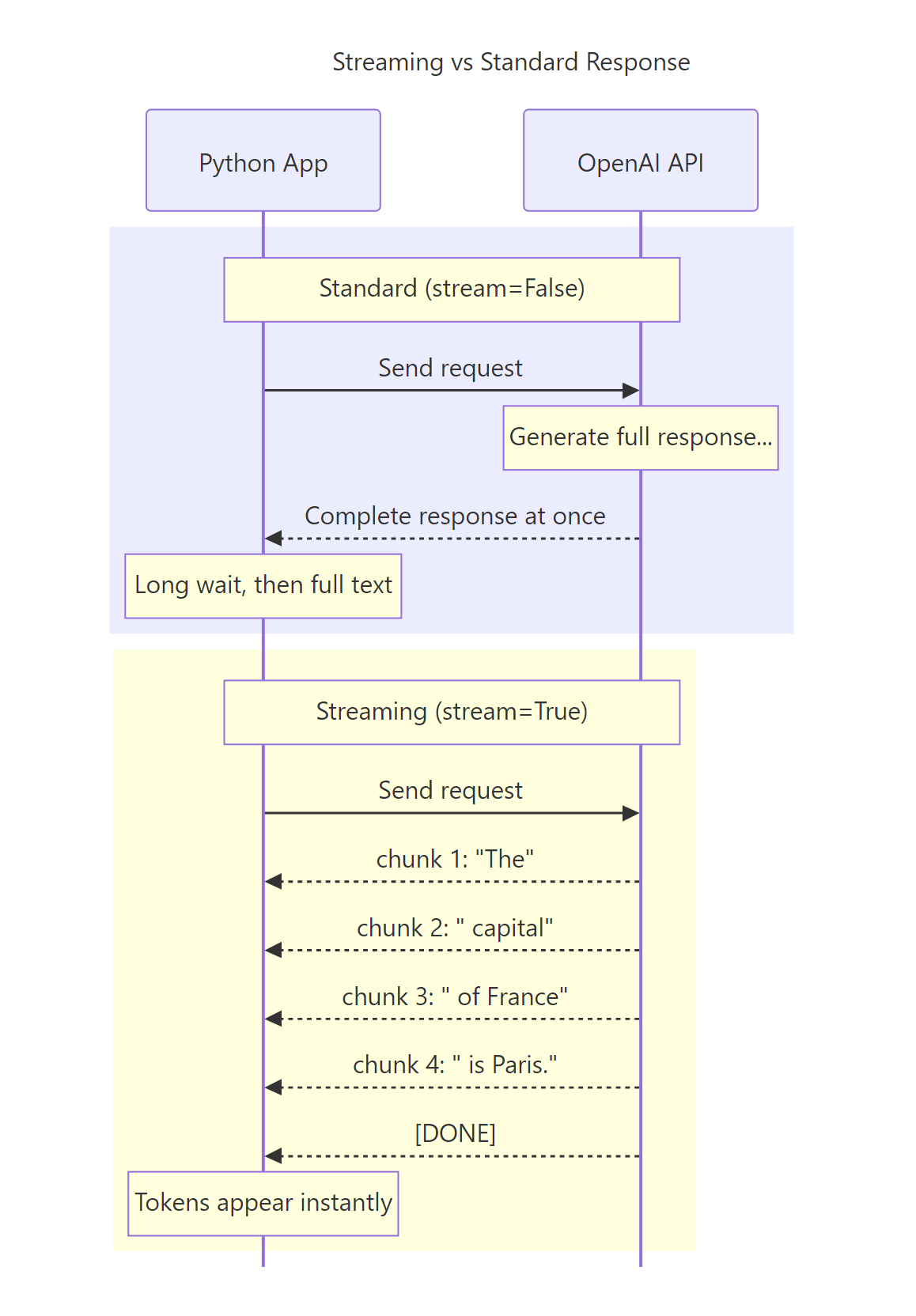
Figure 4: Standard mode waits for the full response. Streaming mode delivers tokens as they’re generated, dramatically reducing perceived latency.
Basic Streaming
To enable streaming, set stream=True in your request. Instead of a ChatCompletion object, you get an iterator (a stream) that yields chunks. Each chunk contains a delta — the incremental piece of the response.
The code below streams a response and prints each token as it arrives. Notice that chunk.choices[0].delta.content gives you the new text, and some chunks may have None content (like the final chunk that signals completion).
import os
from openai import OpenAI

client = OpenAI(api_key=os.getenv("OPENAI_API_KEY", "your-key-here"))

stream = client.chat.completions.create(
    model="gpt-4o-mini",
    messages=[
        {"role": "user", "content": "Count from 1 to 5, one number per line."}
    ],
    stream=True
)

for chunk in stream:
    content = chunk.choices[0].delta.content
    if content is not None:
        print(content, end="", flush=True)

print()  # newline after streaming completes
Output:
python
1
2
3
4
5
Each token appears the moment it’s generated. In a web app, this creates the familiar “typing” effect that makes AI responses feel responsive and engaging.
Collecting the Full Response While Streaming
In production, you usually want to both display tokens as they arrive AND save the complete response. The pattern below collects all chunks into a list and joins them after streaming finishes.
import os
from openai import OpenAI

client = OpenAI(api_key=os.getenv("OPENAI_API_KEY", "your-key-here"))

stream = client.chat.completions.create(
    model="gpt-4o-mini",
    messages=[
        {"role": "user", "content": "Name three Python web frameworks."}
    ],
    stream=True
)

collected_chunks = []
for chunk in stream:
    content = chunk.choices[0].delta.content
    if content is not None:
        print(content, end="", flush=True)
        collected_chunks.append(content)

full_response = "".join(collected_chunks)
print(f"\n\nFull response saved ({len(full_response)} chars)")
Output:
python
1. **Django** — A full-featured web framework with built-in admin, ORM, and authentication.
2. **Flask** — A lightweight micro-framework that gives you flexibility to choose your own components.
3. **FastAPI** — A modern, high-performance framework designed for building APIs with automatic documentation.

Full response saved (297 chars)
This pattern gives you the best of both worlds — real-time display and a complete string for storage or further processing.
Tip: Always use `flush=True` in your print statements when streaming. Without it, Python buffers the output and tokens appear in bursts instead of one-by-one.
🏋️ Exercise 1: Build a Streaming Response Collector
Create a function called stream_and_collect that takes a prompt, streams the response to the console, and returns the complete response as a string. Also return the total number of chunks received.
import os
from openai import OpenAI

# Replace with your actual key or set OPENAI_API_KEY env var
client = OpenAI(api_key=os.getenv("OPENAI_API_KEY", "your-key-here"))

def stream_and_collect(prompt):
    """Stream a response and return (full_text, chunk_count)."""
    stream = client.chat.completions.create(
        model="gpt-4o-mini",
        messages=[{"role": "user", "content": prompt}],
        stream=True
    )

    collected = []
    chunk_count = 0
    # TODO: Loop through the stream, collect content, count chunks
    # Hint: check if chunk.choices[0].delta.content is not None

    full_text = "".join(collected)
    return full_text, chunk_count

text, chunks = stream_and_collect("What is Python?")
print(f"\nChunks: {chunks}, Length: {len(text)}")
Multi-Turn Conversations
A single question-and-answer is useful, but most real applications need multi-turn conversations. Since the API is stateless, you build conversation history by including all previous messages in each request.
The approach is simple: maintain a list of messages and append each user input and assistant response before sending the next request.
import os
from openai import OpenAI

client = OpenAI(api_key=os.getenv("OPENAI_API_KEY", "your-key-here"))

messages = [
    {"role": "system", "content": "You are a helpful Python tutor. Keep answers brief."}
]

# Turn 1
messages.append({"role": "user", "content": "What is a list comprehension?"})
response = client.chat.completions.create(model="gpt-4o-mini", messages=messages)
assistant_msg = response.choices[0].message.content
messages.append({"role": "assistant", "content": assistant_msg})
print(f"Turn 1: {assistant_msg}\n")

# Turn 2 — the model remembers Turn 1
messages.append({"role": "user", "content": "Can you give me an example?"})
response = client.chat.completions.create(model="gpt-4o-mini", messages=messages)
assistant_msg = response.choices[0].message.content
messages.append({"role": "assistant", "content": assistant_msg})
print(f"Turn 2: {assistant_msg}\n")

# Turn 3 — the model has context from both previous turns
messages.append({"role": "user", "content": "How is that different from a regular for loop?"})
response = client.chat.completions.create(model="gpt-4o-mini", messages=messages)
assistant_msg = response.choices[0].message.content
print(f"Turn 3: {assistant_msg}")
Output:
python
Turn 1: A list comprehension is a concise way to create lists in Python. It combines a for loop and an optional condition into a single line: [expression for item in iterable if condition].

Turn 2: Sure! Here's a simple example:
squares = [x**2 for x in range(10)]
This creates a list of squares from 0 to 81.

Turn 3: A list comprehension does the same thing as a for loop but in one line. The for-loop version would be:
  squares = []
  for x in range(10):
      squares.append(x**2)
The comprehension is more concise and typically slightly faster because the iteration happens internally in CPython's C layer.
Notice how Turn 3’s response directly references “list comprehension” and “for loop” from the earlier turns. The model understands the full context because we included all previous messages.
Note: Every model has a context window limit. GPT-4o supports up to 128K tokens. If your conversation history exceeds this, you need to truncate older messages. A common strategy is keeping the system prompt and the last N turns, or summarizing older turns into a single message.
Error Handling and Retries
API calls can fail for many reasons — invalid keys, rate limits, server outages, network issues. Robust error handling separates a demo from a production application.
The OpenAI SDK raises specific exception types for each error category. Here’s the full hierarchy:
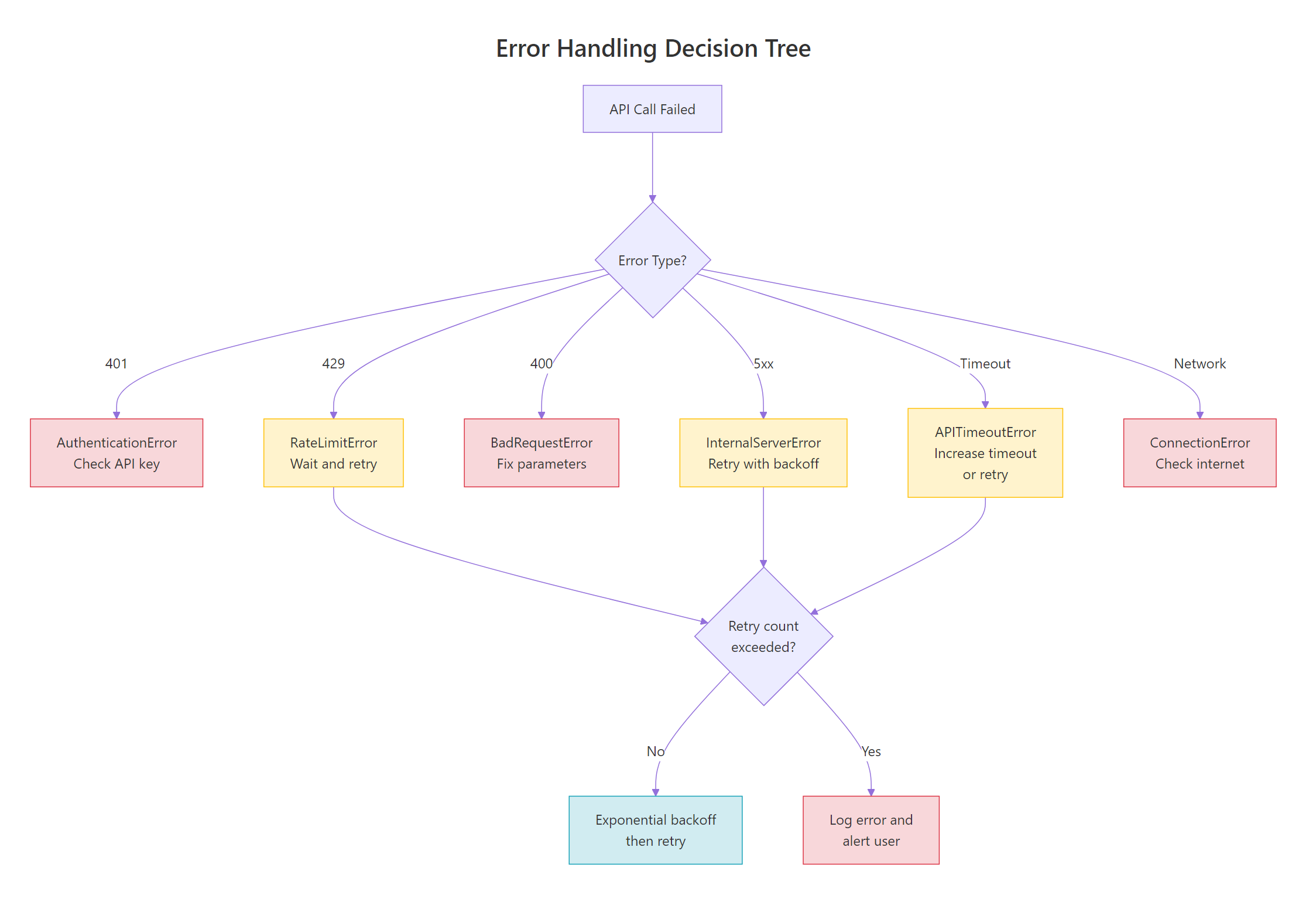
Figure 5: Different errors require different responses. Some are retriable (rate limits, server errors, timeouts), while others require code fixes (bad request, auth error).
Catching Specific Errors
The SDK provides typed exceptions so you can handle each error appropriately. The code below shows the pattern for catching the most common errors. Notice how each exception type tells you exactly what went wrong and what to do.
import os
from openai import (
    OpenAI,
    AuthenticationError,
    RateLimitError,
    BadRequestError,
    APIConnectionError,
    APITimeoutError,
    InternalServerError
)

client = OpenAI(api_key=os.getenv("OPENAI_API_KEY", "your-key-here"))

try:
    response = client.chat.completions.create(
        model="gpt-4o-mini",
        messages=[{"role": "user", "content": "Hello!"}]
    )
    print(response.choices[0].message.content)

except AuthenticationError:
    print("Invalid API key. Check your OPENAI_API_KEY.")

except RateLimitError as e:
    print(f"Rate limit hit. Wait and retry. Details: {e.message}")

except BadRequestError as e:
    print(f"Bad request — fix your parameters. Details: {e.message}")

except APIConnectionError:
    print("Network error. Check your internet connection.")

except APITimeoutError:
    print("Request timed out. Try again or increase timeout.")

except InternalServerError:
    print("OpenAI server error. Retry after a short delay.")
Output:
python
Hello! How can I assist you today?
When everything works, the code runs normally. When something fails, you get a clear error message instead of a cryptic traceback.
The SDK’s Built-In Retry Logic
Good news: the OpenAI SDK already retries certain errors automatically. By default, it retries up to 2 times with exponential backoff for these error types:
| Error Type | Status Code | Auto-Retried? |
|---|---|---|
RateLimitError | 429 | Yes |
InternalServerError | 500+ | Yes |
APITimeoutError | — | Yes |
APIConnectionError | — | Yes |
AuthenticationError | 401 | No |
BadRequestError | 400 | No |
You can change the retry count when creating the client. The code below sets up a client with 5 retries and a 30-second timeout — suitable for batch processing where reliability matters more than speed.
import os
from openai import OpenAI

client = OpenAI(
    api_key=os.getenv("OPENAI_API_KEY", "your-key-here"),
    max_retries=5,     # default is 2
    timeout=30.0       # default is 600 seconds (10 minutes!)
)

# This request will automatically retry up to 5 times
# on rate limits, timeouts, and server errors
response = client.chat.completions.create(
    model="gpt-4o-mini",
    messages=[{"role": "user", "content": "Hello!"}]
)
print(response.choices[0].message.content)
Output:
python
Hello! How can I help you today?
Key Insight: The SDK auto-retries retriable errors with exponential backoff. The delay starts at 0.5 seconds and doubles each time, up to 8 seconds maximum. This means you get basic resilience without writing any retry logic yourself.
Custom Retry with Backoff
For more control, you can implement your own retry logic. The tenacity library makes this clean and configurable. The decorator below retries on rate limit errors, waiting 1 second initially and doubling up to 60 seconds.
python
# pip install tenacity
import time
from openai import OpenAI, RateLimitError

client = OpenAI()

def call_with_retry(prompt, max_retries=3):
    """Call the API with manual exponential backoff."""
    for attempt in range(max_retries):
        try:
            response = client.chat.completions.create(
                model="gpt-4o-mini",
                messages=[{"role": "user", "content": prompt}]
            )
            return response.choices[0].message.content
        except RateLimitError:
            wait_time = 2 ** attempt  # 1, 2, 4 seconds
            print(f"Rate limited. Waiting {wait_time}s (attempt {attempt + 1}/{max_retries})")
            time.sleep(wait_time)

    raise Exception("Max retries exceeded")

result = call_with_retry("What is 2 + 2?")
print(result)
Output:
python
2 + 2 equals 4.
This manual approach gives you full control over which errors to retry, how long to wait, and what to do when all retries are exhausted.
🏋️ Exercise 2: Build a Robust API Caller
Write a function safe_api_call that wraps a chat completion request with proper error handling. It should catch AuthenticationError, RateLimitError, and APIConnectionError, print a helpful message for each, and return None on failure.
import os
from openai import OpenAI, AuthenticationError, RateLimitError, APIConnectionError

client = OpenAI(api_key=os.getenv("OPENAI_API_KEY", "your-key-here"))

def safe_api_call(prompt, model="gpt-4o-mini"):
    """Make an API call with proper error handling. Returns response text or None."""
    # TODO: Wrap the API call in a try/except block
    # Catch AuthenticationError, RateLimitError, APIConnectionError
    # Return the response text on success, None on failure
    pass

result = safe_api_call("What is 1 + 1?")
if result:
    print(f"Success: {result}")
else:
    print("API call failed — check the error message above")
Rate Limits and Best Practices
OpenAI enforces rate limits on two dimensions: RPM (requests per minute) and TPM (tokens per minute). These limits vary by model and account tier.
| Tier | GPT-4o RPM | GPT-4o TPM | GPT-4o-mini RPM | GPT-4o-mini TPM |
|---|---|---|---|---|
| Free | 3 | 200 | 3 | 200 |
| Tier 1 | 500 | 30,000 | 500 | 200,000 |
| Tier 2 | 5,000 | 450,000 | 5,000 | 2,000,000 |
| Tier 3 | 5,000 | 800,000 | 5,000 | 4,000,000 |
Strategies for Staying Within Limits
Here are the most effective strategies to avoid hitting rate limits:
- Use GPT-4o-mini for development and testing. It’s 10-20x cheaper than GPT-4o and has much higher token limits.
- Batch requests instead of sending them one at a time. Use the Batch API for non-time-sensitive workloads — it’s 50% cheaper.
- Cache responses for repeated queries. If multiple users ask the same question, serve the cached answer.
- Count tokens before sending. Use the
tiktokenlibrary to estimate token usage and avoid surprise truncation.
Estimating Costs with tiktoken
The tiktoken library lets you count tokens before making an API call. This is essential for cost estimation and avoiding context window overflows.
import tiktoken

encoding = tiktoken.encoding_for_model("gpt-4o-mini")
prompt = "Explain the difference between supervised and unsupervised learning."
token_count = len(encoding.encode(prompt))

print(f"Prompt: '{prompt}'")
print(f"Token count: {token_count}")
print(f"Estimated cost: ${token_count * 0.00000015:.8f}")
Output:
python
Prompt: 'Explain the difference between supervised and unsupervised learning.'
Token count: 10
Estimated cost: $0.00000150
Ten tokens for that prompt — about $0.0000015. GPT-4o-mini is incredibly affordable for most use cases.
Model Comparison
Choosing the right model depends on your needs. Here’s a comparison of the most popular models:
| Model | Context Window | Input Cost (per 1M tokens) | Output Cost (per 1M tokens) | Best For |
|---|---|---|---|---|
| GPT-4o | 128K | $2.50 | $10.00 | Complex reasoning, analysis |
| GPT-4o-mini | 128K | $0.15 | $0.60 | Most tasks, development, high volume |
| GPT-3.5-turbo | 16K | $0.50 | $1.50 | Legacy support only |
Tip: Start with GPT-4o-mini for everything. Only upgrade to GPT-4o when you hit quality limitations. GPT-4o-mini handles 90% of tasks at a fraction of the cost.
Async API Calls
When you need to make multiple API calls, doing them sequentially is slow. Each call waits for the previous one to finish. Async calls let you fire multiple requests concurrently and gather the results.
The OpenAI SDK provides AsyncOpenAI for this purpose. The code below sends three prompts simultaneously using asyncio.gather(), cutting total time from ~3 seconds to ~1 second.
python
import asyncio
from openai import AsyncOpenAI

async_client = AsyncOpenAI()

async def ask(prompt):
    """Make a single async API call."""
    response = await async_client.chat.completions.create(
        model="gpt-4o-mini",
        messages=[{"role": "user", "content": prompt}]
    )
    return response.choices[0].message.content

async def main():
    prompts = [
        "What is Python?",
        "What is JavaScript?",
        "What is Rust?"
    ]

    # Run all three calls concurrently
    results = await asyncio.gather(*[ask(p) for p in prompts])

    for prompt, result in zip(prompts, results):
        print(f"Q: {prompt}")
        print(f"A: {result[:80]}...\n")

asyncio.run(main())
Output:
python
Q: What is Python?
A: Python is a high-level, interpreted programming language known for its readabi...

Q: What is JavaScript?
A: JavaScript is a versatile, high-level programming language primarily used for ...

Q: What is Rust?
A: Rust is a systems programming language focused on safety, concurrency, and per...
All three responses came back in roughly the time of a single request. This is a game-changer for applications that need to process multiple inputs — batch summarization, parallel classification, bulk content generation.
Note: Async streaming works too. Replace `client.chat.completions.create()` with `await async_client.chat.completions.create(stream=True)` and use `async for chunk in stream:` to iterate. This gives you concurrent streaming for multiple requests.
🏋️ Exercise 3: Async Batch Processor
Write an async function batch_ask that takes a list of prompts and returns a list of responses. Use asyncio.gather() to run all requests concurrently.
import asyncio
import os
from openai import AsyncOpenAI

async_client = AsyncOpenAI(api_key=os.getenv("OPENAI_API_KEY", "your-key-here"))

async def batch_ask(prompts):
    """Send multiple prompts concurrently and return all responses."""
    # TODO: Create an async helper function for a single call
    # TODO: Use asyncio.gather() to run all calls concurrently
    # TODO: Return the list of response texts
    pass

async def main():
    prompts = ["Capital of France?", "Capital of Japan?", "Capital of Brazil?"]
    results = await batch_ask(prompts)
    for p, r in zip(prompts, results):
        print(f"{p} -> {r}")

asyncio.run(main())
Common Mistakes and How to Fix Them
Mistake 1: Hardcoding the API Key
❌ Wrong:
python
client = OpenAI(api_key="sk-proj-abc123...") # exposed in git history!
Why it’s wrong: If this file is committed to Git, your API key is permanently in the repository history. Anyone with access can use it to make API calls at your expense.
✅ Correct:
python
import os
from dotenv import load_dotenv
from openai import OpenAI

load_dotenv()
client = OpenAI()  # reads OPENAI_API_KEY from environment
Mistake 2: Ignoring Token Limits
❌ Wrong:
python
# Stuffing an entire book into the messages
messages = [{"role": "user", "content": entire_book_text}]  # 500K tokens!
response = client.chat.completions.create(model="gpt-4o-mini", messages=messages)
Why it’s wrong: If your input exceeds the model’s context window (128K tokens for GPT-4o), you get a BadRequestError. Even if it fits, very long inputs increase cost and slow down response times.
✅ Correct:
python
import tiktoken

encoding = tiktoken.encoding_for_model("gpt-4o-mini")
token_count = len(encoding.encode(entire_book_text))

if token_count > 120000:  # leave room for the response
    print(f"Input too long ({token_count} tokens). Truncating...")
    # Truncate or chunk the input
Mistake 3: Not Checking finish_reason
❌ Wrong:
python
response = client.chat.completions.create(
    model="gpt-4o-mini",
    messages=[{"role": "user", "content": "Write a 2000-word essay."}],
    max_tokens=100
)
# Using response directly without checking if it was truncated
essay = response.choices[0].message.content
Why it’s wrong: With max_tokens=100, the model stops at 100 tokens regardless of whether it finished. The finish_reason will be "length" instead of "stop", and you’ll get an incomplete essay.
✅ Correct:
python
response = client.chat.completions.create(
    model="gpt-4o-mini",
    messages=[{"role": "user", "content": "Write a 2000-word essay."}],
    max_tokens=3000
)

if response.choices[0].finish_reason == "length":
    print("Warning: Response was truncated. Increase max_tokens.")
else:
    print(response.choices[0].message.content)
Mistake 4: Using a Wrong or Deprecated Model Name
❌ Wrong:
python
response = client.chat.completions.create(
    model="gpt-4",  # older model name — may be deprecated
    messages=[{"role": "user", "content": "Hello"}]
)
Why it’s wrong: Model names change over time. gpt-4 is an older alias that points to a specific snapshot. OpenAI periodically deprecates model versions, which causes NotFoundError.
✅ Correct:
python
# Current recommended models (as of 2025):
response = client.chat.completions.create(
    model="gpt-4o-mini",  # cost-effective, fast
    # model="gpt-4o",     # most capable
    messages=[{"role": "user", "content": "Hello"}]
)
Mistake 5: Building Conversation History Without Limits
❌ Wrong:
python
messages = [{"role": "system", "content": "You are a helpful assistant."}]

while True:
    user_input = input("You: ")
    messages.append({"role": "user", "content": user_input})
    response = client.chat.completions.create(model="gpt-4o-mini", messages=messages)
    assistant_msg = response.choices[0].message.content
    messages.append({"role": "assistant", "content": assistant_msg})
    # messages list grows forever — will eventually exceed context window
Why it’s wrong: After enough turns, the messages list exceeds the model’s context window and throws a BadRequestError. Even before that, costs increase with every turn because you’re re-sending the entire history.
✅ Correct:
python
import tiktoken

MAX_TOKENS = 100000  # leave buffer for response
encoding = tiktoken.encoding_for_model("gpt-4o-mini")

def trim_messages(messages, max_tokens=MAX_TOKENS):
    """Keep system prompt + most recent messages within token limit."""
    system_msg = [m for m in messages if m["role"] == "system"]
    other_msgs = [m for m in messages if m["role"] != "system"]

    total = sum(len(encoding.encode(m["content"])) for m in system_msg)
    trimmed = []

    for msg in reversed(other_msgs):
        msg_tokens = len(encoding.encode(msg["content"]))
        if total + msg_tokens > max_tokens:
            break
        trimmed.insert(0, msg)
        total += msg_tokens

    return system_msg + trimmed
Complete Code
Frequently Asked Questions
How much does the OpenAI API cost?
Pricing depends on the model and token usage. GPT-4o-mini costs $0.15 per million input tokens and $0.60 per million output tokens — roughly $0.01 for a 50-message conversation. GPT-4o costs about 15x more. Check openai.com/pricing for current rates.
Can I use the OpenAI API for free?
OpenAI offers free trial credits ($5-$18 depending on when you sign up) that expire after 3 months. After that, you need a paid account. GPT-4o-mini is cheap enough that most development and small-scale apps cost under $1/month.
What’s the difference between GPT-4o and GPT-4o-mini?
GPT-4o is the most capable model — better at complex reasoning, nuanced writing, and multi-step tasks. GPT-4o-mini is a smaller, faster, cheaper version that handles most tasks well. Start with GPT-4o-mini and only switch to GPT-4o if the quality isn’t sufficient for your use case.
Is the OpenAI Python SDK thread-safe?
Yes. The OpenAI client is thread-safe and can be shared across threads. For async code, use AsyncOpenAI. Both clients manage connection pools internally, so you should create one client instance and reuse it rather than creating a new client for each request.
How do I handle the OpenAI API in production?
Use environment variables for API keys, implement proper error handling with specific exception types, set appropriate max_retries (3-5 for production), log request IDs for debugging, monitor token usage for cost control, and implement rate limiting at the application level if you’re handling high traffic.
What happens when the context window is exceeded?
If your messages array exceeds the model’s context window (128K tokens for GPT-4o), the API returns a BadRequestError. To prevent this, count tokens with tiktoken before each request and trim older messages when approaching the limit.
References
- OpenAI API Reference — Chat Completions. Link
- OpenAI Python SDK — GitHub Repository. Link
- OpenAI Cookbook — How to Handle Rate Limits. Link
- OpenAI Cookbook — How to Stream Completions. Link
- OpenAI API — Streaming Responses Guide. Link
- OpenAI API — Error Codes Reference. Link
- OpenAI API — Rate Limits Guide. Link
- tiktoken — OpenAI’s Token Counting Library. Link
- OpenAI Pricing. Link
Free Course
Master Core Python — Your First Step into AI/ML
Build a strong Python foundation with hands-on exercises designed for aspiring Data Scientists and AI/ML Engineers.
Start Free Course →Trusted by 50,000+ learners

Related Course
Master Gen AI — Hands-On
Join 5,000+ students at edu.machinelearningplus.com
Explore Course


