
machine learning +
Build a Python AI Chatbot with Memory Using LangChain
Multi-Modal RAG Explained: How AI Understands Text, Images, and More
Multi-Modal RAG is an advanced retrieval system that processes and searches through both text and visual content simultaneously, enabling AI to answer questions using information from documents, images, charts, and diagrams together. This approach significantly improves accuracy when dealing with complex documents that contain visual elements.
Multi-Modal RAG is an advanced retrieval system that processes and searches through both text and visual content simultaneously, enabling AI to answer questions using information from documents, images, charts, and diagrams together. This approach significantly improves accuracy when dealing with complex documents that contain visual elements.
Think about it – when you read a research paper or technical document, you don’t just read the text. You look at the charts, diagrams, and images too.
They often contain crucial information that text alone can’t convey. Traditional RAG systems miss this entirely.
Multi-Modal RAG fixes this gap.
If you’ve ever felt frustrated when an AI assistant couldn’t understand a chart you were asking about, or when it gave incomplete answers because it ignored visual elements in your documents, then Multi-Modal RAG is exactly what you need to learn.
1. The Problem We’re Solving
Let me paint a picture for you. You have a research paper about machine learning. It contains text explanations and several graphs showing model performance. You ask your RAG system: “What were the accuracy results for the neural network model?”
Traditional RAG systems would search through text only. They might find mentions of “accuracy” and “neural network” in paragraphs. But they’d completely miss the actual results shown in graphs and charts.
This creates a massive blind spot. Many documents store their most important information in visual form:
- Research papers with result charts
- Financial reports with performance graphs
- Technical manuals with process diagrams
- Product catalogs with images
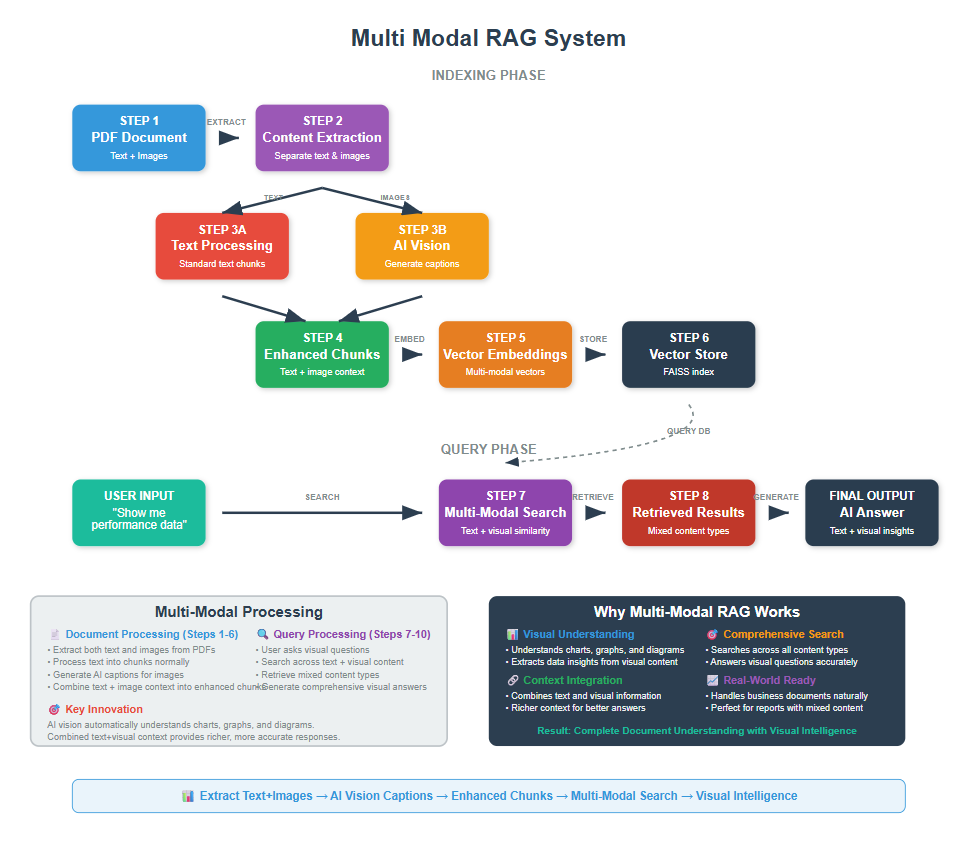
Multi Modal RAG solves this by understanding both text and images. It reads the text around an image. It analyzes the image content. Then it combines both for better results.
2. Setting Up Your Environment
Before we dive into the code, let’s get everything set up. I’ll assume you have Python and VS Code ready to go.
First, let’s install the packages we need:
bash
conda create -p rag python==3.12
conda activate rag
pip install ipykernel
pip install langchain openai faiss-cpu python-dotenv tiktoken
pip install pymupdf pillow
Now let’s import everything:
python
import os
from dotenv import load_dotenv
import fitz  # PyMuPDF for PDF processing
from PIL import Image
import io
import base64
from langchain_openai import ChatOpenAI, OpenAIEmbeddings
from langchain.text_splitter import RecursiveCharacterTextSplitter
from langchain_community.vectorstores import FAISS
from langchain.prompts import PromptTemplate
from langchain.schema import Document
import textwrap
import openai
from openai import OpenAI

# Load environment variables
load_dotenv()
openai.api_key = os.getenv('OPENAI_API_KEY')
Make sure you have a .env file with your OpenAI API key:
python
OPENAI_API_KEY=your_api_key_here
We’re using PyMuPDF instead of langchain’s PDF loader because we need to extract images. PyMuPDF gives us fine control over both text and images in PDFs.
3. Loading and Processing Documents with Images
Traditional PDF loaders only extract text. We need something more sophisticated. Let’s build a system that extracts both text and images from PDFs.
You can download the pdf here
python
def extract_text_and_images_from_pdf(pdf_path):
    """
    Extract text and images from a PDF file
    Returns both text content and image data
    """
    doc = fitz.open(pdf_path)
    text_content = []
    images = []

    for page_num in range(len(doc)):
        page = doc[page_num]

        # Extract text from the page
        page_text = page.get_text()
        if page_text.strip():  # Only add if there's actual text
            text_content.append({
                'page': page_num + 1,
                'text': page_text,
                'type': 'text'
            })

        # Extract images from the page
        image_list = page.get_images()
        for img_index, img in enumerate(image_list):
            # Get image data
            xref = img[0]
            pix = fitz.Pixmap(doc, xref)

            # Convert to PIL Image
            if pix.n - pix.alpha < 4:  # GRAY or RGB
                img_data = pix.tobytes("png")
                img_obj = Image.open(io.BytesIO(img_data))

                images.append({
                    'page': page_num + 1,
                    'image': img_obj,
                    'image_index': img_index,
                    'type': 'image'
                })
            pix = None  # Free memory

    doc.close()
    return text_content, images

# Test with a sample PDF
pdf_path = "Attention_is_all_you_need.pdf"  # Download from the reference repository
text_data, image_data = extract_text_and_images_from_pdf(pdf_path)

print(f"Extracted text from {len(text_data)} pages")
print(f"Found {len(image_data)} images")
python
Extracted text from 15 pages
Found 3 images
This function opens a PDF and extracts two things: all the text content and all the images. Each piece gets tagged with its page number so we can track where it came from.
PyMuPDF converts images to PIL Image objects. This makes them easy to work with in the next steps.
4. Setting Up Image Captioning
Now we need to convert images into text descriptions. We’ll use GPT-4 a model which is much more capable than basic captioning models, especially for technical content.
python
# Initialize the OpenAI client
client = OpenAI()

def encode_image_to_base64(image):
    """
    Convert PIL image to base64 string for OpenAI API
    """
    buffered = io.BytesIO()
    image.save(buffered, format="PNG")
    img_str = base64.b64encode(buffered.getvalue()).decode()
    return img_str

def analyze_image_with_vision_ai(image, context_text=""):
    """
    Use AI vision to analyze and describe images in detail
    """
    base64_image = encode_image_to_base64(image)

    # Create a detailed prompt for technical content
    system_prompt = """You are an expert at analyzing technical diagrams, charts, graphs, and figures from research papers and documents.

    When analyzing an image, provide a detailed description that includes:
    1. The type of figure (diagram, chart, graph, table, etc.)
    2. Key components and their relationships
    3. Any text, labels, or captions visible
    4. Data trends or patterns if it's a chart/graph
    5. The overall purpose or message of the figure

    Be specific and detailed - this description will be used for document search and retrieval."""

    user_prompt = "Analyze this image in detail. "
    if context_text:
        user_prompt += f"Context from the surrounding text: {context_text[:300]}..."

    try:
        response = client.chat.completions.create(
            model="gpt-4o",
            messages=[
                {
                    "role": "system",
                    "content": system_prompt
                },
                {
                    "role": "user",
                    "content": [
                        {
                            "type": "text",
                            "text": user_prompt
                        },
                        {
                            "type": "image_url",
                            "image_url": {
                                "url": f"data:image/png;base64,{base64_image}",
                                "detail": "high"
                            }
                        }
                    ]
                }
            ],
            max_tokens=500,
            temperature=0.1
        )

        return response.choices[0].message.content

    except Exception as e:
        print(f"Error analyzing image with vision AI: {e}")
        return "Technical figure or diagram (analysis failed)"

# Test image analysis with our extracted images
if image_data:
    print("Testing image analysis...")
    for i, img_item in enumerate(image_data[:2]):  # Test first 2 images
        print(f"\nAnalyzing image {i+1} from page {img_item['page']}...")

        # Get context from the same page
        page_context = ""
        for text_item in text_data:
            if text_item['page'] == img_item['page']:
                page_context = text_item['text']
                break

        description = analyze_image_with_vision_ai(img_item['image'], page_context)
        print(f"Image Description: {description}")
        print("-" * 80)
python
Testing image analysis...

Analyzing image 1 from page 3...
Image Description: ### Detailed Analysis of the Image: Transformer Model Architecture

#### Type of Figure
- Diagram illustrating the architecture of the Transformer model.

#### Key Components and Their Relationships

1. **Encoder (Left Half)**
   - **Input Embedding**: The initial input is embedded into a continuous vector space.
   - **Positional Encoding**: Added to the input embeddings to incorporate the order of the sequence.
   - **Nx Blocks**: The encoder consists of multiple identical layers (denoted as Nx), each containing:
     - **Multi-Head Attention**: Allows the model to focus on different parts of the input sequence.
     - **Add & Norm**: A residual connection followed by layer normalization.
     - **Feed Forward**: A fully connected feed-forward network applied to each position separately.
     - **Add & Norm**: Another residual connection followed by layer normalization.

2. **Decoder (Right Half)**
   - **Output Embedding**: The output sequence is embedded similarly to the input.
   - **Positional Encoding**: Added to the output embeddings.
   - **Nx Blocks**: The decoder also consists of multiple identical layers, each containing:
     - **Masked Multi-Head Attention**: Prevents attending to future tokens in the sequence.
     - **Add & Norm**: A residual connection followed by layer normalization.
     - **Multi-Head Attention**: Attends to the encoder's output.
     - **Add & Norm**: Another residual connection followed by layer normalization.
     - **Feed Forward**: A fully connected feed-forward network.
     - **Add & Norm**: Another residual connection followed by layer normalization.

3. **Output Layer**
   - **Linear**: Projects the decoder's output to the vocabulary size.
   - **Softmax**: Converts the linear output into probabilities for each token in the vocabulary.

#### Text, Labels, or Captions
- Labels indicate the function of each block (e.g., "Multi-Head Attention," "Feed Forward").
- Arrows show the flow of data through the model.
- "Nx" indicates the repetition of layers in both encoder and decoder.

#### Data Trends or Patterns
- The architecture emphasizes the use of self-attention and feed-forward networks.
- Residual connections and normalization are consistently applied after each major operation.

#### Overall Purpose or Message
- The diagram illustrates the Transformer model's architecture, highlighting the use of self-attention and feed-forward layers in
--------------------------------------------------------------------------------

Analyzing image 2 from page 4...
Image Description: The image is a diagram illustrating the process of Scaled Dot-Product Attention, a key component in transformer models.

1. **Type of Figure**: Diagram

2. **Key Components and Their Relationships**:
   - **MatMul (bottom)**: Takes inputs \( Q \) (Query) and \( K \) (Key) and performs matrix multiplication.
   - **Scale**: The result of the MatMul operation is scaled, typically by the square root of the dimension of the key vectors.
   - **Mask (opt.)**: An optional masking step, often used to prevent attending to certain positions, such as future tokens in sequence-to-sequence models.
   - **SoftMax**: Applies the softmax function to the scaled scores to obtain attention weights.
   - **MatMul (top)**: The attention weights are then used to perform a weighted sum of the values \( V \).

3. **Text, Labels, or Captions Visible**:
   - Labels include "MatMul," "Scale," "Mask (opt.)," "SoftMax," and "MatMul."
   - Inputs are labeled as \( Q \), \( K \), and \( V \).

4. **Overall Purpose or Message**:
   - The diagram explains the process of computing attention scores and applying them to the values in the context of Scaled Dot-Product Attention. This mechanism is crucial for determining how much focus each part of the input sequence should receive when generating outputs in models like transformers.

This diagram is part of a larger explanation of how attention mechanisms work, specifically highlighting the steps involved in calculating attention scores and applying them to input data.
--------------------------------------------------------------------------------
This function uses GPT-4 to analyze images with a specialized prompt for technical content. The model can understand complex diagrams, read text in images, and provide detailed descriptions that are much more useful than basic captions.
5. Processing All Images and Creating Enhanced Content
Now let’s process all our images and combine them with the surrounding text context
python
def create_enhanced_content_chunks(text_data, image_data):
    """
    Combine text and AI image descriptions into enhanced content chunks
    """
    enhanced_chunks = []

    # Process text chunks
    print("Processing text content...")
    for text_item in text_data:
        enhanced_chunks.append({
            'page': text_item['page'],
            'content': text_item['text'],
            'type': 'text',
            'enhanced_content': text_item['text']
        })

    # Process images with AI vision
    print(f"Processing {len(image_data)} images with AI vision...")
    for i, img_item in enumerate(image_data):
        print(f"Processing image {i+1}/{len(image_data)} from page {img_item['page']}...")

        # Find text from the same page to provide context
        page_text = ""
        for text_item in text_data:
            if text_item['page'] == img_item['page']:
                page_text = text_item['text']
                break

        # Get detailed description from AI vision
        detailed_description = analyze_image_with_vision_ai(img_item['image'], page_text)

        # Create enhanced content combining description and context
        enhanced_content = f"""Image Analysis (Page {img_item['page']}):
{detailed_description}

Page Context:
{page_text[:800] if page_text else 'No text context available'}"""

        enhanced_chunks.append({
            'page': img_item['page'],
            'content': detailed_description,
            'type': 'image',
            'enhanced_content': enhanced_content,
            'original_image': img_item['image'],
            'image_dimensions': img_item.get('dimensions', 'Unknown')
        })

    return enhanced_chunks

# Process all content
print("Creating enhanced content chunks...")
enhanced_content = create_enhanced_content_chunks(text_data, image_data)

print(f"\nCreated {len(enhanced_content)} enhanced chunks")

# Show distribution
text_chunks = [chunk for chunk in enhanced_content if chunk['type'] == 'text']
image_chunks = [chunk for chunk in enhanced_content if chunk['type'] == 'image']

print(f"Text chunks: {len(text_chunks)}")
print(f"Image chunks: {len(image_chunks)}")

# Show sample enhanced content
if image_chunks:
    print("\nSample enhanced image content:")
    sample_img_chunk = image_chunks[0]
    print(f"Page: {sample_img_chunk['page']}")
    print(f"Enhanced content preview: {sample_img_chunk['enhanced_content'][:400]}...")
python
Creating enhanced content chunks...
Processing text content...
Processing 3 images with AI vision...
Processing image 1/3 from page 3...
Processing image 2/3 from page 4...
Processing image 3/3 from page 4...

Created 18 enhanced chunks
Text chunks: 15
Image chunks: 3

Sample enhanced image content:
Page: 3
Enhanced content preview: Image Analysis (Page 3):
The image is a diagram illustrating the architecture of the Transformer model, which is divided into two main components: the encoder and the decoder.

### Encoder (Left Half):
1. **Input Embedding**: The inputs are first converted into embeddings.
2. **Positional Encoding**: Positional information is added to the embeddings to retain the order of the sequence.
3. **Nx Blo...
This function processes everything and creates “enhanced chunks”. Each image gets converted into a detailed text description. We also include text from the same page to provide context.
The enhanced content combines the detailed image analysis with surrounding text. This gives the vector search much richer information to work with than basic image captions.
6. Creating Text Chunks and Building the Vector Store
Now we need to split our enhanced content into smaller, searchable chunks
python
def prepare_documents_for_vectorstore(enhanced_content):
    """
    Prepare enhanced content for vector store by creating Document objects
    """
    documents = []

    # Configure text splitter for multi-modal content
    text_splitter = RecursiveCharacterTextSplitter(
        chunk_size=1200,  # Larger chunks for richer content
        chunk_overlap=200,
        separators=["\n\n", "\n", ". ", " ", ""]
    )

    for item in enhanced_content:
        if item['type'] == 'text':
            # Split text content into smaller chunks
            text_chunks = text_splitter.split_text(item['enhanced_content'])
            for chunk_text in text_chunks:
                if len(chunk_text.strip()) > 50:  # Skip very short chunks
                    doc = Document(
                        page_content=chunk_text,
                        metadata={
                            'page': item['page'],
                            'type': 'text',
                            'source': 'pdf_text'
                        }
                    )
                    documents.append(doc)

        elif item['type'] == 'image':
            # Keep image content as single chunks (they're already detailed)
            doc = Document(
                page_content=item['enhanced_content'],
                metadata={
                    'page': item['page'],
                    'type': 'image',
                    'source': 'pdf_image_gpt4v',
                    'image_description': item['content'],
                    'image_dimensions': str(item['image_dimensions'])
                }
            )
            documents.append(doc)

    return documents

# Prepare documents
print("Preparing documents for vector store...")
documents = prepare_documents_for_vectorstore(enhanced_content)
print(f"Created {len(documents)} document chunks")

# Show distribution
text_docs = [doc for doc in documents if doc.metadata['type'] == 'text']
image_docs = [doc for doc in documents if doc.metadata['type'] == 'image']

print(f"Text document chunks: {len(text_docs)}")
print(f"Image document chunks: {len(image_docs)}")

# Show sample content
if image_docs:
    print(f"\nSample image document:")
    print(f"Page: {image_docs[0].metadata['page']}")
    print(f"Content preview: {image_docs[0].page_content[:300]}...")
python
Preparing documents for vector store...
Created 46 document chunks
Text document chunks: 43
Image document chunks: 3

Sample image document:
Page: 3
Content preview: Image Analysis (Page 3):
The image is a diagram illustrating the architecture of the Transformer model, which is divided into two main components: the encoder and the decoder.

### Encoder (Left Half):
1. **Input Embedding**: The inputs are first converted into embeddings.
2. **Positional Encoding**...
We use larger chunk sizes for multi-modal content because image descriptions need more context. The metadata tracks whether each chunk came from text or an image.
Now let’s create the vector store
python
# Initialize embeddings model
embeddings_model = OpenAIEmbeddings()

# Create vector store
vector_store = FAISS.from_documents(
    documents=documents,
    embedding=embeddings_model
)

print(f"Vector store created with {len(documents)} documents")
python
Vector store created with 46 documents
The vector store now contains both text chunks and image descriptions. When you search, you might get results from either text or images.
8. Building the Multi Modal Retrieval System
Let’s create a retrieval system that can handle multi-modal queries
python
def multimodal_retrieve_documents(query, vector_store, k=5):
    """
    Retrieve documents using multi-modal search
    """
    # Search for similar documents
    retrieved_docs = vector_store.similarity_search(query, k=k)

    # Separate and categorize results
    text_results = []
    image_results = []

    for doc in retrieved_docs:
        if doc.metadata['type'] == 'text':
            text_results.append(doc)
        elif doc.metadata['type'] == 'image':
            image_results.append(doc)

    return {
        'all_results': retrieved_docs,
        'text_results': text_results,
        'image_results': image_results,
        'total_found': len(retrieved_docs),
        'has_visual_content': len(image_results) > 0
    }

# Test multi-modal retrieval
query = "Show me information about Transformer architecture"
results = multimodal_retrieve_documents(query, vector_store, k=5)

print(f"Multi-modal search for: '{query}'")
print(f"Total results: {results['total_found']}")
print(f"Text results: {len(results['text_results'])}")
print(f"Image results: {len(results['image_results'])}")

print("\n=== TEXT RESULTS ===")
for i, doc in enumerate(results['text_results']):
    print(f"Text Result {i+1} (Page {doc.metadata['page']}):")
    print(f"{doc.page_content[:200]}...")
    print("-" * 40)

print("\n=== IMAGE RESULTS ===")
for i, doc in enumerate(results['image_results']):
    print(f"Image Result {i+1} (Page {doc.metadata['page']}):")
    print(f"Enhanced content: {doc.page_content[:200]}...")
    print("-" * 40)
python
Multi-modal search for: 'Show me information about Transformer architecture'
Total results: 5
Text results: 4
Image results: 1

=== TEXT RESULTS ===
Text Result 1 (Page 3):
Figure 1: The Transformer - model architecture.
The Transformer follows this overall architecture using stacked self-attention and point-wise, fully
connected layers for both the encoder and decoder, ...
----------------------------------------
Text Result 2 (Page 9):
Table 3: Variations on the Transformer architecture. Unlisted values are identical to those of the base
model. All metrics are on the English-to-German translation development set, newstest2013. Liste...
----------------------------------------
Text Result 3 (Page 1):
Provided proper attribution is provided, Google hereby grants permission to
reproduce the tables and figures in this paper solely for use in journalistic or
scholarly works.
Attention Is All You Need
...
----------------------------------------
Text Result 4 (Page 2):
of a single sequence in order to compute a representation of the sequence. Self-attention has been
used successfully in a variety of tasks including reading comprehension, abstractive summarization,
t...
----------------------------------------

=== IMAGE RESULTS ===
Image Result 1 (Page 3):
Enhanced content: Image Analysis (Page 3):
The image is a diagram illustrating the architecture of the Transformer model, which is divided into two main components: the encoder and the decoder.

### Encoder (Left Half)...
----------------------------------------
This retrieval function separates text and image results. This helps you understand what type of content is answering your query.
9. Creating a Complete Question-Answering System
Now let’s build a complete system that can answer questions using both text and images
python
def answer_question_multimodal(question, vector_store, provide_sources=True):
    """
    Answer questions using multi-modal retrieval
    """
    print(f" Question: {question}")
    print("\n Searching for relevant information...")

    # Retrieve relevant documents
    results = multimodal_retrieve_documents(question, vector_store, k=6)

    # Combine all content for context, clearly marking visual vs text content
    context_parts = []
    visual_sources = []
    text_sources = []

    for doc in results['all_results']:
        content_type = doc.metadata['type']
        page_num = doc.metadata['page']

        if content_type == 'image':
            context_parts.append(f"[VISUAL CONTENT from page {page_num}]:\n{doc.page_content}")
            visual_sources.append(f"Page {page_num} (Visual)")
        else:
            context_parts.append(f"[TEXT CONTENT from page {page_num}]:\n{doc.page_content}")
            text_sources.append(f"Page {page_num} (Text)")

    context = "\n\n".join(context_parts)

    # Create answer using language model
    llm = ChatOpenAI(temperature=0)

    answer_prompt = PromptTemplate(
        input_variables=["question", "context"],
        template="""Based on the following context that includes both text content and detailed visual analysis, answer the question comprehensively.

The context includes:
- TEXT CONTENT: Regular text from the document
- VISUAL CONTENT: Detailed analysis of diagrams, charts, and figures

When referencing information from visual content, clearly indicate that it comes from figures/diagrams/charts.

Context:
{context}

Question: {question}

Answer:"""
    )

    answer_chain = answer_prompt | llm
    final_answer = answer_chain.invoke({
        "question": question,
        "context": context
    })

    print("\n Answer:")
    print("=" * 80)
    print(textwrap.fill(final_answer.content, width=80))

    if provide_sources:
        total_sources = len(visual_sources) + len(text_sources)
        print(f"\n Sources ({total_sources} total):")
        print("-" * 50)

        if text_sources:
            print(" Text Sources:")
            for source in text_sources[:3]:
                print(f"  • {source}")

        if visual_sources:
            print("\n  Visual Sources (analyzed by AI vision):")
            for source in visual_sources[:3]:
                print(f"  • {source}")

        if results['has_visual_content']:
            print(f"\n This answer incorporates visual information from diagrams and figures!")
# Test the complete system
test_question = "Show me information about Transformer architecture"

print("\n" + "="*80)
answer_question_multimodal(test_question, vector_store)
print("="*80)
python
================================================================================
 Question: Show me information about Transformer architecture

 Searching for relevant information...

 Answer:
================================================================================
The Transformer architecture consists of two main components: the encoder and
the decoder.   ### Encoder: - **Input Embedding**: Inputs are converted into
embeddings. - **Positional Encoding**: Positional information is added to retain
the sequence order. - **Nx Blocks**: The encoder comprises multiple identical
layers, each containing:    - **Multi-Head Attention**: Allows focusing on
different parts of the input sequence simultaneously.    - **Add & Norm**:
Residual connection followed by layer normalization.    - **Feed Forward**:
Fully connected feed-forward network applied to each position.    - **Add &
Norm**: Another residual connection followed by layer normalization.  ###
Decoder: - **Output Embedding**: Outputs, shifted right, are converted into
embeddings. - **Positional Encoding**: Similar to the encoder, positional
information is added. - **Nx Blocks**: The decoder also consists of multiple
identical layers, each containing:    - **Masked Multi-Head Attention**: Similar
to encoder's attention but with masking for future tokens.    - **Add & Norm**:
Residual connection followed by layer normalization.    - **Multi-Head
Attention**: Attends to the encoder's output.    - **Add & Norm**: Another
residual connection followed by layer normalization.    - **Feed Forward**:
Fully connected feed-forward network.    - **Add & Norm**: Another residual
connection followed by layer normalization.  ### Output: - **Linear and Softmax
Layers**: Decoder's output passes through a linear layer and softmax to produce
output probabilities.  The Transformer model processes input sequences through
stacked self-attention and fully connected layers in both the encoder and
decoder, enabling efficient sequence-to-sequence learning. The architecture is
based solely on attention mechanisms, eliminating the need for recurrence and
convolutions, making it more parallelizable and superior in quality for tasks
like machine translation.

 Sources (6 total):
--------------------------------------------------
 Text Sources:
  • Page 3 (Text)
  • Page 9 (Text)
  • Page 1 (Text)

  Visual Sources (analyzed by AI vision):
  • Page 3 (Visual)

 This answer incorporates visual information from diagrams and figures!
================================================================================
This system combines text and image information to answer questions. It clearly indicates when information comes from visual content versus text.
10. Comparing Multi Modal vs Traditional RAG
Let’s see the difference between our multi-modal system and a traditional text-only approach
python
def create_traditional_text_vectorstore():
    """
    Create a traditional text-only vector store for comparison
    """
    # Only use text content, ignore images
    text_only_docs = []

    for item in enhanced_content:
        if item['type'] == 'text':
            text_splitter = RecursiveCharacterTextSplitter(
                chunk_size=1000,
                chunk_overlap=200
            )

            text_chunks = text_splitter.split_text(item['content'])
            for chunk_text in text_chunks:
                doc = Document(
                    page_content=chunk_text,
                    metadata={'page': item['page'], 'type': 'text'}
                )
                text_only_docs.append(doc)

    # Create traditional vector store
    traditional_store = FAISS.from_documents(
        documents=text_only_docs,
        embedding=embeddings_model
    )

    return traditional_store, text_only_docs

# Create traditional store
print("Creating traditional text-only vector store...")
traditional_store, traditional_docs = create_traditional_text_vectorstore()
print(f"Traditional store has {len(traditional_docs)} text-only documents")

def compare_rag_approaches(question):
    """
    Compare multi-modal RAG vs traditional text-only RAG
    """
    print(f" QUESTION: {question}")
    print("=" * 60)

    # Traditional RAG search
    print("\n TRADITIONAL RAG (Text Only):")
    traditional_results = traditional_store.similarity_search(question, k=3)
    for i, doc in enumerate(traditional_results):
        print(f"  {i+1}. Page {doc.metadata['page']}: {doc.page_content[:150]}...")

    print(f"\nTraditional RAG found: {len(traditional_results)} text documents")

    # Multi-modal RAG search
    print("\n MULTI-MODAL RAG (Text + Images):")
    multimodal_results = multimodal_retrieve_documents(question, vector_store, k=5)

    print(f"Multi-modal RAG found: {multimodal_results['total_found']} total documents")
    print(f"  - Text sources: {len(multimodal_results['text_results'])}")
    print(f"  - Image sources: {len(multimodal_results['image_results'])}")

    if multimodal_results['text_results']:
        print("\n TEXT CONTENT FOUND:")
        for i, doc in enumerate(multimodal_results['text_results'][:2]):
            print(f"  {i+1}. Page {doc.metadata['page']}: {doc.page_content[:150]}...")
    if multimodal_results['image_results']:
        print("\n  Visual Information Found:")
        for i, doc in enumerate(multimodal_results['image_results'][:2]):
            print(f"  {i+1}. Page {doc.metadata['page']} (Image):")
            print(f"      {doc.page_content[:200]}...")
            print()

question = "Show me information about Transformer architecture"

compare_rag_approaches(question)
print("\n" + "-"*80 + "\n")
python
Creating traditional text-only vector store...
Traditional store has 52 text-only documents
 QUESTION: Show me information about Transformer architecture
============================================================

 TRADITIONAL RAG (Text Only):
  1. Page 3: Figure 1: The Transformer - model architecture.
The Transformer follows this overall architecture using stacked self-attention and point-wise, fully
c...
  2. Page 2: In this work we propose the Transformer, a model architecture eschewing recurrence and instead
relying entirely on an attention mechanism to draw glob...
  3. Page 1: mechanism. We propose a new simple network architecture, the Transformer,
based solely on attention mechanisms, dispensing with recurrence and convolu...

Traditional RAG found: 3 text documents

 MULTI-MODAL RAG (Text + Images):
Multi-modal RAG found: 5 total documents
  - Text sources: 4
  - Image sources: 1

 TEXT CONTENT FOUND:
  1. Page 3: Figure 1: The Transformer - model architecture.
The Transformer follows this overall architecture using stacked self-attention and point-wise, fully
c...
  2. Page 9: Table 3: Variations on the Transformer architecture. Unlisted values are identical to those of the base
model. All metrics are on the English-to-Germa...

  Visual Information Found:
  1. Page 3 (Image):
      Image Analysis (Page 3):
The image is a diagram illustrating the architecture of the Transformer model, which is divided into two main components: the encoder and the decoder.

### Encoder (Left Half)...


--------------------------------------------------------------------------------
This comparison shows how multi-modal RAG finds additional relevant information that traditional systems miss completely.
The key advantage is that your AI can now “see” the visual information that traditional systems miss. This makes your RAG system much more comprehensive and useful.
Multi Modal RAG isn’t just about adding images to text search. It’s about creating AI systems that understand information the way humans do – by processing both what we read and what we see.
Free Course
Master Core Python — Your First Step into AI/ML
Build a strong Python foundation with hands-on exercises designed for aspiring Data Scientists and AI/ML Engineers.
Start Free Course →Trusted by 50,000+ learners

Related Course
Master Gen AI — Hands-On
Join 5,000+ students at edu.machinelearningplus.com
Explore Course


