
machine learning +
OpenAI API Python Tutorial — Chat Completions, Streaming & Error Handling
LLM Temperature, Top-P, and Top-K Explained — With Python Simulations
Build temperature, top-p, top-k, and min-p sampling from scratch in Python. Interactive code, probability visuals, and a per-task cheat sheet.
You set temperature=0.7, top_p=0.9, and hope for the best. But do you actually know what those numbers do to the probability distribution inside the model? Let’s build the math from scratch and see it happen.
Every LLM API call includes sampling parameters. Temperature, top-p, top-k — these control how your model picks the next token. Set them wrong, and your chatbot sounds like a robot or spews nonsense.
The problem? Most developers treat these as magic numbers. They copy temperature=0.7 from a tutorial and never touch it again. That works until the model generates garbage — and you have no idea which knob to turn.
This guide changes that. You will build every sampling algorithm from scratch in Python, watch the probability distributions shift, and understand exactly how each parameter reshapes the model’s choices. By the end, you will know which settings to use for any task — and why.
What Happens Before an LLM Picks a Token
Before we touch any parameters, you need to understand what the model gives us to work with.
When you send a prompt to an LLM, the model doesn’t immediately output a word. It outputs a probability distribution — a list of scores for every token in its vocabulary. These raw scores are called logits (short for “log-odds,” they are unnormalized numbers that can be positive or negative).
Here’s the pipeline. The model produces logits. A function called softmax converts those logits into probabilities that sum to 1.0. Then a sampling strategy picks one token from those probabilities.

Figure 1: The LLM token generation pipeline — logits become probabilities via softmax, then a sampling strategy picks the next token.
Let’s see this in code. We’ll create a set of fake logits for seven tokens and convert them to probabilities using softmax. The function takes each logit, computes e raised to that power, then divides by the sum of all exponentials so the results add up to 1.0. Watch how the highest logit (“the” at 2.5) gets the largest probability share.
import numpy as np

# Fake logits for 7 tokens
logits = np.array([2.5, 1.8, 1.0, 0.5, -0.3, -1.0, -1.5])
tokens = ["the", "a", "cat", "dog", "pizza", "moon", "void"]

# Softmax: convert logits to probabilities
def softmax(logits):
    exp_logits = np.exp(logits - np.max(logits))  # subtract max for numerical stability
    return exp_logits / exp_logits.sum()

probs = softmax(logits)
for token, prob in zip(tokens, probs):
    print(f"  {token:>6}: {prob:.4f} ({prob*100:.1f}%)")
Output:
python
     the: 0.3686 (36.9%)
       a: 0.1831 (18.3%)
     cat: 0.0823 (8.2%)
     dog: 0.0500 (5.0%)
   pizza: 0.0224 (2.2%)
    moon: 0.0111 (1.1%)
    void: 0.0068 (0.7%)
“the” grabbed 36.9% of the probability — the largest share because it had the highest logit. But notice the long tail: “pizza,” “moon,” and “void” together hold only 4%. Without any sampling tricks, the model would just pick “the” every time. That’s called greedy decoding, and it produces boring, repetitive text because the same high-probability tokens win over and over.
Sampling parameters exist to add controlled randomness. They let the model sometimes pick “cat” or even “pizza” — making the output more diverse and interesting. The question is: how much randomness, and which tokens should be eligible?
Key Insight: Sampling parameters don’t change the model’s predictions — they change how the model picks from its predictions. The logits stay the same. Temperature, top-k, and top-p only reshape the probability distribution or filter which tokens are eligible before sampling.
Decoding Strategies — Greedy, Beam Search, and Sampling
Before we dive into temperature and top-p, let’s zoom out. There are three main strategies for choosing the next token from the model’s probability distribution.
Greedy decoding always picks the single most probable token. It’s fast and deterministic, but the output is repetitive and dull. Real language has variety — humans don’t always pick the most obvious next word.
Beam search tracks the top N most probable sequences (not just single tokens) at each step. It produces higher-quality text than greedy decoding, but it’s computationally expensive and still tends toward generic output. It’s mostly used in machine translation, not in chatbots.
Sampling randomly picks a token from the probability distribution. The higher a token’s probability, the more likely it is chosen — but lower-probability tokens have a shot too. This produces creative, diverse text. Temperature, top-k, and top-p are all sampling controls — they adjust how the random selection happens.
Note: Almost every modern LLM API uses sampling, not greedy or beam search. When you set `temperature=0.0`, you’re effectively switching to greedy decoding. Any temperature above 0 uses sampling. This is why understanding sampling parameters matters — they control every API call you make.
Temperature — The Sharpness Knob
Temperature is the most important sampling parameter. It controls how “sharp” or “flat” the probability distribution is before the model picks a token.
The intuition is simple. Low temperature makes the model more confident and predictable. The highest-probability token dominates even more. High temperature makes the model more adventurous. Lower-probability tokens get a bigger share of the pie.
The Math
Temperature modifies the softmax function by dividing the logits by a temperature value $T$ before computing exponentials.
\[\text{softmax}(x_i, T) = \frac{e^{x_i / T}}{\sum_j e^{x_j / T}}\]Where:
– \(x_i\) = the logit for token $i$
– $T$ = the temperature value (typically 0.0 to 2.0)
– The denominator sums over all tokens in the vocabulary
If you’re not interested in the math, skip to the code below — the visual output tells the full story.
Here’s why dividing by T works. Consider two logits: 2.5 and 0.5, with a gap of 2.0. If you divide both by T=0.5, you get 5.0 and 1.0 — the gap grows to 4.0. Softmax amplifies larger gaps, so the top token dominates even more. If you divide by T=2.0, you get 1.25 and 0.25 — the gap shrinks to 1.0. Softmax sees smaller gaps, so probabilities spread out more evenly.
See It in Code
Let’s modify our softmax to accept a temperature parameter. The function will divide all logits by T before computing exponentials. We’ll compare the resulting distributions at four temperatures — 0.2, 0.7, 1.0, and 1.5 — to see how the same logits produce very different probability spreads. Watch how “the” goes from dominating at low T to sharing the spotlight at high T.
import numpy as np

logits = np.array([2.5, 1.8, 1.0, 0.5, -0.3, -1.0, -1.5])
tokens = ["the", "a", "cat", "dog", "pizza", "moon", "void"]

def softmax_with_temp(logits, temperature=1.0):
    """Apply temperature scaling before softmax."""
    if temperature == 0:
        result = np.zeros_like(logits, dtype=float)
        result[np.argmax(logits)] = 1.0
        return result
    scaled = logits / temperature
    exp_scaled = np.exp(scaled - np.max(scaled))
    return exp_scaled / exp_scaled.sum()

# Compare four temperatures
for temp in [0.2, 0.7, 1.0, 1.5]:
    probs = softmax_with_temp(logits, temp)
    top3 = " | ".join(f"{t}: {p:.1%}" for t, p in zip(tokens[:4], probs[:4]))
    tail = sum(probs[4:])
    print(f"T={temp:.1f}  ->  {top3} | tail: {tail:.1%}")
Output:
python
T=0.2  ->  the: 85.4% | a: 10.6% | cat: 1.6% | dog: 0.4% | tail: 0.0%
T=0.7  ->  the: 46.5% | a: 23.4% | cat: 10.0% | dog: 5.3% | tail: 2.8%
T=1.0  ->  the: 36.9% | a: 18.3% | cat: 8.2% | dog: 5.0% | tail: 4.0%
T=1.5  ->  the: 27.5% | a: 17.2% | cat: 10.8% | dog: 8.0% | tail: 8.7%
Look at the shift. At T=0.2, “the” grabs 85% of the probability — the model almost always picks it. The tail tokens (“pizza,” “moon,” “void”) collectively hold 0.0% — they’re effectively eliminated. At T=1.5, “the” drops to 27.5% and the tail tokens rise to 8.7% combined. The distribution went from a spike to a spread. This is why high temperature outputs feel “creative” — tokens that would normally never appear suddenly have a real chance of being selected.
What Temperature Should You Use?
Here’s a reference table mapping temperature ranges to behavior and use cases.
| Temperature | Behavior | Best For |
|---|---|---|
| 0.0 | Greedy — always picks the top token | Code generation, factual Q&A |
| 0.1-0.3 | Very focused, minimal variation | Structured data extraction, classification |
| 0.5-0.7 | Balanced — some creativity, mostly coherent | General chat, summarization |
| 0.8-1.0 | Creative but occasionally surprising | Creative writing, brainstorming |
| 1.2-2.0 | Wild — high randomness, may produce nonsense | Experimental, poetry, idea generation |
Tip: Start with temperature=0.7 for most tasks. It’s the sweet spot between coherence and variety. Only go lower (0.0-0.3) for factual/structured tasks, or higher (1.0+) for creative tasks where surprise is welcome.
Top-K Sampling — Hard Vocabulary Limit
Temperature changes the shape of the distribution, but it still lets every token in the vocabulary have a chance — even tokens with near-zero probability. Top-k takes a different approach: hard-cut the vocabulary to only the K most probable tokens and discard the rest completely.
The intuition is like limiting a restaurant menu. Instead of choosing from 50,000 dishes (the full vocabulary), you only see the top 10. The rest simply don’t exist for this round of selection.
How It Works
- Sort all tokens by probability (highest first)
- Keep only the top K tokens
- Set all other token probabilities to zero
- Renormalize the remaining K probabilities so they sum to 1.0
- Sample from this smaller distribution
Let’s implement this. Our top_k_sampling function will compute probabilities using softmax, find the indices of the K highest-probability tokens with np.argsort, zero out everything else into a mask, then renormalize. We’ll run it at K=1, 3, 5, and 7 to see how the pool shrinks.
import numpy as np

def softmax_with_temp(logits, temperature=1.0):
    if temperature == 0:
        result = np.zeros_like(logits, dtype=float)
        result[np.argmax(logits)] = 1.0
        return result
    scaled = logits / temperature
    exp_scaled = np.exp(scaled - np.max(scaled))
    return exp_scaled / exp_scaled.sum()

def top_k_sampling(logits, k, temperature=1.0):
    """Apply temperature, then keep only top-k tokens."""
    probs = softmax_with_temp(logits, temperature)
    top_k_indices = np.argsort(probs)[-k:]
    mask = np.zeros_like(probs)
    mask[top_k_indices] = probs[top_k_indices]
    return mask / mask.sum()

logits = np.array([2.5, 1.8, 1.0, 0.5, -0.3, -1.0, -1.5])
tokens = ["the", "a", "cat", "dog", "pizza", "moon", "void"]

for k in [1, 3, 5, 7]:
    probs = top_k_sampling(logits, k)
    dist = " | ".join(f"{t}: {p:.1%}" for t, p in zip(tokens, probs))
    print(f"K={k}  ->  {dist}")
Output:
python
K=1  ->  the: 100.0% | a: 0.0% | cat: 0.0% | dog: 0.0% | pizza: 0.0% | moon: 0.0% | void: 0.0%
K=3  ->  the: 56.3% | a: 27.9% | cat: 12.6% | dog: 0.0% | pizza: 0.0% | moon: 0.0% | void: 0.0%
K=5  ->  the: 38.4% | a: 19.1% | cat: 8.6% | dog: 5.2% | pizza: 2.3% | moon: 0.0% | void: 0.0%
K=7  ->  the: 36.9% | a: 18.3% | cat: 8.2% | dog: 5.0% | pizza: 2.2% | moon: 1.1% | void: 0.7%
K=1 is greedy decoding — only “the” survives with 100%. At K=3, something interesting happens: “the” jumps from 36.9% (its original probability) to 56.3%. We didn’t change temperature — so why did “the” get stronger? That’s renormalization. The probability mass that used to belong to “dog,” “pizza,” “moon,” and “void” gets redistributed among the three survivors. The fewer tokens you keep, the more the top token dominates, even without lowering temperature.
At K=7, all tokens survive, so the distribution is identical to the original softmax. This tells you that top-k only matters when K is smaller than the number of tokens with meaningful probability.
The Problem with Top-K
Top-k has a fundamental flaw: K is fixed regardless of context. Sometimes the model is 99% sure the next token is “Paris” (after “The capital of France is”). In that case, even K=2 is too many — the second token is noise. Other times, any of 100 tokens would make sense. K=10 would be too few.
Top-k doesn’t adapt. That’s why top-p was invented.
Warning: Don’t set K too low for open-ended tasks. K=1 (greedy) produces repetitive, dull text. K=5 is a common minimum for general use. For creative tasks, K=40-100 gives the model enough room to surprise you.
Top-P (Nucleus Sampling) — Dynamic Vocabulary
Top-p, also called nucleus sampling (from the 2020 paper by Holtzman et al.), solves top-k’s biggest problem. Instead of keeping a fixed number of tokens, it keeps tokens until their cumulative probability reaches a threshold $p$.
Let’s walk through this with concrete numbers before we touch any code. Say our tokens have these probabilities after softmax:
“the”: 37%, “a”: 18%, “cat”: 8%, “dog”: 5%, “pizza”: 2%, “moon”: 1%, “void”: 0.7%
Starting from the highest, we add up: 37% isn’t enough for our threshold of 90%. So we add “a”: 37% + 18% = 55%, still short. Add “cat”: 55% + 8% = 63%, keep going. Add “dog”: 63% + 5% = 68%. Add “pizza”: 68% + 2% = 70%. Add “moon”: 70% + 1% = 71%. We haven’t hit 90% yet, so we keep all of them. But if we’d set top-p=0.7, we’d stop after “moon” and discard “void.”
The beauty is that this adapts automatically. If the model is 95% confident in one token, top-p=0.95 keeps just that one token. If the model is uncertain and the top 50 tokens only sum to 90%, top-p=0.95 keeps all 50. The pool size adjusts to the model’s confidence.
How It Works
- Sort tokens by probability (highest first)
- Compute the cumulative sum of probabilities
- Find the smallest set of tokens whose cumulative probability is at least $p$
- Zero out all tokens outside this set
- Renormalize and sample
Let’s build this. The top_p_sampling function will compute probabilities, sort them in descending order, find where the cumulative sum crosses the threshold using np.searchsorted, then mask everything below the cutoff. We’ll test at four thresholds to see how the pool size adapts.
import numpy as np

def softmax_with_temp(logits, temperature=1.0):
    if temperature == 0:
        result = np.zeros_like(logits, dtype=float)
        result[np.argmax(logits)] = 1.0
        return result
    scaled = logits / temperature
    exp_scaled = np.exp(scaled - np.max(scaled))
    return exp_scaled / exp_scaled.sum()

def top_p_sampling(logits, p, temperature=1.0):
    """Apply temperature, then keep tokens until cumulative prob >= p."""
    probs = softmax_with_temp(logits, temperature)
    sorted_indices = np.argsort(probs)[::-1]
    sorted_probs = probs[sorted_indices]
    cumulative = np.cumsum(sorted_probs)
    cutoff_idx = min(np.searchsorted(cumulative, p) + 1, len(probs))
    mask = np.zeros_like(probs)
    mask[sorted_indices[:cutoff_idx]] = probs[sorted_indices[:cutoff_idx]]
    return mask / mask.sum()

logits = np.array([2.5, 1.8, 1.0, 0.5, -0.3, -1.0, -1.5])
tokens = ["the", "a", "cat", "dog", "pizza", "moon", "void"]

for p in [0.5, 0.7, 0.9, 0.95]:
    probs = top_p_sampling(logits, p)
    active = sum(1 for x in probs if x > 0)
    dist = " | ".join(f"{t}: {pv:.1%}" for t, pv in zip(tokens, probs))
    print(f"P={p:.2f} ({active} tokens)  ->  {dist}")
Output:
python
P=0.50 (2 tokens)  ->  the: 66.8% | a: 33.2% | cat: 0.0% | dog: 0.0% | pizza: 0.0% | moon: 0.0% | void: 0.0%
P=0.70 (3 tokens)  ->  the: 57.9% | a: 28.7% | cat: 12.9% | dog: 0.0% | pizza: 0.0% | moon: 0.0% | void: 0.0%
P=0.90 (5 tokens)  ->  the: 39.3% | a: 19.5% | cat: 8.8% | dog: 5.3% | pizza: 2.4% | moon: 0.0% | void: 0.0%
P=0.95 (6 tokens)  ->  the: 37.6% | a: 18.7% | cat: 8.4% | dog: 5.1% | pizza: 2.3% | moon: 1.1% | void: 0.0%
At P=0.5, only “the” and “a” are needed to cover 50% of the probability mass, so only 2 tokens survive. At P=0.95, six tokens are needed. The pool size adapts to the distribution — and that’s the whole point. If “the” had 95% probability on its own, top-p=0.95 would keep just that single token. Top-k=3 would still include two unnecessary tokens. This adaptive behavior is why top-p produces more consistent output quality across different contexts than top-k.
Key Insight: Top-p adapts to context, top-k does not. When the model is confident, top-p keeps fewer tokens (focused). When the model is uncertain, top-p keeps more tokens (exploratory). This makes top-p generally superior to top-k for most applications.
🏋️ Exercise 1: Build Your Own Top-P Filter
Implement a function that takes logits, a temperature, and a top-p value, then returns the filtered probability distribution. Test it with the logits below and top_p=0.8.
import numpy as np

logits = np.array([3.0, 2.0, 1.0, 0.5, 0.1, -1.0])
tokens = ["Paris", "London", "Berlin", "Tokyo", "Rome", "Mars"]

def softmax_with_temp(logits, temperature=1.0):
    if temperature == 0:
        result = np.zeros_like(logits, dtype=float)
        result[np.argmax(logits)] = 1.0
        return result
    scaled = logits / temperature
    exp_scaled = np.exp(scaled - np.max(scaled))
    return exp_scaled / exp_scaled.sum()

def my_top_p(logits, p=0.8, temperature=1.0):
    # TODO: implement top-p sampling
    # 1. Apply temperature via softmax_with_temp
    # 2. Sort by probability descending
    # 3. Find cumulative sum
    # 4. Keep tokens until cumulative >= p
    # 5. Renormalize
    pass

result = my_top_p(logits, p=0.8, temperature=0.7)
if result is not None:
    for t, prob in zip(tokens, result):
        print(f"  {t:>8}: {prob:.4f}")
How Temperature, Top-K, and Top-P Work Together
In practice, these parameters are applied in sequence — not in isolation. Here’s the typical pipeline that most LLM APIs follow.
- Temperature scales the logits (reshapes the distribution)
- Top-k removes all but the K most probable tokens
- Top-p removes additional tokens below the cumulative probability threshold
- Sample from the remaining distribution
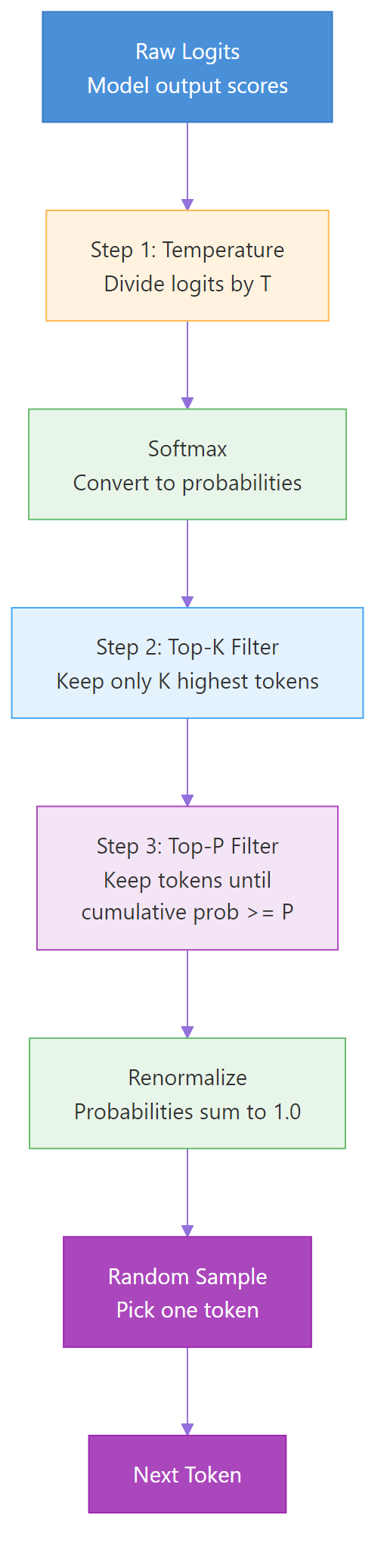
Figure 2: The complete sampling pipeline — temperature reshapes probabilities, then top-k and top-p filter the candidate tokens before final sampling.
Let’s build the complete pipeline and watch how each step transforms the distribution. The full_sampling_pipeline function applies temperature first, then optionally top-k, then optionally top-p, and finally picks a random token weighted by the surviving probabilities. We’ll test four configurations to see how stacking the filters changes the outcome.
import numpy as np

def softmax_with_temp(logits, temperature=1.0):
    if temperature == 0:
        result = np.zeros_like(logits, dtype=float)
        result[np.argmax(logits)] = 1.0
        return result
    scaled = logits / temperature
    exp_scaled = np.exp(scaled - np.max(scaled))
    return exp_scaled / exp_scaled.sum()

def full_sampling_pipeline(logits, temperature=1.0, top_k=0, top_p=1.0):
    probs = softmax_with_temp(logits, temperature)
    if top_k > 0:
        top_k_idx = np.argsort(probs)[-top_k:]
        mask = np.zeros_like(probs)
        mask[top_k_idx] = probs[top_k_idx]
        probs = mask / mask.sum()
    if top_p < 1.0:
        sorted_idx = np.argsort(probs)[::-1]
        sorted_probs = probs[sorted_idx]
        cumulative = np.cumsum(sorted_probs)
        cutoff = min(np.searchsorted(cumulative, top_p) + 1, len(probs))
        mask = np.zeros_like(probs)
        mask[sorted_idx[:cutoff]] = probs[sorted_idx[:cutoff]]
        probs = mask / mask.sum()
    return probs

logits = np.array([2.5, 1.8, 1.0, 0.5, -0.3, -1.0, -1.5])
tokens = ["the", "a", "cat", "dog", "pizza", "moon", "void"]

configs = [
    {"temperature": 0.7, "top_k": 0, "top_p": 1.0, "label": "T=0.7 only"},
    {"temperature": 0.7, "top_k": 4, "top_p": 1.0, "label": "T=0.7 + K=4"},
    {"temperature": 0.7, "top_k": 0, "top_p": 0.9, "label": "T=0.7 + P=0.9"},
    {"temperature": 0.7, "top_k": 4, "top_p": 0.9, "label": "T=0.7 + K=4 + P=0.9"},
]

for cfg in configs:
    probs = full_sampling_pipeline(logits, cfg["temperature"], cfg["top_k"], cfg["top_p"])
    active = sum(1 for x in probs if x > 0.001)
    dist = " | ".join(f"{t}: {p:.1%}" for t, p in zip(tokens, probs))
    print(f"{cfg['label']:>25}  ({active} tokens)  ->  {dist}")
Output:
python
                T=0.7 only  (7 tokens)  ->  the: 46.5% | a: 23.4% | cat: 10.0% | dog: 5.3% | pizza: 1.7% | moon: 0.6% | void: 0.3%
           T=0.7 + K=4  (4 tokens)  ->  the: 54.5% | a: 27.4% | cat: 11.7% | dog: 6.2% | pizza: 0.0% | moon: 0.0% | void: 0.0%
          T=0.7 + P=0.9  (4 tokens)  ->  the: 54.5% | a: 27.4% | cat: 11.7% | dog: 6.2% | pizza: 0.0% | moon: 0.0% | void: 0.0%
     T=0.7 + K=4 + P=0.9  (4 tokens)  ->  the: 54.5% | a: 27.4% | cat: 11.7% | dog: 6.2% | pizza: 0.0% | moon: 0.0% | void: 0.0%
Notice that top-k=4 and top-p=0.9 produce the exact same result here — both end up keeping the same four tokens. In practice, they often overlap because both are trying to cut the low-probability tail. The last row confirms it: adding both filters together doesn’t change anything compared to using either one alone. Most API providers recommend using temperature + top-p OR temperature + top-k, not all three.
Here’s a quick reference for which combination to use.
| Combination | When to Use |
|---|---|
| Temperature only | Simple tasks, quick experiments |
| Temperature + Top-P | Most production use cases (OpenAI default) |
| Temperature + Top-K | When you want hard vocabulary limits |
| All three | Rarely needed — adds complexity without benefit |
Note: OpenAI’s API uses temperature + top-p by default. Anthropic’s Claude API also supports `temperature` + `top_p`. Google’s Gemini API supports all three. When using these APIs, stick with the provider’s recommended combination — the defaults exist for a reason.
Min-P — The New Challenger
There’s a newer sampling method gaining traction: Min-P. It was introduced in a 2025 ICLR paper and addresses a flaw in top-p that shows up at high temperatures.
The problem with top-p: at high temperatures, the distribution becomes flat. Many tokens have similar probabilities. Top-p uses a fixed cumulative threshold, so it ends up including many low-quality tokens when the distribution is flat — tokens like “xylophone” after “The capital of France is.”
Min-P takes a different approach. Instead of a cumulative threshold, it uses a relative threshold. It keeps any token whose probability is at least \(p \times p_{\text{max}}\), where \(p_{\text{max}}\) is the probability of the most likely token. If the top token has 30% probability and you set min_p=0.1, any token below 3% (30% times 0.1) is eliminated.
Let’s compare min-p against top-p to see the difference. We’ll use a larger 10-token vocabulary to make the effect more visible. The min_p_sampling function computes a threshold relative to the top token’s probability and masks everything below it. We’ll run both methods at high temperature (T=1.5), where top-p’s weakness shows up.
import numpy as np

def softmax_with_temp(logits, temperature=1.0):
    if temperature == 0:
        result = np.zeros_like(logits, dtype=float)
        result[np.argmax(logits)] = 1.0
        return result
    scaled = logits / temperature
    exp_scaled = np.exp(scaled - np.max(scaled))
    return exp_scaled / exp_scaled.sum()

def top_p_sampling(logits, p, temperature=1.0):
    probs = softmax_with_temp(logits, temperature)
    sorted_indices = np.argsort(probs)[::-1]
    sorted_probs = probs[sorted_indices]
    cumulative = np.cumsum(sorted_probs)
    cutoff_idx = min(np.searchsorted(cumulative, p) + 1, len(probs))
    mask = np.zeros_like(probs)
    mask[sorted_indices[:cutoff_idx]] = probs[sorted_indices[:cutoff_idx]]
    return mask / mask.sum()

def min_p_sampling(logits, min_p=0.1, temperature=1.0):
    """Keep tokens with prob >= min_p * max_prob."""
    probs = softmax_with_temp(logits, temperature)
    threshold = min_p * probs.max()
    mask = np.where(probs >= threshold, probs, 0.0)
    return mask / mask.sum()

# Larger vocabulary to show the difference clearly
logits = np.array([2.5, 1.8, 1.0, 0.5, -0.3, -0.8, -1.2, -1.5, -2.0, -2.5])
tokens = ["the", "a", "cat", "dog", "pizza", "moon", "void", "quantum", "zebra", "flux"]

print("=== High temperature (T=1.5) — where the difference matters ===\n")

print("Top-P=0.9:")
probs_tp = top_p_sampling(logits, p=0.9, temperature=1.5)
active_tp = sum(1 for x in probs_tp if x > 0.001)
for t, p in zip(tokens, probs_tp):
    if p > 0.001: print(f"  {t:>8}: {p:.1%}")
print(f"  Active tokens: {active_tp}\n")

print("Min-P=0.1:")
probs_mp = min_p_sampling(logits, min_p=0.1, temperature=1.5)
active_mp = sum(1 for x in probs_mp if x > 0.001)
for t, p in zip(tokens, probs_mp):
    if p > 0.001: print(f"  {t:>8}: {p:.1%}")
print(f"  Active tokens: {active_mp}")
Output:
python
=== High temperature (T=1.5) — where the difference matters ===

Top-P=0.9:
       the: 19.5%
         a: 14.9%
       cat: 10.3%
       dog: 8.0%
     pizza: 5.4%
      moon: 4.2%
      void: 3.3%
   quantum: 2.8%
  Active tokens: 8

Min-P=0.1:
       the: 24.2%
         a: 18.5%
       cat: 12.8%
       dog: 9.9%
     pizza: 6.7%
      moon: 5.2%
  Active tokens: 6
Now the difference is dramatic. At high temperature, top-p=0.9 keeps 8 tokens — including “void” and “quantum” with only 3% each. These low-quality tokens can produce bizarre output in the wrong context. Min-p=0.1 keeps only 6 tokens by eliminating everything below 10% of the top token’s probability. It’s stricter because it measures each token relative to the best token, not against a cumulative sum. This prevents low-quality tokens from sneaking in when the distribution is flat.
The key advantage: min-p’s threshold automatically tightens when the model is confident (high top probability) and relaxes when the model is uncertain (low top probability). It adapts like top-p, but without top-p’s tendency to let garbage through at high temperatures.
Tip: For open-source models (via vLLM, llama.cpp, Ollama), try min_p=0.05-0.1 with temperature=0.7-1.0. This combination outperforms top-p in the ICLR 2025 benchmarks, especially for creative tasks at higher temperatures. Most commercial APIs (OpenAI, Anthropic) don’t expose min-p yet, so use top-p there.
Repetition Penalties — The Adjacent Controls
Temperature, top-k, and top-p control which tokens are eligible for selection. But there’s another family of parameters that control which tokens are discouraged: repetition penalties.
Frequency penalty reduces the probability of tokens that have already appeared in the output. The more times a token has been used, the stronger the penalty. This prevents the model from repeating the same phrase over and over.
Presence penalty is simpler — it applies a fixed penalty to any token that has appeared at least once, regardless of how many times. It encourages the model to bring up new topics rather than dwelling on the same one.
Both penalties work by adjusting the logits before sampling. A positive frequency penalty subtracts from the logit of each repeated token proportionally to its count. A positive presence penalty subtracts a flat value from any previously-seen token’s logit.
Here’s how they interact with temperature: if you use high temperature for creativity but the model keeps repeating itself, a small frequency_penalty (0.3-0.7) can break the loop without reducing creative variety. The penalty pushes repeated tokens’ logits down, and temperature handles the rest.
Warning: Don’t set repetition penalties too high. Values above 1.0 can cause the model to actively avoid common words it needs, producing unnatural phrasing. Start with 0.0 (off) and only increase if you see repetition problems. Typical values: 0.3-0.7 for frequency_penalty, 0.0-0.5 for presence_penalty.
Practical Cheat Sheet — Settings for Every Task
Here’s a ready-to-use reference for setting sampling parameters by task type.
| Task | Temperature | Top-P | Top-K | Notes |
|---|---|---|---|---|
| Code generation | 0.0-0.2 | 0.1-0.3 | 1-5 | Prioritize correctness |
| Factual Q&A | 0.0-0.3 | 0.1-0.5 | 1-10 | Reduce hallucination |
| Summarization | 0.3-0.5 | 0.7-0.9 | — | Some variation, mostly faithful |
| General chat | 0.5-0.7 | 0.9 | — | Balanced |
| Creative writing | 0.7-1.0 | 0.9-0.95 | 40-100 | Allow surprises |
| Brainstorming | 0.9-1.2 | 0.95 | — | Maximum variety |
| Poetry / fiction | 1.0-1.5 | 0.95 or min-p 0.05 | — | Embrace weirdness |
The Decision Framework
Don’t memorize this table. Instead, follow this decision process:
- Start with temperature=0.7 and top_p=1.0 (no filtering). Run your prompt a few times.
- If the output is too boring or repetitive, raise temperature to 0.9-1.0.
- If the output is too wild or incoherent, lower temperature to 0.3-0.5.
- Only add top-p when you want to keep temperature high but prevent garbage tokens. Set top_p=0.9 to cut the long tail.
- If you still see repetition, add frequency_penalty=0.3-0.5. Don’t touch temperature for repetition problems — that’s what penalties are for.
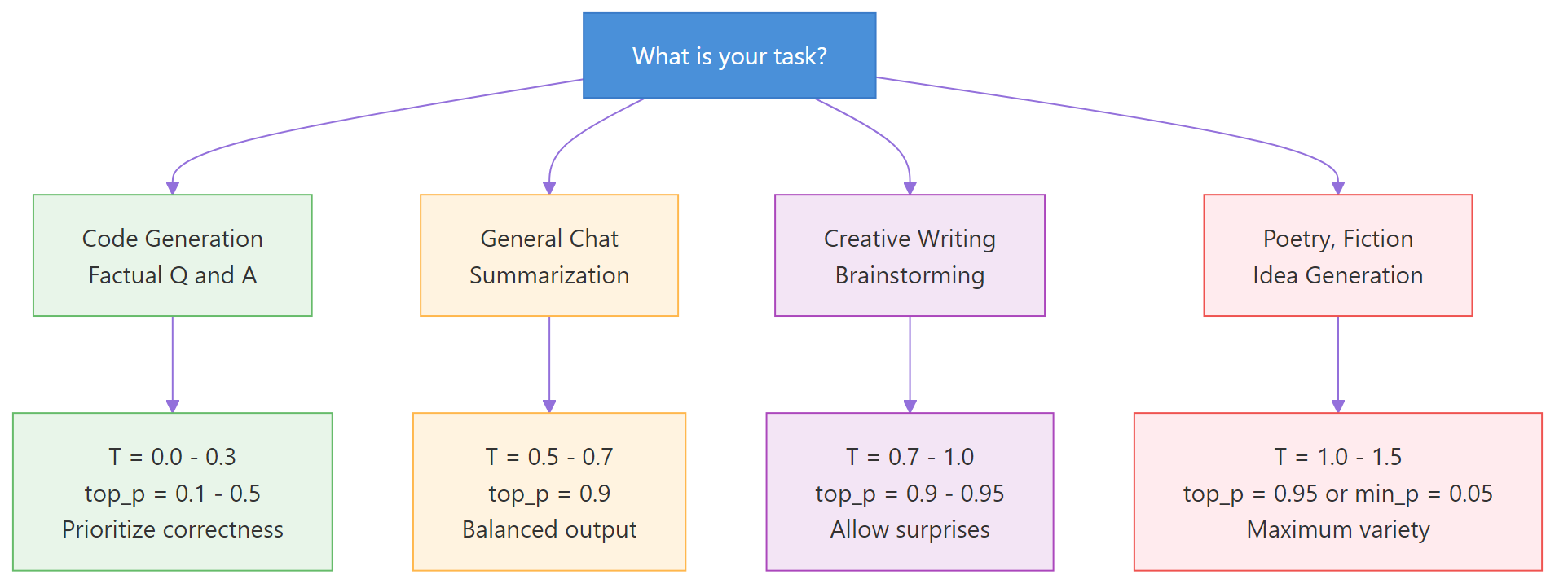
Figure 3: Decision flowchart — choose your sampling settings based on your task type.
API Parameter Names Across Providers
The parameter names are slightly different across providers. Here’s a quick lookup table.
| Parameter | OpenAI | Anthropic (Claude) | Google (Gemini) | HuggingFace |
|---|---|---|---|---|
| Temperature | temperature | temperature | temperature | temperature |
| Top-P | top_p | top_p | top_p | top_p |
| Top-K | Not supported | top_k | top_k | top_k |
| Frequency penalty | frequency_penalty | Not supported | frequency_penalty | repetition_penalty |
| Presence penalty | presence_penalty | Not supported | presence_penalty | — |
| Max tokens | max_tokens | max_tokens | max_output_tokens | max_new_tokens |
Warning: OpenAI does not support top-k. If you need hard vocabulary filtering with OpenAI models, use temperature + top-p instead. Anthropic and Google support all three parameters.
🏋️ Exercise 2: Sampling Parameter Advisor
Write a function that takes a task description and returns recommended sampling parameters. Test it with three different tasks.
def recommend_params(task):
    """Return recommended temperature, top_p, top_k for a given task."""
    task = task.lower()

    # TODO: Map task types to parameter recommendations
    # Use if/elif checks for keywords like "code", "creative", "fact", etc.
    # Return a dict with temperature, top_p, top_k, and reasoning

    return {"temperature": 0.7, "top_p": 0.9, "top_k": None, "reason": "default"}

# Test with three tasks
tasks = [
    "Generate Python code to sort a list",
    "Write a creative poem about the ocean",
    "Answer: What is the capital of France?",
]

for task in tasks:
    rec = recommend_params(task)
    print(f"Task: {task}")
    print(f"  T={rec['temperature']}, top_p={rec['top_p']}, "
          f"top_k={rec['top_k']}, reason: {rec['reason']}")
    print()
See It in Action — OpenAI API Demo
Let’s use the OpenAI API to see how temperature changes real model output. We’ll send the same prompt at three different temperatures and compare the results. The completions are genuinely different — T=0.0 is safe, T=0.7 is expressive, and T=1.5 is borderline surreal.
<
python
from openai import OpenAI

client = OpenAI()  # uses OPENAI_API_KEY env var

prompt = "Complete this sentence creatively: The robot looked at the sunset and felt"

print(f"Prompt: '{prompt}'\n")

for temp in [0.0, 0.7, 1.5]:
    response = client.chat.completions.create(
        model="gpt-4o-mini",
        messages=[{"role": "user", "content": prompt}],
        temperature=temp,
        max_tokens=30,
    )
    text = response.choices[0].message.content
    print(f"T={temp:.1f}: {text}")
```text
**Output:**
Prompt: ‘Complete this sentence creatively: The robot looked at the sunset and felt’
T=0.0: The robot looked at the sunset and felt a strange warmth in its circuits, as if the fading light had awakened something it wasn’t programmed to
T=0.7: The robot looked at the sunset and felt a quiet longing stir within its metallic frame, an echo of emotions it could never quite name
T=1.5: The robot looked at the sunset and felt crackling whispers of amber dissolving through quantum veins — a phosphorescent ache between zeros
python
At T=0.0, the output is safe and predictable — exactly what greedy decoding produces. At T=0.7, the language is more expressive ("quiet longing," "echo of emotions") because the model can reach beyond the top-probability tokens. At T=1.5, the distribution is so flat that unusual tokens win ("crackling whispers," "quantum veins"), creating poetic but borderline incoherent prose. Each temperature serves a different purpose — and now you understand exactly why.

### 🏋️ Exercise 3: Temperature Comparison Tool

Build a function that runs our sampling simulation at multiple temperatures and prints a comparison table. Use the functions we built (no API needed).

<pre class="python-runnable" data-label="Exercise: Build a temperature comparison tool">
import numpy as np

def softmax_with_temp(logits, temperature=1.0):
    if temperature == 0:
        result = np.zeros_like(logits, dtype=float)
        result[np.argmax(logits)] = 1.0
        return result
    scaled = logits / temperature
    exp_scaled = np.exp(scaled - np.max(scaled))
    return exp_scaled / exp_scaled.sum()

# Simulate "next token" prediction for the phrase "The cat sat on the ___"
logits = np.array([3.5, 2.0, 1.2, 0.5, 0.1, -0.5, -1.0])
tokens = ["mat", "floor", "roof", "table", "moon", "dream", "void"]

def compare_temperatures(logits, tokens, temperatures):
    """Print a comparison table showing token probs at each temperature."""
    # TODO: For each temperature, compute softmax and print the distribution
    # Format as a clean table with header row
    pass

compare_temperatures(logits, tokens, [0.1, 0.5, 0.7, 1.0, 1.5])</pre>

<details>
<summary>💡 Hints</summary>

1. Loop through temperatures, call `softmax_with_temp` for each
2. Use f-strings with alignment for clean output: `f"{prob:>6.1%}"`
3. Print a header row with token names, then one row per temperature

</details>

<details>
<summary>🔑 Solution</summary>

<pre class="python-runnable" data-label="Solution: Temperature comparison tool">
import numpy as np

def softmax_with_temp(logits, temperature=1.0):
    if temperature == 0:
        result = np.zeros_like(logits, dtype=float)
        result[np.argmax(logits)] = 1.0
        return result
    scaled = logits / temperature
    exp_scaled = np.exp(scaled - np.max(scaled))
    return exp_scaled / exp_scaled.sum()

logits = np.array([3.5, 2.0, 1.2, 0.5, 0.1, -0.5, -1.0])
tokens = ["mat", "floor", "roof", "table", "moon", "dream", "void"]

def compare_temperatures(logits, tokens, temperatures):
    header = f"{'Temp':>6} | " + " | ".join(f"{t:>6}" for t in tokens)
    print(header)
    print("-" * len(header))
    for temp in temperatures:
        probs = softmax_with_temp(logits, temp)
        row = f"{temp:>5.1f}  | " + " | ".join(f"{p:>5.1%}" for p in probs)
        print(row)

compare_temperatures(logits, tokens, [0.1, 0.5, 0.7, 1.0, 1.5])</pre>

The table shows how probability mass shifts from "mat" to less likely tokens as temperature increases. At T=0.1, "mat" holds nearly 100% — no other token has a chance. At T=1.5, "mat" drops to around 30% and even "void" gets a few percent. The transition from spike to spread is gradual — there's no sharp cliff, which is why fine-tuning temperature by 0.1 increments can produce noticeably different outputs.

</details>

## Common Mistakes and How to Fix Them {#common-mistakes}

### Mistake 1: Setting Both Temperature and Top-P to Extreme Values

Combining a high temperature with a very high top-p removes almost all filtering. The model can pick any token.

❌ **Wrong:**

```python
response = client.chat.completions.create(
    model="gpt-4o",
    messages=[{"role": "user", "content": "Explain gravity"}],
    temperature=1.8,
    top_p=0.99,  # almost no filtering
)
# Result: incoherent, rambling output
```text
**Why it's wrong:** Temperature=1.8 flattens the distribution dramatically. Top-p=0.99 keeps virtually all tokens. Together, even the lowest-probability tokens have a shot. The output degrades into gibberish.

✅ **Correct:**

```python
response = client.chat.completions.create(
    model="gpt-4o",
    messages=[{"role": "user", "content": "Explain gravity"}],
    temperature=0.9,
    top_p=0.9,  # filters the long tail
)
# Result: creative but coherent
```text
If you want more creativity, increase temperature OR top-p — not both to their maximums.

### Mistake 2: Expecting Identical Output at Temperature=0

Temperature=0 means greedy decoding. Many developers assume this guarantees identical output every time. It usually does — but not always.

❌ **Wrong assumption:**

```python
# "This will always return the exact same text"
response = client.chat.completions.create(
    model="gpt-4o",
    messages=[{"role": "user", "content": "What is 2+2?"}],
    temperature=0,
)
# May vary slightly between API calls due to floating-point differences
```text
**Why it's wrong:** GPU floating-point arithmetic isn't perfectly deterministic. Different hardware, batching, or server routing can cause tiny numerical differences that occasionally flip which token is "highest." OpenAI offers a `seed` parameter for more reproducibility.

✅ **Correct:**

```python
response = client.chat.completions.create(
    model="gpt-4o",
    messages=[{"role": "user", "content": "What is 2+2?"}],
    temperature=0,
    seed=42,  # improves reproducibility
)
```text
### Mistake 3: Confusing max_tokens with Sampling Parameters

Max tokens limits the output **length**. It has nothing to do with creativity or randomness.

❌ **Wrong:**

```python
# "I'll set max_tokens low to get a concise, focused answer"
response = client.chat.completions.create(
    model="gpt-4o",
    messages=[{"role": "user", "content": "Explain gravity"}],
    max_tokens=20,
    temperature=1.5,  # still generates wild tokens
)
# Result: short AND incoherent — worst of both worlds
```text
**Why it's wrong:** The model still uses temperature=1.5 to pick each token. You just cut it off after 20 tokens. The output is short AND random.

✅ **Correct:**

```python
response = client.chat.completions.create(
    model="gpt-4o",
    messages=[{"role": "user", "content": "Explain gravity in one sentence"}],
    max_tokens=50,
    temperature=0.3,  # focused tokens
)
```text
Use temperature to control **quality/style**. Use max_tokens to control **length**. They are independent knobs.

### Mistake 4: Using Top-K with OpenAI Models

OpenAI's API does not support the `top_k` parameter. Passing it causes an error.

❌ **Wrong:**

```python
response = client.chat.completions.create(
    model="gpt-4o",
    messages=[{"role": "user", "content": "Hello"}],
    top_k=50,  # ERROR: OpenAI doesn't support this
)
```text
✅ **Correct:**

```python
response = client.chat.completions.create(
    model="gpt-4o",
    messages=[{"role": "user", "content": "Hello"}],
    top_p=0.9,
    temperature=0.7,
)
```text
Check your provider's [API docs](https://platform.openai.com/docs/api-reference/chat/create) for supported parameters before coding.

## Frequently Asked Questions {#faq}

### What is the difference between temperature and top-p?

Temperature changes **how much** each token's probability differs from others — it reshapes the entire curve. Top-p changes **how many** tokens are eligible to be picked — it cuts the tail. Temperature controls the *shape* of the distribution; top-p controls the *size* of the candidate pool. You can use both together: temperature sets the sharpness, then top-p removes whatever low-probability tokens survive.

### What is a good temperature for an LLM?

For most tasks, **0.7 is the best starting point**. It provides enough variety to avoid repetitive output while keeping responses coherent. Lower (0.0-0.3) for code generation and factual tasks. Higher (0.9-1.2) for creative writing. Never go above 1.5 unless you're deliberately experimenting.

### What does temperature 0 mean in LLM?

Temperature=0 disables sampling entirely and uses **greedy decoding** — the model always picks the single highest-probability token. This gives you the most predictable, deterministic output. It's ideal for tasks where correctness matters more than variety, like code generation or data extraction.

### What is the default temperature for GPT-4 and ChatGPT?

OpenAI's default temperature is **1.0** for GPT-4 and GPT-4o. ChatGPT's web interface uses internal settings that aren't publicly documented but are believed to be around 0.7-1.0. Anthropic's Claude defaults to **1.0**. Google's Gemini also defaults to **1.0**. These defaults are designed for general-purpose chat.

### Can sampling parameters cause hallucinations?

Yes. Higher temperature increases the chance of selecting low-probability tokens, which can include factually incorrect continuations. If your model hallucinates, lowering temperature (0.0-0.3) and top-p (0.1-0.5) reduces the randomness that allows hallucinated tokens through. However, hallucinations can also happen at temperature=0 — sampling parameters reduce the *chance* of hallucination but don't eliminate it.

### Do reasoning models (o1, o3) use these parameters?

Most reasoning models lock their sampling parameters internally. OpenAI's o1 and o3 models do not accept temperature or top-p in the API — they use fixed internal settings optimized for chain-of-thought reasoning. DeepSeek-R1 similarly recommends temperature=0.6 and discourages changes. If you're using a reasoning model, trust its defaults.

### Is there a way to see what tokens the model considered?

Yes. You can request `logprobs=True` in the [OpenAI API](https://platform.openai.com/docs/api-reference/chat/create). This returns the log-probabilities of the top tokens at each position, letting you see which tokens the model considered and how confident it was. This is invaluable for debugging unexpected outputs — you can see whether a bad token was a 0.1% fluke or a 40% contender.

## Complete Code {#complete-code}

<details>
<summary>Click to expand the full script (copy-paste and run)</summary>

```python
# Complete code from: LLM Temperature, Top-p, and Top-k Explained
# Requires: pip install numpy
# Optional: pip install openai (for API demo)
# Python 3.9+

import numpy as np


# --- Core Functions ---

def softmax(logits):
    """Standard softmax function."""
    exp_logits = np.exp(logits - np.max(logits))
    return exp_logits / exp_logits.sum()


def softmax_with_temp(logits, temperature=1.0):
    """Softmax with temperature scaling."""
    if temperature == 0:
        result = np.zeros_like(logits, dtype=float)
        result[np.argmax(logits)] = 1.0
        return result
    scaled = logits / temperature
    exp_scaled = np.exp(scaled - np.max(scaled))
    return exp_scaled / exp_scaled.sum()


def top_k_sampling(logits, k, temperature=1.0):
    """Apply temperature, then keep only top-k tokens."""
    probs = softmax_with_temp(logits, temperature)
    top_k_indices = np.argsort(probs)[-k:]
    mask = np.zeros_like(probs)
    mask[top_k_indices] = probs[top_k_indices]
    return mask / mask.sum()


def top_p_sampling(logits, p, temperature=1.0):
    """Apply temperature, then keep tokens until cumulative prob >= p."""
    probs = softmax_with_temp(logits, temperature)
    sorted_indices = np.argsort(probs)[::-1]
    sorted_probs = probs[sorted_indices]
    cumulative = np.cumsum(sorted_probs)
    cutoff_idx = min(np.searchsorted(cumulative, p) + 1, len(probs))
    mask = np.zeros_like(probs)
    mask[sorted_indices[:cutoff_idx]] = probs[sorted_indices[:cutoff_idx]]
    return mask / mask.sum()


def min_p_sampling(logits, min_p=0.1, temperature=1.0):
    """Keep tokens with prob >= min_p * max_prob."""
    probs = softmax_with_temp(logits, temperature)
    threshold = min_p * probs.max()
    mask = np.where(probs >= threshold, probs, 0.0)
    return mask / mask.sum()


def full_sampling_pipeline(logits, temperature=1.0, top_k=0, top_p=1.0):
    """Complete sampling pipeline: temperature -> top-k -> top-p -> sample."""
    probs = softmax_with_temp(logits, temperature)

    if top_k > 0:
        top_k_idx = np.argsort(probs)[-top_k:]
        mask = np.zeros_like(probs)
        mask[top_k_idx] = probs[top_k_idx]
        probs = mask / mask.sum()

    if top_p < 1.0:
        sorted_idx = np.argsort(probs)[::-1]
        sorted_probs = probs[sorted_idx]
        cumulative = np.cumsum(sorted_probs)
        cutoff = min(np.searchsorted(cumulative, top_p) + 1, len(probs))
        mask = np.zeros_like(probs)
        mask[sorted_idx[:cutoff]] = probs[sorted_idx[:cutoff]]
        probs = mask / mask.sum()

    chosen = np.random.choice(len(probs), p=probs)
    return probs, chosen


# --- Demo ---

if __name__ == "__main__":
    logits = np.array([2.5, 1.8, 1.0, 0.5, -0.3, -1.0, -1.5])
    tokens = ["the", "a", "cat", "dog", "pizza", "moon", "void"]

    print("=== Temperature Comparison ===")
    for temp in [0.2, 0.7, 1.0, 1.5]:
        probs = softmax_with_temp(logits, temp)
        dist = " | ".join(f"{t}: {p:.1%}" for t, p in zip(tokens, probs))
        print(f"T={temp:.1f}  ->  {dist}")

    print("\n=== Top-K Comparison ===")
    for k in [1, 3, 5, 7]:
        probs = top_k_sampling(logits, k)
        dist = " | ".join(f"{t}: {p:.1%}" for t, p in zip(tokens, probs))
        print(f"K={k}  ->  {dist}")

    print("\n=== Top-P Comparison ===")
    for p in [0.5, 0.7, 0.9, 0.95]:
        probs = top_p_sampling(logits, p)
        active = sum(1 for x in probs if x > 0)
        dist = " | ".join(f"{t}: {pv:.1%}" for t, pv in zip(tokens, probs))
        print(f"P={p:.2f} ({active} tokens)  ->  {dist}")

    print("\n=== Min-P vs Top-P at High Temperature ===")
    logits_10 = np.array([2.5, 1.8, 1.0, 0.5, -0.3, -0.8, -1.2, -1.5, -2.0, -2.5])
    probs_tp = top_p_sampling(logits_10, p=0.9, temperature=1.5)
    probs_mp = min_p_sampling(logits_10, min_p=0.1, temperature=1.5)
    print(f"Top-P: {sum(1 for x in probs_tp if x > 0.001)} active tokens")
    print(f"Min-P: {sum(1 for x in probs_mp if x > 0.001)} active tokens")

    print("\nScript completed successfully.")
References
- Holtzman, A. et al. — “The Curious Case of Neural Text Degeneration.” ICLR 2020. arXiv:1904.09751. The original nucleus sampling (top-p) paper.
- Fan, A., Lewis, M., & Dauphin, Y. — “Hierarchical Neural Story Generation.” ACL 2018. arXiv:1805.04833. Introduced top-k sampling for text generation.
- Nguyen, M. et al. — “Turning Up the Heat: Min-p Sampling for Creative and Coherent LLM Outputs.” ICLR 2025. arXiv:2407.01082. The min-p paper demonstrating improvements over top-p.
- OpenAI API Reference — Chat Completions. Link. Official documentation for temperature, top_p, and other parameters.
- Anthropic API Reference — Messages. Link. Claude API documentation for sampling parameters.
- Google Gemini API — GenerationConfig. Link. Gemini API documentation including top-k support.
- Chng, P. — “Token selection strategies: Top-K, Top-P, and Temperature.” Link. Excellent visual explanation of softmax with temperature.
- Radford, A. et al. — “Language Models are Unsupervised Multitask Learners.” OpenAI (2019). GPT-2 paper that popularized these sampling strategies.
Free Course
Master Core Python — Your First Step into AI/ML
Build a strong Python foundation with hands-on exercises designed for aspiring Data Scientists and AI/ML Engineers.
Start Free Course →Trusted by 50,000+ learners

Related Course
Master Gen AI — Hands-On
Join 5,000+ students at edu.machinelearningplus.com
Explore Course


