
machine learning +
Build a Python AI Chatbot with Memory Using LangChain
Feedback Loop RAG: Improving Retrieval with User Interactions
Feedback Loop RAG is an advanced RAG technique that learns from user interactions to continuously improve retrieval quality over time. Unlike traditional RAG systems that remain static, this approach learns from each interaction to deliver more accurate and personalized responses.
Feedback Loop RAG is an advanced RAG technique that learns from user interactions to continuously improve retrieval quality over time. Unlike traditional RAG systems that remain static, this approach learns from each interaction to deliver more accurate and personalized responses.
Picture this: You build a RAG chatbot for your company. On day one, it gives decent answers. But after weeks of users asking questions and rating responses, it becomes incredibly smart about your specific domain.
It knows which documents users found helpful for certain types of questions. It prioritizes information that actually solved problems.
This is Feedback Loop RAG in action.
Traditional RAG systems are like that friend who never learns from mistakes. They retrieve the same documents for similar questions. Feedback Loop RAG is different. It’s like having a research assistant who remembers every conversation, learns from every correction, and gets better at finding exactly what you need.
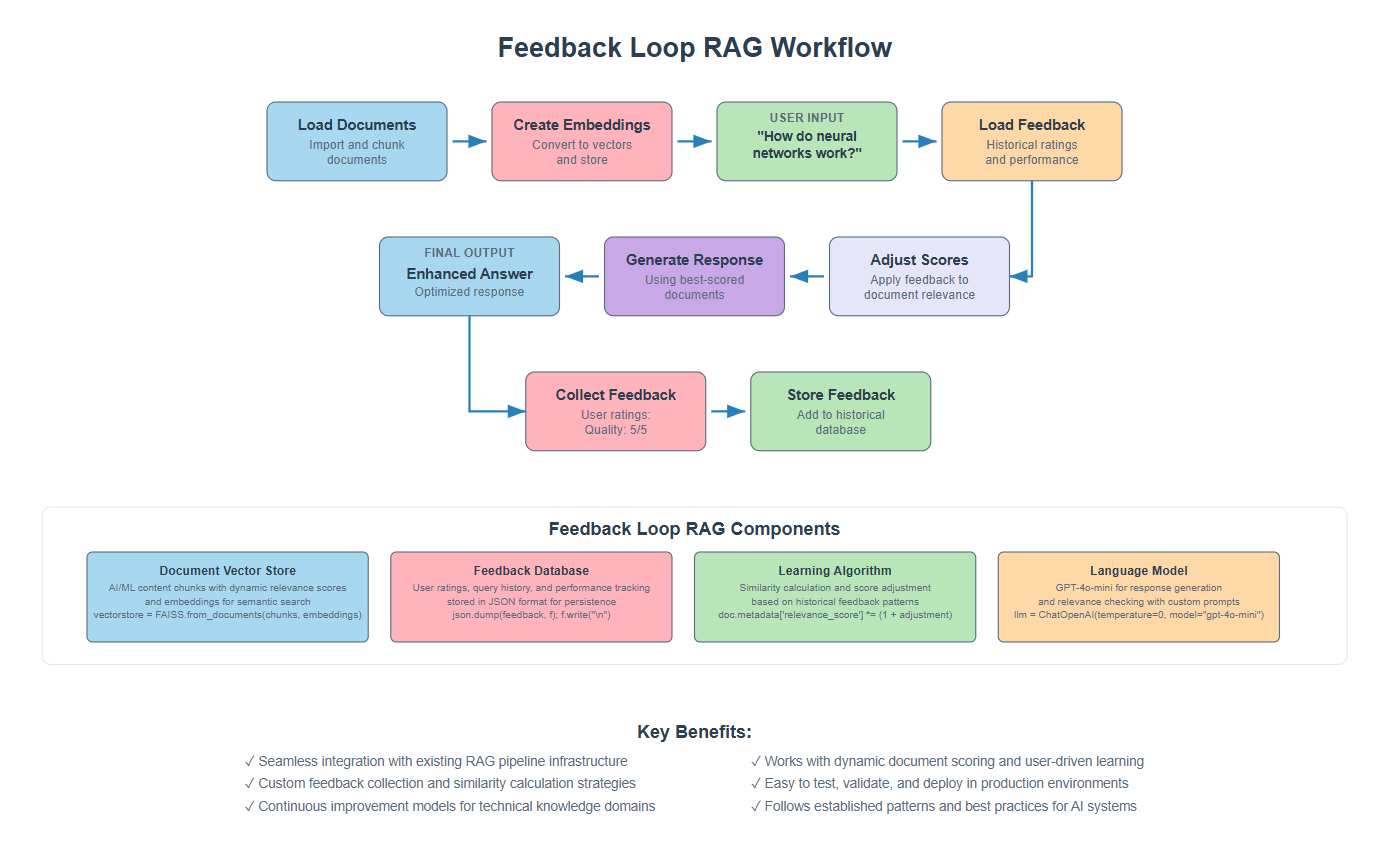
1. The Problem We’re Solving
Let me tell you what happens with standard RAG systems. You ask a question. The system finds some documents. It generates an answer. Then it forgets everything. Next time you ask a similar question, it starts from scratch.
This creates frustration. Users have to rephrase questions when the first answer wasn’t great. The system makes the same mistakes repeatedly. Valuable feedback from user interactions goes to waste.
Here’s what usually happens:
- User asks: “How do I configure SSL certificates?”
- System retrieves: Generic SSL documentation
- User rates the answer: 2/5 (not helpful)
- Next user asks the same question
- System retrieves: The exact same generic documentation
2. How Feedback Loop RAG Works
Researchers tackled this problem by building on classical information retrieval work, particularly Gerard Salton and Chris Buckley’s foundational research on “Improving retrieval performance by relevance feedback” (1990), combined with modern machine learning approaches to ranking systems.
The key innovation: transform static RAG into an adaptive system with three components:
1. Memory to store what worked
2. Learning to adjust document relevance scores based on feedback
3. Improvement by incorporating successful Q&A pairs back into the knowledge base.
Instead of repeating the same retrieval mistakes, the system learns from each query to deliver increasingly relevant results.
3. Setting Up Your Environment
Before we start building, let’s get your workspace ready. I’ll assume you have Python and your development environment set up.
First, install the packages we need:
bash
conda create -p rag python==3.12
conda activate rag
pip install ipykernel
pip install langchain langchain openai faiss-cpu python-dotenv pypdf
Now let’s import everything we’ll use:
python
import os
import json
from dotenv import load_dotenv
from langchain_openai import ChatOpenAI, OpenAIEmbeddings
from langchain.text_splitter import RecursiveCharacterTextSplitter
from langchain_community.document_loaders import PyPDFLoader
from langchain_community.vectorstores import FAISS
from langchain.prompts import PromptTemplate
from langchain.schema import Document

# Load environment variables
load_dotenv()
os.environ["OPENAI_API_KEY"] = os.getenv('OPENAI_API_KEY')
Make sure you have a .env file with your OpenAI API key:
python
OPENAI_API_KEY=your_api_key_here
4. Loading and Processing Documents
Let’s start by loading a PDF document and breaking it into chunks. For this tutorial, I’ll use a comprehensive PDF about AI and Machine Learning fundamentals.
You can download the pdf here
python
# Load the PDF document
document_path = "Artificial Intelligence.pdf" # Replace this with your path to the document
pdf_loader = PyPDFLoader(document_path)
raw_documents = pdf_loader.load()

print(f"Loaded {len(raw_documents)} pages from the PDF")
python
Loaded 14 pages from the PDF
Now let’s split the document into smaller chunks. This is important because we want to retrieve specific sections, not entire pages.
python
# Split into chunks
text_splitter = RecursiveCharacterTextSplitter(
    chunk_size=1000,
    chunk_overlap=200
)
document_chunks = text_splitter.split_documents(raw_documents)

print(f"Split into {len(document_chunks)} chunks")
print(f"Sample chunk: {document_chunks[0].page_content[:200]}...")
python
Split into 57 chunks
Sample chunk: Artificial Intelligence and Machine Learning: Fundamentals,
Applications, and Future Directions
Introduction to Artificial Intelligence
Artificial Intelligence represents one of the most transformativ...
Each chunk now represents a focused piece of content that can be independently retrieved and scored based on user feedback.
5. Creating the Vector Store
Now let’s convert our text chunks into numerical vectors and store them in a searchable format.
python
# Create embeddings and vector store
embeddings = OpenAIEmbeddings()
vectorstore = FAISS.from_documents(document_chunks, embeddings)
retriever = vectorstore.as_retriever()

print("Vector store created successfully")
python
Vector store created successfully
The embeddings convert text into numerical vectors that capture semantic meaning. FAISS creates an index of these vectors for fast retrieval.
python
# Initialize language model
llm = ChatOpenAI(temperature=0, model_name="gpt-4o-mini", max_tokens=1000)

print("Language model initialized")
python
Language model initialized
The language model will generate our final responses using the retrieved documents as context.
6. Basic Query and Response Generation
Let’s test our basic RAG system before adding feedback functionality. We’ll create a prompt template and generate a response to see how the system works initially.
python
# Test with a simple query
query = "What is artificial intelligence?"
docs = retriever.invoke(query)

print(f"Query: {query}")
print(f"Retrieved {len(docs)} documents")
print(f"First document preview: {docs[0].page_content[:150]}...")
python
Query: What is artificial intelligence?
Retrieved 4 documents
First document preview: Artificial Intelligence and Machine Learning: Fundamentals,
Applications, and Future Directions
Introduction to Artificial Intelligence
Artificial Int...
Now let’s generate a response using these documents. We’ll combine the document content and use a clear prompt template to instruct the language model.
python
# Combine document content into context
context = "\n\n".join([doc.page_content for doc in docs])

# Create prompt template
prompt = PromptTemplate(
    input_variables=["context", "question"],
    template="""Based on the following context, answer the question comprehensively.

Context:
{context}

Question: {question}

Answer:"""
)

# Generate response
response = llm.invoke(prompt.format(context=context, question=query))
answer = response.content

print(f"Generated response: {answer[:200]}...")
python
Generated response: Artificial Intelligence (AI) is defined as the simulation of human intelligence processes by machines. It encompasses a wide range of capabilities that mimic human cognitive functions, including learn...
This gives us our baseline response using standard RAG without any feedback learning. The response quality depends entirely on which documents were initially retrieved.
7. Collect User Feedback
The core of our feedback system is collecting user ratings on response quality. We structure feedback with relevance and quality scores plus optional comments.
python
# Collect feedback for our response
relevance_score = 4  # How relevant was the answer (1-5)
quality_score = 4    # How good was the answer quality (1-5)
comments = "Good basic explanation of AI"

# Structure the feedback
feedback = {
    "query": query,
    "response": answer,
    "relevance": int(relevance_score),
    "quality": int(quality_score),
    "comments": comments
}

print("Feedback collected")
python
Feedback collected
Each feedback entry captures the original query, generated response, and user ratings. This creates a structured record of user preferences.
python
# Store feedback in JSON file
with open("feedback_data.json", "a") as f:
    json.dump(feedback, f)
    f.write("\n")

print("Feedback stored successfully")
python
Feedback stored successfully
We store this in a simple JSON file where each line contains one feedback record. This creates a growing database of user preferences that our system can learn from.
8. Load Historical Feedback
To learn from past interactions, we need to load and process historical feedback data. Let’s read all previous feedback entries from our storage file.
python
# Load all feedback from file
feedback_data = []
try:
    with open("feedback_data.json", "r") as f:
        for line in f:
            if line.strip():
                feedback_data.append(json.loads(line.strip()))
    print(f"Loaded {len(feedback_data)} feedback entries")
except FileNotFoundError:
    print("No feedback file found. Starting fresh.")
    feedback_data = []
python
Loaded 1 feedback entries
This code handles the case where no feedback file exists yet (for new systems) and safely parses each JSON line. The loaded feedback becomes the foundation for our learning algorithm.
9. Build Some Historical Datas
To demonstrate the feedback loop, we need some historical data. Let’s simulate several queries with different quality scores to create a learning foundation.
python
# Create historical queries with varying quality
historical_queries = [
    {"query": "What is machine learning?", "score": 4},
    {"query": "How do neural networks work?", "score": 5},
    {"query": "What is deep learning?", "score": 3},
    {"query": "Explain AI applications?", "score": 4},
    {"query": "What are the types of machine learning?", "score": 5}
]

print("Building historical feedback data...")
python
Building historical feedback data...
Now let’s generate responses and feedback for each historical query. This simulates real user interactions over time.
python
# Clear existing feedback to start fresh
with open("feedback_data.json", "w") as f:
    pass

# Generate responses and feedback for historical queries
for i, hist in enumerate(historical_queries):
    print(f"\nProcessing historical query {i+1}: {hist['query']}")

    # Get documents for this query
    docs = retriever.get_relevant_documents(hist["query"])

    # Generate response
    context = "\n\n".join([doc.page_content for doc in docs])
    response = llm.invoke(prompt.format(context=context, question=hist["query"]))

    # Create feedback entry
    feedback = {
        "query": hist["query"],
        "response": response.content,
        "relevance": hist["score"],
        "quality": hist["score"],
        "comments": f"Historical feedback {i+1}"
    }

    # Store feedback
    with open("feedback_data.json", "a") as f:
        json.dump(feedback, f)
        f.write("\n")

    print(f"  → Stored feedback with score: {hist['score']}/5")

print(f"\n✓ Built historical feedback for {len(historical_queries)} queries")
python
Processing historical query 1: What is machine learning?
  → Stored feedback with score: 4/5

Processing historical query 2: How do neural networks work?
  → Stored feedback with score: 5/5

Processing historical query 3: What is deep learning?
  → Stored feedback with score: 3/5

Processing historical query 4: Explain AI applications?
  → Stored feedback with score: 4/5

Processing historical query 5: What are the types of machine learning?
  → Stored feedback with score: 5/5

✓ Built historical feedback for 5 queries
This creates a realistic history of user interactions with varying satisfaction levels. Some queries received high ratings (5/5) while others were less satisfactory (3/5).
10. Apply Feedback Learning to New Query
Now let’s test with a new query and see how the system applies lessons learned from historical feedback. This is where the real learning happens.
python
# Test with a new similar query
new_query = "What are the fundamentals of artificial intelligence?"
print(f"New query: {new_query}")

# Get candidate documents
docs = retriever.get_relevant_documents(new_query)
print(f"Retrieved {len(docs)} candidate documents")
python
New query: What are the fundamentals of artificial intelligence?
Retrieved 4 candidate documents
Here’s where the feedback learning algorithm comes in. We’ll adjust document scores based on how well they performed in similar past queries.
python
# Load all historical feedback
feedback_data = []
with open("feedback_data.json", "r") as f:
    for line in f:
        if line.strip():
            feedback_data.append(json.loads(line.strip()))

print(f"Using {len(feedback_data)} historical feedback entries for learning")

# Apply feedback learning to each document
query_words = set(new_query.lower().split())

for doc_idx, doc in enumerate(docs):
    applicable_feedback = []

    # Find relevant feedback for this document
    for feedback in feedback_data:
        feedback_words = set(feedback['query'].lower().split())
        doc_words = set(doc.page_content.lower().split())

        # Check if feedback query is similar to current query
        query_similarity = len(query_words & feedback_words) / len(query_words | feedback_words)

        # Check if document is relevant to the feedback
        doc_relevance = len(doc_words & feedback_words) / len(feedback_words)

        # Apply feedback if both similarities are above threshold
        if query_similarity > 0.2 and doc_relevance > 0.1:
            applicable_feedback.append(feedback)

    # Adjust document score based on applicable feedback
    if applicable_feedback:
        avg_score = sum(f['relevance'] + f['quality'] for f in applicable_feedback) / (len(applicable_feedback) * 2)
        adjustment = (avg_score - 3) / 3 * 0.3  # 30% max adjustment

        # Apply adjustment to document metadata
        if 'relevance_score' not in doc.metadata:
            doc.metadata['relevance_score'] = 1.0
        doc.metadata['relevance_score'] *= (1 + adjustment)

        print(f"Document {doc_idx+1}: Applied {len(applicable_feedback)} feedback entries, adjustment: {adjustment:.3f}")
    else:
        # Set default score if no feedback applies
        doc.metadata['relevance_score'] = 1.0
        print(f"Document {doc_idx+1}: No applicable feedback found")
python
Using 5 historical feedback entries for learning
Document 1: Applied 1 feedback entries, adjustment: 0.200
Document 2: Applied 1 feedback entries, adjustment: 0.200
Document 3: Applied 1 feedback entries, adjustment: 0.200
Document 4: Applied 1 feedback entries, adjustment: 0.200
This algorithm compares the current query with historical queries to find relevant feedback. Documents that contributed to well-rated responses get score boosts, while those from poorly-rated responses get penalized.
python
# Sort documents by adjusted scores and select top 3
sorted_docs = sorted(docs, key=lambda x: x.metadata.get('relevance_score', 1.0), reverse=True)
final_docs = sorted_docs[:3]

print("\nTop documents after feedback learning:")
for i, doc in enumerate(final_docs, 1):
    score = doc.metadata.get('relevance_score', 1.0)
    print(f"{i}. Score: {score:.3f} - {doc.page_content[:100]}...")
python
Top documents after feedback learning:
1. Score: 1.200 - Artificial Intelligence and Machine Learning: Fundamentals,
Applications, and Future Directions
Intr...
2. Score: 1.200 - expectations and limitations in computational power. However, the field experienced a renaissance
in...
3. Score: 1.200 - processing, and autonomous systems.
Foundations of Machine Learning
Machine Learning, a subset of ar...
You should now see different relevance scores for documents based on their historical performance. Documents that previously led to highly-rated responses get prioritized.
11. Generate Response with Feedback-Optimized Documents
Now let’s generate a response using our feedback-optimized documents and see how the learning has improved our system.
python
# Generate response using feedback-optimized documents
context = "\n\n".join([doc.page_content for doc in final_docs])
response = llm.invoke(prompt.format(context=context, question=new_query))
optimized_answer = response.content

print(f"Query: {new_query}")
print(f"Optimized response: {optimized_answer[:300]}...")
print(f"Used {len(final_docs)} feedback-optimized documents")
python
Query: What are the fundamentals of artificial intelligence?
Optimized response: The fundamentals of artificial intelligence (AI) encompass a range of concepts, techniques, and historical developments that have shaped the field. Here are the key components:

1. **Definition and Scope**: AI is defined as the simulation of human intelligence processes by machines. It includes a va...
Used 3 feedback-optimized documents
This response should be better than a standard RAG response because it’s using documents that have historically performed well for similar queries.
python
# Collect feedback for this new response
user_relevance = 5
user_quality = 4
user_comments = "Excellent comprehensive explanation"

# Store the new feedback
new_feedback = {
    "query": new_query,
    "response": optimized_answer,
    "relevance": user_relevance,
    "quality": user_quality,
    "comments": user_comments
}

with open("feedback_data.json", "a") as f:
    json.dump(new_feedback, f)
    f.write("\n")

print(f"New feedback stored with scores: Relevance={user_relevance}/5, Quality={user_quality}/5")
print("System continues learning from this interaction!")
python
New feedback stored with scores: Relevance=5/5, Quality=4/5
System continues learning from this interaction!
This new feedback becomes part of the historical data that will influence future document selection, creating a continuous learning loop.
12. The Complete System
Let’s test our complete feedback-enhanced system with a final query to see how all the components work together.
python
# Test the complete feedback-enhanced system
final_test_query = "How does machine learning differ from traditional programming?"
print(f"Final test query: {final_test_query}")

# Step 1: Get candidate documents (now includes our enhanced knowledge base)
docs = retriever.invoke(final_test_query)
print(f"Retrieved {len(docs)} documents (including enhanced knowledge base)")

# Step 2: Load feedback and apply learning
all_feedback = []
with open("feedback_data.json", "r") as f:
    for line in f:
        if line.strip():
            all_feedback.append(json.loads(line.strip()))

# Step 3: Apply feedback learning
test_query_words = set(final_test_query.lower().split())

for doc in docs:
    applicable_feedback = []

    for feedback in all_feedback:
        feedback_words = set(feedback['query'].lower().split())
        doc_words = set(doc.page_content.lower().split())

        query_similarity = len(test_query_words & feedback_words) / len(test_query_words | feedback_words)
        doc_relevance = len(doc_words & feedback_words) / len(feedback_words)

        if query_similarity > 0.2 and doc_relevance > 0.1:
            applicable_feedback.append(feedback)

    if applicable_feedback:
        avg_score = sum(f['relevance'] + f['quality'] for f in applicable_feedback) / (len(applicable_feedback) * 2)
        adjustment = (avg_score - 3) / 3 * 0.3

        if 'relevance_score' not in doc.metadata:
            doc.metadata['relevance_score'] = 1.0
        doc.metadata['relevance_score'] *= (1 + adjustment)
    else:
        doc.metadata['relevance_score'] = doc.metadata.get('relevance_score', 1.0)

# Step 4: Select best documents and generate response
final_docs = sorted(docs, key=lambda x: x.metadata.get('relevance_score', 1.0), reverse=True)[:3]
final_context = "\n\n".join([doc.page_content for doc in final_docs])
final_response = llm.invoke(prompt.format(context=final_context, question=final_test_query))

print(f"\nFinal response: {final_response.content}...")
print(f"\nUsed {len(final_docs)} feedback-optimized documents")

# Show document scores
print("\nDocument scores:")
for i, doc in enumerate(final_docs, 1):
    score = doc.metadata.get('relevance_score', 1.0)
    source = doc.metadata.get('source', 'original')
    print(f"{i}. Score: {score:.3f} - {doc.page_content[:80]}...")
python
Final test query: How does machine learning differ from traditional programming?
Retrieved 4 documents (including enhanced knowledge base)

Final response: Machine learning differs from traditional programming in several fundamental ways, primarily in how systems are developed and how they learn to perform tasks.

1. **Learning from Data vs. Explicit Instructions**: In traditional programming, a developer writes explicit instructions for the computer to follow, detailing every step required to complete a task. The program operates strictly according to these predefined rules. In contrast, machine learning systems learn from data. They analyze patterns and relationships within the data to make predictions or decisions, allowing them to adapt and improve their performance over time without needing explicit programming for every possible scenario.

2. **Adaptability**: Machine learning models can adjust their behavior based on new data. As they are exposed to more examples, they refine their algorithms to enhance accuracy and efficiency. Traditional programming lacks this adaptability; once a program is written, it will only perform as intended unless manually updated by a programmer.

3. **Types of Problems Addressed**: Traditional programming is often suited for well-defined problems with clear rules and outcomes. Machine learning, however, excels in handling complex, ambiguous problems where the relationships between inputs and outputs are not easily defined. This includes tasks like image recognition, natural language processing, and predictive analytics, where the underlying patterns may be too intricate for explicit programming.

4. **Paradigms of Learning**: Machine learning encompasses various paradigms such as supervised learning, unsupervised learning, and reinforcement learning, each with its own approach to learning from data. Supervised learning uses labeled datasets to train models, while unsupervised learning identifies patterns without labeled data. Traditional programming does not have these learning paradigms; it relies solely on deterministic algorithms.

5. **Performance Improvement**: In machine learning, the performance of a model can improve over time as it processes more data and learns from its experiences. Traditional programming does not inherently possess this capability; any improvement in performance requires manual intervention and reprogramming by a developer.

In summary, while traditional programming relies on explicit instructions and deterministic logic, machine learning leverages data-driven approaches to learn and adapt, making it particularly powerful for complex and dynamic tasks....

Used 3 feedback-optimized documents

Document scores:
1. Score: 1.200 - processing, and autonomous systems.
Foundations of Machine Learning
Machine Lear...
2. Score: 1.200 - expectations and limitations in computational power. However, the field experien...
3. Score: 1.000 - improve their performance over time. This early work established the fundamental...
This complete demonstration shows how the system now uses both original documents and user-validated Q&A pairs, with relevance scores adjusted based on historical feedback. The system has learned from past interactions to provide better responses.
Free Course
Master Core Python — Your First Step into AI/ML
Build a strong Python foundation with hands-on exercises designed for aspiring Data Scientists and AI/ML Engineers.
Start Free Course →Trusted by 50,000+ learners

Related Course
Master Gen AI — Hands-On
Join 5,000+ students at edu.machinelearningplus.com
Explore Course


