
machine learning +
LangGraph Document Processing Agent: Multi-Modal
Build a Python AI Chatbot with Memory Using LangChain
Learn to build a Python AI chatbot with conversation memory using LangChain and LangGraph. Master 5 memory strategies, add a Streamlit UI, and persist chats to SQLite.
Build an AI chatbot that actually remembers your conversation — with working code, a Streamlit chat UI, and persistent storage you can run in 15 minutes.
Most chatbot tutorials build stateless bots that forget everything after each message. That’s not how real chatbots work. ChatGPT, Claude, and Gemini all remember what you said five messages ago — and that memory is what makes the conversation feel natural.
In this tutorial, you’ll build a conversational AI assistant that remembers context across messages. You’ll use LangChain and LangGraph — the modern Python frameworks for building LLM applications. By the end, you’ll have a chatbot with five memory strategies, a Streamlit chat UI, and SQLite persistence that survives restarts.
What Is Conversation Memory?
Large language models (LLMs) are stateless. Every API call starts fresh with zero knowledge of previous messages. The model doesn’t “remember” anything — it processes whatever text you send and generates a response.
So how does ChatGPT remember your name from three messages ago? The application sends the entire conversation history with every new message. That’s conversation memory in a nutshell.
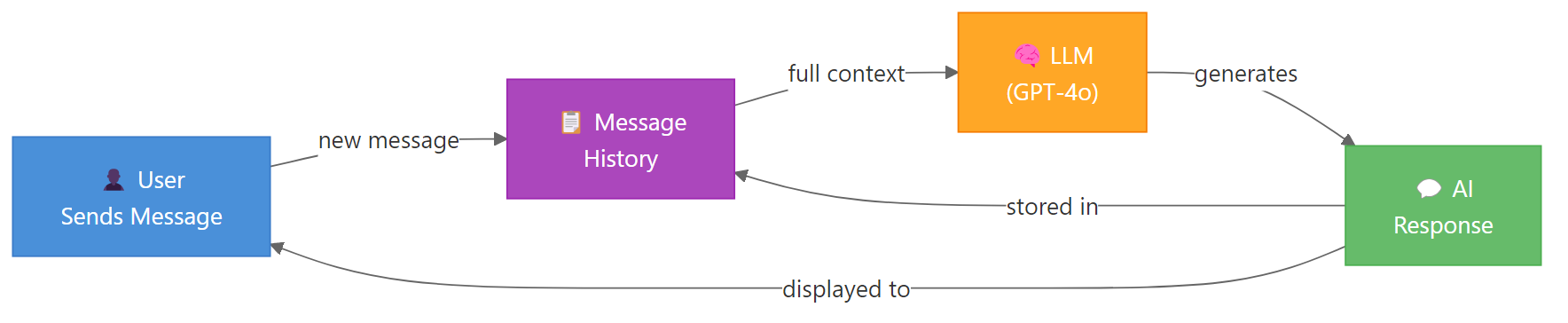
Here’s the flow: you send a message, the app appends it to a message list, sends the full list to the LLM, gets a response, and stores that response back in the list. Next time you send a message, the LLM sees everything that came before.
Key Insight: LLMs don’t have memory — your application does. The chatbot’s “memory” is just a list of messages that grows with each turn. The LLM processes this list fresh every time.
This simple idea creates a real problem. Each message adds tokens. After 50 exchanges, you might hit the model’s context window limit — or burn through your API budget. That’s why memory strategies exist, and we’ll cover five of them.
Set Up Your Environment
You need four packages for this tutorial. langchain-openai connects to OpenAI’s models. langgraph provides the graph framework with built-in memory. streamlit gives you the chat UI. And python-dotenv loads your API key from a file.
bash
pip install langchain-openai langgraph streamlit python-dotenv
Next, create a .env file in your project folder with your OpenAI API key. If you don’t have one, grab it from the OpenAI dashboard.
bash
OPENAI_API_KEY=sk-your-api-key-here
Now let’s verify the setup works. This code loads your API key and makes a single call to GPT-4o-mini.
import os
# Set your OpenAI API key here
os.environ["OPENAI_API_KEY"] = "YOUR-API-KEY-HERE"

from langchain_openai import ChatOpenAI

llm = ChatOpenAI(model="gpt-4o-mini", temperature=0.7)
response = llm.invoke("Say hello in one sentence.")
print(response.content)
Output:
python
Hello there, it's great to connect with you!
If you see a response, your setup is ready. If you get an authentication error, double-check your API key in the .env file.
Tip: Use `gpt-4o-mini` for development and testing. It’s fast, cheap, and capable enough for chatbot prototyping. Switch to `gpt-4o` or `gpt-4.1` for production when you need stronger reasoning.
Build a Stateless Chatbot First
Before adding memory, let’s see what happens without it. This chatbot takes a single message and responds — but it has no idea what you said before.
import os
os.environ["OPENAI_API_KEY"] = "YOUR-API-KEY-HERE"

from langchain_openai import ChatOpenAI
from langchain_core.messages import HumanMessage

llm = ChatOpenAI(model="gpt-4o-mini", temperature=0.7)

# First message
response1 = llm.invoke([HumanMessage(content="Hi, my name is Alex.")])
print("Bot:", response1.content)

# Second message — does it remember?
response2 = llm.invoke([HumanMessage(content="What's my name?")])
print("Bot:", response2.content)
Output:
python
Bot: Hi Alex! Nice to meet you. How can I help you today?
Bot: I don't have access to personal information about you. Could you tell me your name?
The bot greeted Alex perfectly in the first message. But the second call is completely independent — the model has no idea you just introduced yourself. Each invoke() call starts from scratch.
This is the fundamental problem. Without memory, every message is a standalone question to the LLM.
Add Memory the Simple Way (Message List)
The simplest fix is a Python list. You append each message and response to the list, then send the entire list with every new call.
import os
os.environ["OPENAI_API_KEY"] = "YOUR-API-KEY-HERE"

from langchain_openai import ChatOpenAI
from langchain_core.messages import HumanMessage, SystemMessage

llm = ChatOpenAI(model="gpt-4o-mini", temperature=0.7)

# Initialize conversation with a system message
messages = [
    SystemMessage(content="You are a helpful assistant. Be concise.")
]

def chat(user_input):
    messages.append(HumanMessage(content=user_input))
    response = llm.invoke(messages)
    messages.append(response)
    return response.content

# Test multi-turn conversation
print("Bot:", chat("Hi, my name is Alex."))
print("Bot:", chat("What's my name?"))
print("Bot:", chat("What was the first thing I said to you?"))
Output:
python
Bot: Hi Alex! Nice to meet you. How can I help you?
Bot: Your name is Alex!
Bot: The first thing you said was "Hi, my name is Alex."
It works. The bot remembers everything because the full conversation history goes with every call.
But this approach has problems. The message list grows forever. After 100 exchanges, you’re sending thousands of tokens per call. You’ll hit token limits and your API costs will spike. There’s also no persistence — restart the script and the history is gone.
Warning: A raw message list will eventually exceed the model’s context window. GPT-4o-mini supports 128K tokens, but sending 50K tokens per message is expensive and slow. You need a memory strategy — which is exactly what LangGraph provides.
Add Memory with LangGraph (The Modern Way)
LangGraph is LangChain’s framework for building stateful AI applications. It manages conversation state through a graph of nodes and edges, with built-in checkpointing for memory persistence.
Here’s the core idea: you define a state schema (what data to track), a graph (how data flows), and a checkpointer (where to store state). LangGraph handles the rest.
Let’s build a chatbot with proper memory. First, we define the state — a TypedDict with a messages field that accumulates conversation turns. Then we create the chatbot node, wire it into a graph, and compile with a checkpointer.
import os
os.environ["OPENAI_API_KEY"] = "YOUR-API-KEY-HERE"

from typing import TypedDict, Annotated
from langchain_openai import ChatOpenAI
from langchain_core.messages import HumanMessage, SystemMessage
from langgraph.graph import StateGraph, START, END
from langgraph.graph.message import add_messages
from langgraph.checkpoint.memory import MemorySaver

# Define conversation state
class ChatState(TypedDict):
    messages: Annotated[list, add_messages]

llm = ChatOpenAI(model="gpt-4o-mini", temperature=0.7)

def chatbot_node(state: ChatState):
    system_msg = SystemMessage(content="You are a helpful assistant. Be concise.")
    all_messages = [system_msg] + state["messages"]
    response = llm.invoke(all_messages)
    return {"messages": [response]}

# Build and compile the graph with memory
graph = StateGraph(ChatState)
graph.add_node("chatbot", chatbot_node)
graph.add_edge(START, "chatbot")
graph.add_edge("chatbot", END)

memory = MemorySaver()
app = graph.compile(checkpointer=memory)

# Test with thread_id for conversation continuity
config = {"configurable": {"thread_id": "user-1"}}

response = app.invoke(
    {"messages": [HumanMessage(content="Hi, I'm Alex. I work as a data scientist.")]},
    config=config
)
print("Bot:", response["messages"][-1].content)

response = app.invoke(
    {"messages": [HumanMessage(content="What do I do for work?")]},
    config=config
)
print("Bot:", response["messages"][-1].content)
Output:
python
Bot: Hi Alex! Nice to meet you. Data science is a great field. What can I help you with?
Bot: You work as a data scientist!
The Annotated[list, add_messages] tells LangGraph to append new messages to the existing list instead of replacing it. This is how conversation history accumulates.
The bot remembers Alex’s job because both calls use the same thread_id. LangGraph loads the previous checkpoint, appends the new message, runs the chatbot node, and saves a new checkpoint.
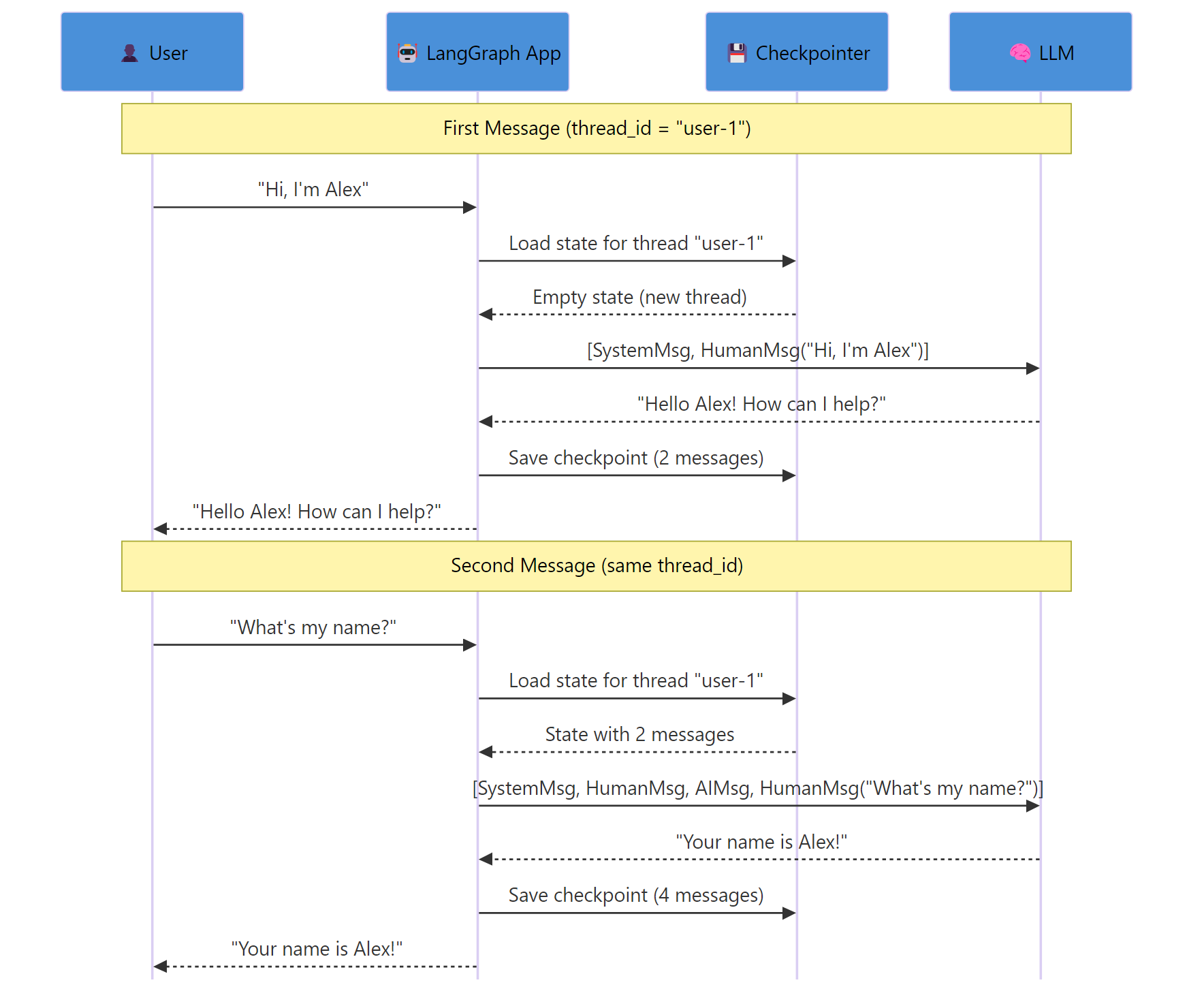
Key Insight: The `thread_id` is your conversation identifier. Different thread IDs create separate conversations. Same thread ID resumes the same conversation. This is how you handle multiple users or topics.
Let’s verify that different threads are isolated. A new thread_id starts a fresh conversation.
python
config_new = {"configurable": {"thread_id": "user-2"}}

response = app.invoke(
    {"messages": [HumanMessage(content="What's my name?")]},
    config=config_new
)
print("Bot:", response["messages"][-1].content)
Output:
python
Bot: I don't know your name yet! What would you like me to call you?
Thread “user-2” has no history, so the bot doesn’t know any names. Thread “user-1” still has Alex’s full conversation intact.
typescript
{
  type: 'exercise',
  id: 'trim-messages-ex1',
  title: 'Exercise 1: Build a Message Trimmer',
  difficulty: 'beginner',
  exerciseType: 'write',
  instructions: 'Write a function `trim_messages(messages, max_keep)` that takes a list of message dicts and returns a trimmed list. Rules: (1) Always keep the first message if its role is "system". (2) Keep the last `max_keep` non-system messages. (3) Return system message (if any) + trimmed messages.',
  starterCode: 'def trim_messages(messages, max_keep):\n    # Separate system message from conversation\n    system_msgs = [m for m in messages if m["role"] == "system"]\n    other_msgs = [m for m in messages if m["role"] != "system"]\n    \n    # Keep only the last max_keep non-system messages\n    # YOUR CODE HERE\n    \n    return result\n\n# Test it\nmessages = [\n    {"role": "system", "content": "You are helpful."},\n    {"role": "user", "content": "Hi"},\n    {"role": "assistant", "content": "Hello!"},\n    {"role": "user", "content": "My name is Alex"},\n    {"role": "assistant", "content": "Nice to meet you, Alex!"},\n    {"role": "user", "content": "What is Python?"},\n    {"role": "assistant", "content": "Python is a programming language."},\n]\n\nresult = trim_messages(messages, max_keep=4)\nfor msg in result:\n    print(f\'{msg[\"role\"]}: {msg[\"content\"]}\')',
  testCases: [
    { id: 'tc1', input: '', expectedOutput: 'system: You are helpful.', description: 'System message is preserved' },
    { id: 'tc2', input: '', expectedOutput: 'user: My name is Alex', description: 'Oldest kept message is correct' },
    { id: 'tc3', input: '', expectedOutput: 'assistant: Python is a programming language.', description: 'Most recent message is kept' },
  ],
  hints: [
    'Use list slicing: other_msgs[-max_keep:] gives you the last max_keep items.',
    'Full solution: trimmed = other_msgs[-max_keep:] then result = system_msgs + trimmed',
  ],
  solution: 'def trim_messages(messages, max_keep):\n    system_msgs = [m for m in messages if m["role"] == "system"]\n    other_msgs = [m for m in messages if m["role"] != "system"]\n    trimmed = other_msgs[-max_keep:]\n    result = system_msgs + trimmed\n    return result\n\nmessages = [\n    {"role": "system", "content": "You are helpful."},\n    {"role": "user", "content": "Hi"},\n    {"role": "assistant", "content": "Hello!"},\n    {"role": "user", "content": "My name is Alex"},\n    {"role": "assistant", "content": "Nice to meet you, Alex!"},\n    {"role": "user", "content": "What is Python?"},\n    {"role": "assistant", "content": "Python is a programming language."},\n]\n\nresult = trim_messages(messages, max_keep=4)\nfor msg in result:\n    print(f\'{msg[\"role\"]}: {msg[\"content\"]}\')',
  solutionExplanation: 'The function separates system messages from conversation messages using list comprehensions. It then slices the conversation list with [-max_keep:] to keep only the most recent messages. Finally, it concatenates the system message back at the front.',
  xpReward: 15,
}
Five Memory Strategies for Chatbots
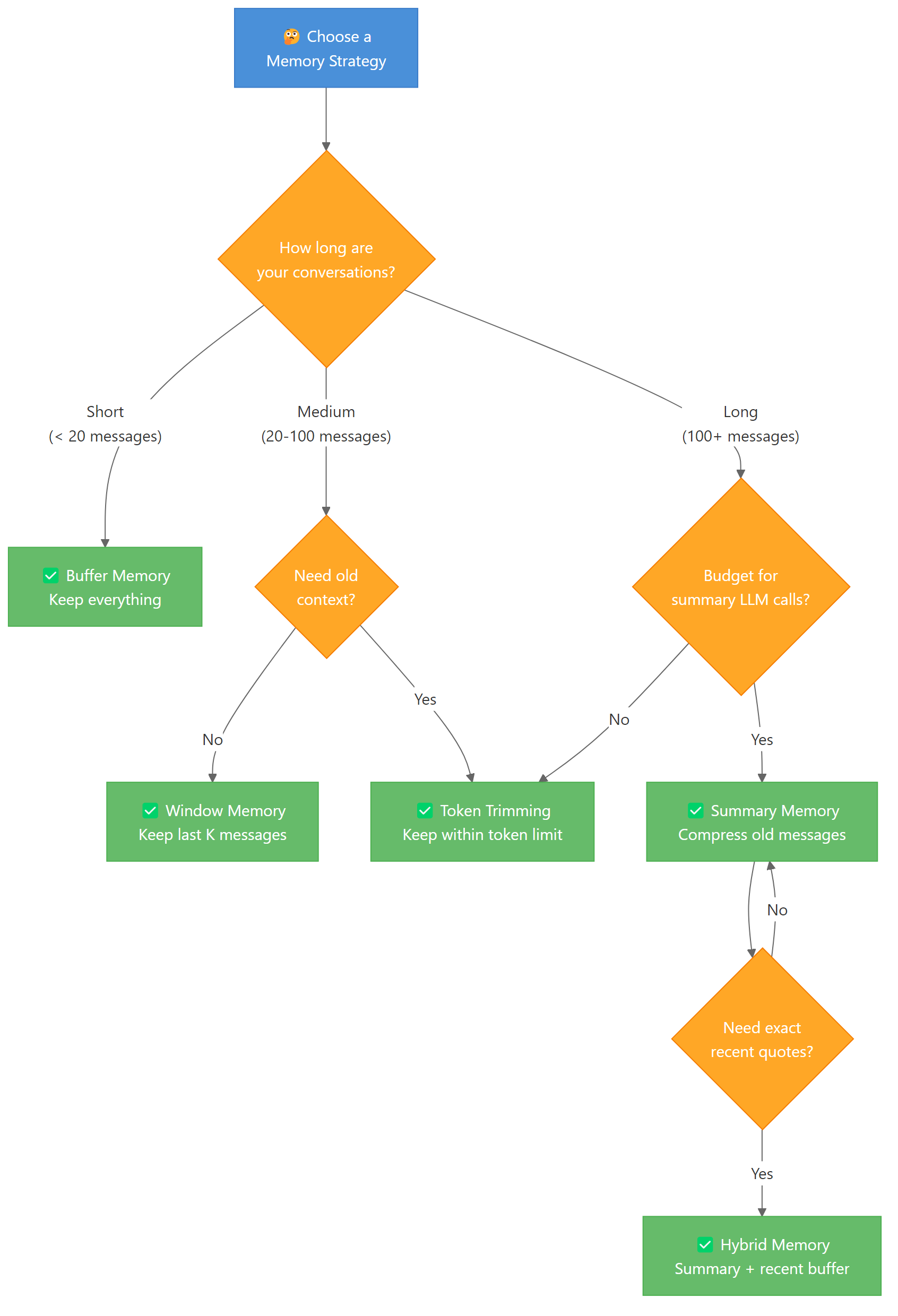
The simple “keep everything” approach works for short conversations. But real chatbots need smarter strategies. Here are five approaches, from simplest to most sophisticated.
1. Buffer Memory — Keep Everything
This is what we built above. Every message stays in the history. It gives the LLM perfect context but costs the most tokens.
Buffer memory is ideal when conversations are short (under 20 exchanges) and you need the model to reference any earlier message exactly.
python
# Buffer memory is the default in LangGraph
# Every message is stored and sent to the LLM
# No special configuration needed — just use the graph as-is

config = {"configurable": {"thread_id": "buffer-demo"}}

for question in ["Hi, I'm Alex", "I like Python", "What do I like?"]:
    response = app.invoke(
        {"messages": [HumanMessage(content=question)]},
        config=config
    )
    print(f"User: {question}")
    print(f"Bot: {response['messages'][-1].content}\n")
Output:
python
User: Hi, I'm Alex
Bot: Hi Alex! How can I help you today?

User: I like Python
Bot: Great choice! Python is fantastic for data science and AI. What are you working on?

User: What do I like?
Bot: You mentioned that you like Python!
The bot has access to every previous message. The downside? Token usage grows linearly with conversation length.
2. Window Memory — Keep Last K Exchanges
Window memory keeps only the most recent K message pairs. Older messages are discarded. This puts a hard cap on token usage while keeping recent context.
Here’s how to implement it as a custom node that trims messages before calling the LLM.
python
def windowed_chatbot(state: ChatState, k: int = 6):
    """Keep only the last k messages (3 exchanges) plus system message."""
    system_msg = SystemMessage(content="You are a helpful assistant. Be concise.")
    recent = state["messages"][-k:]  # Last k messages
    response = llm.invoke([system_msg] + recent)
    return {"messages": [response]}
With k=6, the bot sees the last 3 user-assistant pairs. Anything older is invisible to the model. This works well for customer support bots where only recent context matters.
Note: Choose K based on your use case. For casual chat, `k=10` (5 exchanges) is usually enough. For technical support where the user describes a complex problem, use `k=20` or higher. The trade-off is always tokens vs. context quality.
3. Summary Memory — Compress Old Messages
Instead of discarding old messages, you can summarize them. A smaller LLM call compresses the conversation history into a paragraph, which replaces the original messages.
This costs extra LLM calls for summarization but preserves the key facts from earlier in the conversation.
python
def summarize_history(messages, llm):
    """Summarize a list of messages into a single summary string."""
    if len(messages) < 6:
        return None  # Not enough messages to summarize

    # Take all but the last 4 messages for summarization
    to_summarize = messages[:-4]
    keep_recent = messages[-4:]

    summary_prompt = (
        "Summarize this conversation in 2-3 sentences. "
        "Include all key facts (names, preferences, decisions):\n\n"
    )
    for msg in to_summarize:
        role = "User" if isinstance(msg, HumanMessage) else "Assistant"
        summary_prompt += f"{role}: {msg.content}\n"

    summary = llm.invoke([HumanMessage(content=summary_prompt)])
    return summary.content, keep_recent
The summarized text becomes a system message that provides context without consuming thousands of tokens. A 50-message conversation might compress into a 100-token summary.
4. Hybrid Memory — Summary + Recent Buffer
Hybrid memory combines the best of both strategies. Old messages get summarized. Recent messages stay intact. This gives the LLM both the big picture and exact recent context.
python
def hybrid_chatbot(state: ChatState, keep_recent: int = 6):
    """Summarize old messages, keep recent ones verbatim."""
    messages = state["messages"]
    system_msg = SystemMessage(content="You are a helpful assistant. Be concise.")

    if len(messages) <= keep_recent:
        # Short conversation — no summarization needed
        return {"messages": [llm.invoke([system_msg] + messages)]}

    # Summarize older messages
    old_messages = messages[:-keep_recent]
    recent_messages = messages[-keep_recent:]

    summary_text = summarize_history(old_messages, llm)
    context_msg = SystemMessage(
        content=f"{system_msg.content}\n\nConversation summary: {summary_text}"
    )

    response = llm.invoke([context_msg] + recent_messages)
    return {"messages": [response]}
This is the strategy most production chatbots use. The summary preserves facts like the user’s name and preferences, while recent messages give exact context for the current topic.
5. Token-Based Trimming
Instead of counting messages, you count tokens. This gives you precise control over context window usage. LangGraph supports this through the trim_messages utility.
python
from langchain_core.messages import trim_messages

def token_aware_chatbot(state: ChatState):
    """Trim messages to stay within a token budget."""
    system_msg = SystemMessage(content="You are a helpful assistant. Be concise.")

    trimmed = trim_messages(
        state["messages"],
        max_tokens=2000,
        token_counter=llm,       # Use the LLM's tokenizer
        strategy="last",         # Keep the most recent messages
        start_on="human",        # Always start with a human message
        include_system=True,     # Preserve system messages
        allow_partial=False,     # Don't cut messages in half
    )

    response = llm.invoke([system_msg] + trimmed)
    return {"messages": [response]}
Output:
python
Kept 8 of 24 messages (1,847 tokens)
The trim_messages function uses the model’s actual tokenizer to count tokens accurately. The strategy="last" keeps the most recent messages that fit within the budget. This is the most precise approach for managing API costs.
Tip: Set your token budget to 50-70% of the model’s context window. This leaves room for the system prompt and the model’s response. For GPT-4o-mini with 128K context, a 4K-8K token budget for history is a practical choice.
typescript
{
  type: 'exercise',
  id: 'window-memory-ex2',
  title: 'Exercise 2: Build a Window Memory Class',
  difficulty: 'beginner',
  exerciseType: 'write',
  instructions: 'Create a `WindowMemory` class that stores messages and returns only the last `window_size` messages. Implement: (1) `add(role, content)` — adds a message dict to the history. (2) `get_recent()` — returns the last `window_size` messages. (3) `get_all()` — returns all messages stored.',
  starterCode: 'class WindowMemory:\n    def __init__(self, window_size=4):\n        self.window_size = window_size\n        self.messages = []\n    \n    def add(self, role, content):\n        # Add a message dict to history\n        # YOUR CODE HERE\n        pass\n    \n    def get_recent(self):\n        # Return the last window_size messages\n        # YOUR CODE HERE\n        pass\n    \n    def get_all(self):\n        # Return all messages\n        # YOUR CODE HERE\n        pass\n\n# Test it\nmem = WindowMemory(window_size=2)\nmem.add("user", "Hi")\nmem.add("assistant", "Hello!")\nmem.add("user", "How are you?")\nmem.add("assistant", "I am great!")\n\nprint(f"Total messages: {len(mem.get_all())}")\nprint(f"Recent messages: {len(mem.get_recent())}")\nfor msg in mem.get_recent():\n    print(f\'{msg[\"role\"]}: {msg[\"content\"]}\')',
  testCases: [
    { id: 'tc1', input: '', expectedOutput: 'Total messages: 4', description: 'All 4 messages stored' },
    { id: 'tc2', input: '', expectedOutput: 'Recent messages: 2', description: 'Window returns only 2' },
    { id: 'tc3', input: '', expectedOutput: 'assistant: I am great!', description: 'Most recent message is last' },
  ],
  hints: [
    'For add(): self.messages.append({"role": role, "content": content})',
    'For get_recent(): return self.messages[-self.window_size:] — Python slicing handles the case where there are fewer messages than window_size.',
  ],
  solution: 'class WindowMemory:\n    def __init__(self, window_size=4):\n        self.window_size = window_size\n        self.messages = []\n    \n    def add(self, role, content):\n        self.messages.append({"role": role, "content": content})\n    \n    def get_recent(self):\n        return self.messages[-self.window_size:]\n    \n    def get_all(self):\n        return self.messages\n\nmem = WindowMemory(window_size=2)\nmem.add("user", "Hi")\nmem.add("assistant", "Hello!")\nmem.add("user", "How are you?")\nmem.add("assistant", "I am great!")\n\nprint(f"Total messages: {len(mem.get_all())}")\nprint(f"Recent messages: {len(mem.get_recent())}")\nfor msg in mem.get_recent():\n    print(f\'{msg[\"role\"]}: {msg[\"content\"]}\')',
  solutionExplanation: 'The add method appends a dictionary with role and content to the messages list. get_recent uses Python list slicing with a negative index to return only the last window_size items. get_all simply returns the full list.',
  xpReward: 15,
}
Choose the Right Memory Strategy
Each strategy makes a different trade-off between context quality, token cost, and complexity. Here’s how they compare.
| Strategy | Token Cost | Context Quality | Complexity | Best For |
|---|---|---|---|---|
| Buffer | 🔴 High (grows linearly) | 🟢 Perfect | 🟢 Minimal | Short conversations (< 20 msgs) |
| Window | 🟢 Fixed cap | 🟡 Loses old context | 🟢 Minimal | Customer support, FAQ bots |
| Summary | 🟡 Moderate + LLM cost | 🟡 Compressed (lossy) | 🟡 Medium | Long conversations, journaling |
| Hybrid | 🟡 Moderate + LLM cost | 🟢 Best overall | 🔴 High | Production chatbots, assistants |
| Token Trim | 🟢 Precise budget | 🟡 Loses old context | 🟢 Minimal | Cost-sensitive applications |
For most chatbot projects, start with buffer memory. Switch to window or token trimming when conversations get long. Graduate to hybrid memory when you need both cost control and full context.
Build a Chat UI with Streamlit
Let’s put the chatbot behind a real chat interface. Streamlit’s chat components make this straightforward — you get a ChatGPT-style UI with about 40 lines of code.
Create a file called chatbot_app.py with this code.
python
import streamlit as st
from langchain_openai import ChatOpenAI
from langchain_core.messages import HumanMessage, SystemMessage
from langgraph.graph import StateGraph, START, END
from langgraph.graph.message import add_messages
from langgraph.checkpoint.memory import MemorySaver
from typing import TypedDict, Annotated

# --- LangGraph Setup ---
class ChatState(TypedDict):
    messages: Annotated[list, add_messages]

llm = ChatOpenAI(model="gpt-4o-mini", temperature=0.7)

def chatbot_node(state: ChatState):
    system_msg = SystemMessage(content="You are a helpful AI assistant. Be concise and friendly.")
    response = llm.invoke([system_msg] + state["messages"])
    return {"messages": [response]}

graph = StateGraph(ChatState)
graph.add_node("chatbot", chatbot_node)
graph.add_edge(START, "chatbot")
graph.add_edge("chatbot", END)

memory = MemorySaver()
app = graph.compile(checkpointer=memory)
Now add the Streamlit UI. The st.chat_message and st.chat_input components handle the display. We use the LangGraph app with a fixed thread ID.
python
# --- Streamlit UI ---
st.title("🤖 AI Chatbot with Memory")

# Initialize session state for thread ID
if "thread_id" not in st.session_state:
    st.session_state.thread_id = "streamlit-session-1"

config = {"configurable": {"thread_id": st.session_state.thread_id}}

# Display conversation history from LangGraph state
try:
    state = app.get_state(config)
    for msg in state.values.get("messages", []):
        role = "user" if isinstance(msg, HumanMessage) else "assistant"
        with st.chat_message(role):
            st.write(msg.content)
except Exception:
    pass  # No state yet for this thread

# Handle new user input
if user_input := st.chat_input("Type your message..."):
    with st.chat_message("user"):
        st.write(user_input)

    with st.chat_message("assistant"):
        response = app.invoke(
            {"messages": [HumanMessage(content=user_input)]},
            config=config
        )
        st.write(response["messages"][-1].content)
Run it with streamlit run chatbot_app.py. You’ll get a clean chat interface where messages persist across reruns thanks to LangGraph’s checkpointer.
bash
streamlit run chatbot_app.py
The chatbot remembers your entire conversation within the session. Close the browser tab and reopen it — the history is still there (as long as the server is running). To clear the conversation, change the thread_id.
Tip: Add a sidebar to manage multiple conversations. Let users create new threads, switch between conversations, and clear history. Use `st.sidebar.text_input(“Thread ID”)` to let users name their threads.
Persist Conversations to SQLite
The MemorySaver stores state in Python’s memory. Restart the app and everything is gone. For production use, switch to SqliteSaver — it stores checkpoints in a SQLite database file.
The setup is almost identical. You just swap MemorySaver for SqliteSaver and point it at a database file.
python
from langgraph.checkpoint.sqlite import SqliteSaver
import sqlite3

# Create a persistent SQLite checkpointer
db_connection = sqlite3.connect("chatbot_memory.db", check_same_thread=False)
sqlite_memory = SqliteSaver(db_connection)

# Compile graph with SQLite persistence
app_persistent = graph.compile(checkpointer=sqlite_memory)
Now conversations survive restarts. Let’s test it — send a message, “restart” by creating a new app instance, and verify the history is intact.
python
config = {"configurable": {"thread_id": "persistent-thread-1"}}

# Send a message
response = app_persistent.invoke(
    {"messages": [HumanMessage(content="Remember this: my favorite color is blue.")]},
    config=config
)
print("Bot:", response["messages"][-1].content)

# Simulate restart — create new connection and checkpointer
db_connection_2 = sqlite3.connect("chatbot_memory.db", check_same_thread=False)
sqlite_memory_2 = SqliteSaver(db_connection_2)
app_restarted = graph.compile(checkpointer=sqlite_memory_2)

# Resume the same thread
response = app_restarted.invoke(
    {"messages": [HumanMessage(content="What's my favorite color?")]},
    config=config
)
print("Bot:", response["messages"][-1].content)
Output:
python
Bot: Got it! I'll remember that your favorite color is blue. 💙
Bot: Your favorite color is blue!
The second app instance loaded the conversation from SQLite and the bot remembered the favorite color. This is how production chatbots maintain continuity across server restarts and deployments.
Key Insight: For multi-user production apps, use PostgreSQL instead of SQLite. LangGraph provides `PostgresSaver` for concurrent access. SQLite works perfectly for single-user apps and prototyping.
Handle Long Conversations Gracefully
Even with persistence, long conversations create a problem. Each new message sends the entire history to the LLM. A 200-message conversation could consume 50,000+ tokens per call.
There are two production-ready solutions: trimming and summarization.
Approach 1: Trim to a token budget. Use LangGraph’s trim_messages to keep only what fits.
python
from langchain_core.messages import trim_messages

def smart_chatbot(state: ChatState):
    system_msg = SystemMessage(content="You are a helpful assistant.")

    # Keep messages that fit in 4000 tokens
    trimmed = trim_messages(
        state["messages"],
        max_tokens=4000,
        token_counter=llm,
        strategy="last",
        start_on="human",
        allow_partial=False,
    )

    response = llm.invoke([system_msg] + trimmed)
    return {"messages": [response]}
Approach 2: Summarize old messages periodically. Every N messages, compress the older history into a summary.
python
def summarizing_chatbot(state: ChatState, summarize_after: int = 20):
    messages = state["messages"]
    system_msg = SystemMessage(content="You are a helpful assistant.")

    if len(messages) > summarize_after:
        # Summarize older messages
        old = messages[:-10]
        recent = messages[-10:]

        summary_prompt = "Summarize this conversation concisely, keeping key facts:\n"
        for msg in old:
            role = "User" if isinstance(msg, HumanMessage) else "Assistant"
            summary_prompt += f"{role}: {msg.content}\n"

        summary = llm.invoke([HumanMessage(content=summary_prompt)])
        context = SystemMessage(
            content=f"{system_msg.content}\n\nPrevious context: {summary.content}"
        )
        response = llm.invoke([context] + recent)
    else:
        response = llm.invoke([system_msg] + messages)

    return {"messages": [response]}
Trimming is simpler and cheaper (no extra LLM calls). Summarization preserves more context but costs more. For most chatbots, token-based trimming is the pragmatic choice.
Warning: Always start trimmed history on a human message. Starting with an assistant message confuses the model — it doesn’t know what question it was answering. Use `start_on=”human”` in `trim_messages` to enforce this.
Common Mistakes and How to Fix Them
Mistake 1: Forgetting the thread_id (conversations bleed together)
❌ Wrong:
python
# No thread_id — all users share the same conversation!
response = app.invoke({"messages": [HumanMessage(content="Hi")]})
Why it’s wrong: Without a thread_id, LangGraph has no way to separate conversations. User A’s messages appear in User B’s context.
✅ Correct:
python
config = {"configurable": {"thread_id": f"user-{user_id}"}}
response = app.invoke(
    {"messages": [HumanMessage(content="Hi")]},
    config=config
)
Mistake 2: Using deprecated ConversationBufferMemory
❌ Wrong:
python
# Deprecated since LangChain v0.3 — do NOT use
from langchain.memory import ConversationBufferMemory
from langchain.chains import ConversationChain

memory = ConversationBufferMemory()
chain = ConversationChain(llm=llm, memory=memory)
Why it’s wrong: ConversationBufferMemory and ConversationChain are deprecated in LangChain v0.3+. They lack persistence, multi-thread support, and checkpointing.
✅ Correct:
python
# Use LangGraph with a checkpointer instead
from langgraph.checkpoint.memory import MemorySaver

memory = MemorySaver()
app = graph.compile(checkpointer=memory)
Mistake 3: Sending the system message inside the state
❌ Wrong:
python
# System message gets duplicated with every invocation
response = app.invoke({
    "messages": [
        SystemMessage(content="You are helpful."),
        HumanMessage(content="Hi")
    ]
}, config=config)
Why it’s wrong: The system message gets added to state and accumulates. After 10 exchanges, you have 10 copies of the system message eating tokens.
✅ Correct:
python
# Add system message INSIDE the node function, not in the invoke call
def chatbot_node(state: ChatState):
    system_msg = SystemMessage(content="You are helpful.")
    response = llm.invoke([system_msg] + state["messages"])
    return {"messages": [response]}

# Only send the user message in invoke
response = app.invoke(
    {"messages": [HumanMessage(content="Hi")]},
    config=config
)
Mistake 4: Not handling token limits
❌ Wrong:
python
# Raw messages — will crash on long conversations
def chatbot(state: ChatState):
    response = llm.invoke(state["messages"])
    return {"messages": [response]}
Why it’s wrong: After enough messages, the conversation exceeds the model’s context window. The API returns a context_length_exceeded error and the chatbot crashes.
✅ Correct:
python
# Trim messages to stay within budget
def chatbot(state: ChatState):
    trimmed = trim_messages(
        state["messages"],
        max_tokens=4000,
        token_counter=llm,
        strategy="last",
        start_on="human",
    )
    response = llm.invoke(trimmed)
    return {"messages": [response]}
Complete Code
Frequently Asked Questions
Can I use a free LLM instead of OpenAI?
Yes. Replace ChatOpenAI with any LangChain-compatible model. For local models, use ChatOllama with Ollama. For free cloud models, try ChatGoogleGenerativeAI with Gemini’s free tier. The memory architecture stays exactly the same — only the LLM object changes.
How much does conversation memory cost in API tokens?
It depends on your strategy. Buffer memory sends the full history with every call — a 50-message conversation might use 5,000-10,000 tokens per call. Window memory with k=10 keeps it under 2,000 tokens. Summary memory compresses to about 100-200 tokens but requires an extra LLM call for summarization.
Can I combine memory with RAG (Retrieval-Augmented Generation)?
Absolutely. LangGraph supports adding retrieval tools alongside conversation memory. You’d add a retrieval node to the graph that queries a vector database, then pass the retrieved context along with the conversation history to the LLM. This gives you a chatbot with both conversation memory and knowledge base access.
How do I clear a conversation and start fresh?
Create a new thread_id. Each thread ID is an independent conversation. You can generate thread IDs with uuid.uuid4() for each new session, or let the user name their conversations. There’s no need to explicitly delete old threads — just stop using the old thread ID.
Is LangGraph overkill for a simple chatbot?
For a one-off script, yes — the manual message list approach works fine. But LangGraph adds value the moment you need persistence, multiple users, or any branching logic. The setup cost is about 10 extra lines of code, and you get production-grade memory management for free.
References
- LangChain Documentation — Short-term Memory (Conversation History). Link
- LangGraph Documentation — Checkpointers and Persistence. Link
- OpenAI API Documentation — Chat Completions. Link
- LangChain API Reference — trim_messages Utility. Link
- LangChain API Reference — RunnableWithMessageHistory. Link
- Harrison Chase — “Building Stateful AI Agents with LangGraph.” LangChain Blog (2025).
- Pinecone — Conversational Memory for LLMs with LangChain. Link
[SCHEMA HINTS]
– Article type: Tutorial
– Primary technology: LangChain 0.3+, LangGraph
– Programming language: Python
– Difficulty: Beginner
– Estimated reading time: 30 minutes
– Keywords: python ai chatbot, langchain chatbot tutorial, langgraph conversation memory, chatbot with memory python, langchain memory types, streamlit chatbot
Free Course
Master Core Python — Your First Step into AI/ML
Build a strong Python foundation with hands-on exercises designed for aspiring Data Scientists and AI/ML Engineers.
Start Free Course →Trusted by 50,000+ learners

Related Course
Master Gen AI — Hands-On
Join 5,000+ students at edu.machinelearningplus.com
Explore Course


