
machine learning +
LLM Temperature, Top-P, and Top-K Explained — With Python Simulations
Fusion RAG Explained: How to Combine Vector and Keyword Search for Better AI Answers
Fusion RAG is a technique that combines vector and keyword search scores to find more relevant documents for your system. Instead of relying on just one search approach, it normalizes scores from different methods and creates an intelligent weighted average to give you better, more comprehensive answers.
Fusion RAG is a technique that combines vector and keyword search scores to find more relevant documents for your system. Instead of relying on just one search approach, it normalizes scores from different methods and creates an intelligent weighted average to give you better, more comprehensive answers.
Think about it this way: when you’re looking for something important, you don’t just check one place, right? You ask different people, search online, maybe check a book.
Fusion RAG does the same thing for AI systems.
It searches your documents using different techniques, then combines the best results. This means your AI gets better context and gives you more accurate answers.
If you’ve ever built a RAG system and felt like it sometimes misses obvious relevant documents, Fusion RAG might be exactly what you need. Let me walk you through how to build one from scratch.
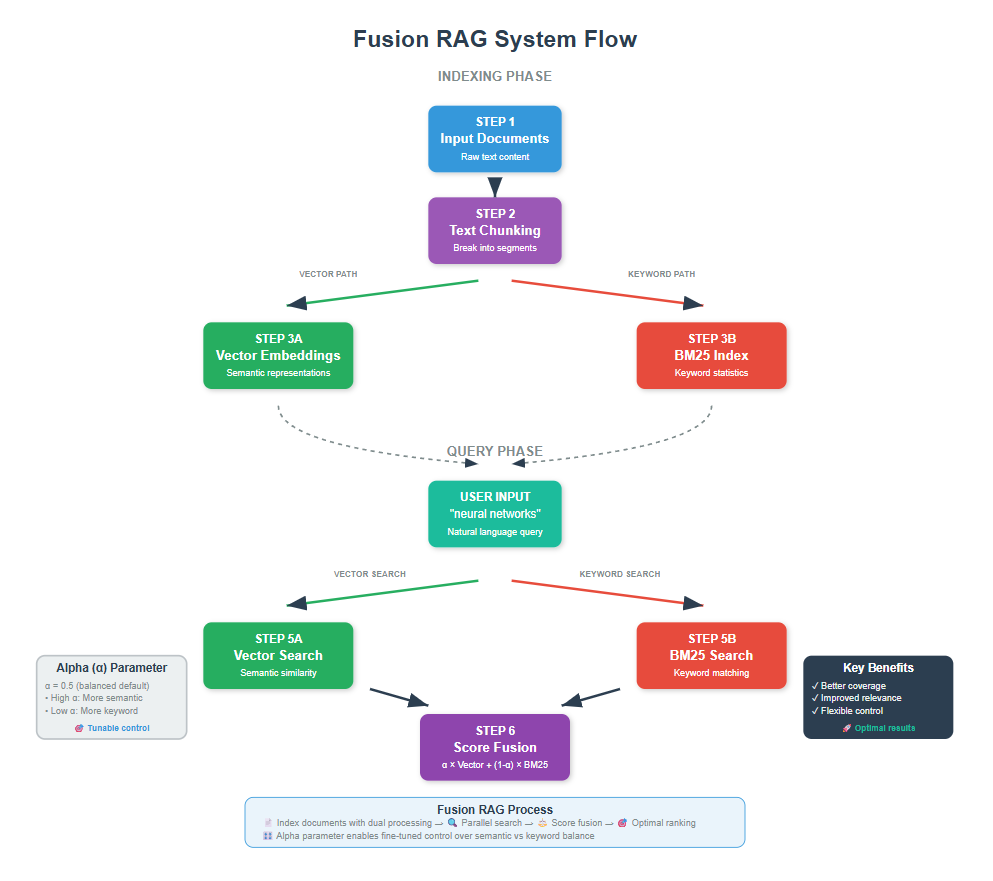
1. What Problem Are We Solving?
Consider an example. You have a knowledge base about machine learning, and someone asks: “How do neural networks learn?”
With traditional RAG, you might use just vector search (semantic similarity). But what if the perfect answer uses the exact phrase “neural network training” while your question uses “how neural networks learn”? Vector search might miss it, but keyword search would catch it perfectly.
This is where Fusion RAG shines. It runs multiple search methods in parallel:
- Vector search: Finds semantically similar content
- Keyword search: Catches exact phrase matches
- Hybrid approaches: Combines both strengths
Then it intelligently merges all results, giving you the best of all worlds.
2. How Fusion RAG Works
Fusion RAG solves the problem of choosing between finding documents that match your exact words versus finding documents that understand what you mean.
Nir Diamant’s implementation in his comprehensive RAG techniques repository tackled this by running two searches at the same time.
The first search looks for semantic meaning (understanding concepts), while the second search looks for exact keyword matches. Since these two methods score documents differently, his system converts both scores to the same 0-1 scale so they can be fairly compared. He then creates weighted combinations using an alpha parameter (α×vector_score + (1-α)×keyword_score).
The breakthrough is eliminating the either-or choice entirely. Instead of sacrificing semantic understanding for keyword precision or vice versa, Fusion RAG lets you control the balance with a single parameter, giving you the best of both worlds for any query type.
3. Setting Up Your Environment
Before we dive into the code, let’s get everything ready. I’ll assume you have Python and VS Code set up already.
First, let’s install the packages we need
bash
conda create -n rag python==3.12
conda activate rag
pip install ipykernel
pip install langchain openai faiss-cpu python-dotenv tiktoken pypdf rank-bm25
Now let’s import everything we’ll use
python
import os
from dotenv import load_dotenv
from langchain_openai import ChatOpenAI, OpenAIEmbeddings
from langchain.text_splitter import RecursiveCharacterTextSplitter
from langchain_community.document_loaders import PyPDFLoader
from langchain_community.vectorstores import FAISS
from langchain.prompts import PromptTemplate
from langchain.schema import Document
from rank_bm25 import BM25Okapi
import numpy as np
from typing import List, Dict, Tuple
import re

# Load environment variables
load_dotenv()
os.environ["OPENAI_API_KEY"] = os.getenv('OPENAI_API_KEY')
Make sure you have a .env file with your OpenAI API key:
python
OPENAI_API_KEY=your_api_key_here
The key new package here is rank-bm25, which gives us keyword-based search capabilities. BM25 is a ranking algorithm that’s excellent at finding documents with specific keywords or phrases.
4. Loading and Processing Documents
Let’s start by loading a sample document. For this tutorial, I’ll use a PDF on AI, but you can use any document you want.
You can download the pdf here
python
# Load the PDF document
document_path = "Artificial Intelligence.pdf"  # Replace with your PDF path
pdf_loader = PyPDFLoader(document_path)
raw_documents = pdf_loader.load()

print(f"Loaded {len(raw_documents)} pages from the PDF")
print(f"First page preview: {raw_documents[0].page_content[:200]}...")
python
Loaded 14 pages from the PDF
First page preview: Artificial Intelligence and Machine Learning: Fundamentals,
Applications, and Future Directions
Introduction to Artificial Intelligence
Artificial Intelligence represents one of the most transformativ...
This loads each page as a separate document. But we need smaller chunks for better retrieval, so let’s split them up.
5. Creating Smart Document Chunks
Why do we chunk documents? Imagine you have a 20-page document about artificial intelligence. If someone asks about “gradient descent,” you don’t want to return the entire document. You want just the relevant paragraphs.
python
# Configure text splitting
chunk_size = 600  # Slightly larger chunks for better context
chunk_overlap = 150  # More overlap to maintain continuity

text_splitter = RecursiveCharacterTextSplitter(
    chunk_size=chunk_size,
    chunk_overlap=chunk_overlap,
    separators=["\n\n", "\n", " ", ""]
)

# Split documents into chunks
document_chunks = text_splitter.split_documents(raw_documents)

print(f"Split {len(raw_documents)} pages into {len(document_chunks)} chunks")
print(f"Average chunk length: {np.mean([len(chunk.page_content) for chunk in document_chunks]):.0f} characters")
python
Split 14 pages into 95 chunks
Average chunk length: 529 characters
The RecursiveCharacterTextSplitter is smart. It tries to split on paragraphs first, then sentences, preserving context as much as possible.
The overlap ensures important information doesn’t get cut off at chunk boundaries.
6. Building the Vector Search Component
First, let’s create our vector-based retrieval system. This finds documents based on semantic similarity.
python
# Initialize embeddings model
embeddings_model = OpenAIEmbeddings()

# Create vector store
print("Creating vector store... This might take a moment.")
vector_store = FAISS.from_documents(
    documents=document_chunks,
    embedding=embeddings_model
)

print(f"Created vector store with {len(document_chunks)} chunks")
python
Creating vector store... This might take a moment.
Created vector store with 95 chunks
Vector search converts text into high-dimensional numbers that capture meaning. Similar concepts end up close together in this mathematical space, even if they use different words.
Let’s test it
python
# Test vector search
test_query = "neural network training process"
vector_results = vector_store.similarity_search(test_query, k=3)

print(f"Vector search found {len(vector_results)} results for: '{test_query}'")
for i, doc in enumerate(vector_results, 1):
    print(f"Result {i}: {doc.page_content[:150]}...")
    print("-" * 50)
python
Vector search found 3 results for: 'neural network training process'
Result 1: learning algorithm for neural networks. However, the limitations of single-layer perceptrons,
famously highlighted by Marvin Minsky and Seymour Papert...
--------------------------------------------------
Result 2: over the past two decades, enabling breakthroughs in image recognition, natural language
processing, and game playing that were previously thought to ...
--------------------------------------------------
Result 3: introduction of residual networks (ResNets) by Kaiming He and his colleagues at Microsoft Research
solved the problem of vanishing gradients in very d...
--------------------------------------------------
Notice how vector search finds conceptually similar content, even if the exact words don’t match. Lower distance scores mean higher similarity.
7. Building the Keyword Search Component
Now let’s add keyword-based search using BM25. This excels at finding exact phrases and specific terms.
python
# Prepare documents for BM25
def prepare_docs_for_bm25(chunks):
    """Convert document chunks into format suitable for BM25"""
    # Extract just the text content
    texts = [chunk.page_content for chunk in chunks]

    # Tokenize texts (simple word splitting)
    tokenized_texts = []
    for text in texts:
        # Simple tokenization - split on whitespace and punctuation
        tokens = text.split()  # Keep it simple like NirDiamant's approach
        tokenized_texts.append(tokens)

    return texts, tokenized_texts

# Create BM25 index
raw_texts, tokenized_docs = prepare_docs_for_bm25(document_chunks)
bm25_index = BM25Okapi(tokenized_docs)

print(f"Created BM25 index with {len(tokenized_docs)} documents")
python
Created BM25 index with 95 documents
BM25 works by analyzing how often specific words appear in documents and how rare those words are across the entire collection. Rare words that appear frequently in a document get higher scores.
Let’s test the search using BM25:
python
# Test BM25 search
def test_bm25_search(query, k=3):
    """Test BM25 search with a query"""
    query_tokens = query.split()
    scores = bm25_index.get_scores(query_tokens)

    # Get top k document indices
    top_indices = np.argsort(scores)[::-1][:k]

    print(f"BM25 search results for: '{query}'")
    for i, idx in enumerate(top_indices, 1):
        if scores[idx] > 0:
            print(f"Result {i} (score: {scores[idx]:.4f}): {document_chunks[idx].page_content[:150]}...")
        print("-" * 50)

test_bm25_search("neural network training process")
python
BM25 search results for: 'neural network training process'
Result 1 (score: 8.8422): learning algorithm for neural networks. However, the limitations of single-layer perceptrons,
famously highlighted by Marvin Minsky and Seymour Papert...
--------------------------------------------------
Result 2 (score: 4.0235): minimal training examples. OpenAI's GPT series, Google's PaLM, and Meta's LLaMA represent
examples of increasingly capable language models. The emerge...
--------------------------------------------------
Result 3 (score: 3.9594): conventional von Neumann architectures, neuromorphic systems process information using spike-
based communication and distributed memory, potentially ...
--------------------------------------------------
Notice how BM25 might find different results than vector search. It’s especially good at finding documents with specific keywords from your query.
8. Implementing Score Normalization Fusion
Now comes the fusion part – combining results from different search methods using score normalization and weighted averaging.
python
def fusion_search_with_normalization(query, alpha=0.5, top_k=5):
    """
    Perform fusion search using score normalization and weighted combination

    Args:
        query: Search query
        alpha: Weight for vector search (0=pure BM25, 1=pure vector, 0.5=balanced)
        top_k: Number of results to return
    """
    epsilon = 1e-8  # Small value to prevent division by zero

    print(f" Fusion search for: '{query}'")
    print(f"    Using alpha={alpha} (vector weight: {alpha}, BM25 weight: {1-alpha})")

    # Step 1: Get vector search results for all documents
    print("   Running vector search...")
    all_vector_results = vector_store.similarity_search_with_score(
        query, k=len(document_chunks)
    )

    # Step 2: Get BM25 scores for all documents
    print("   Running BM25 search...")
    query_tokens = query.split()
    all_bm25_scores = bm25_index.get_scores(query_tokens)

    # Step 3: Extract and normalize vector scores
    vector_distances = np.array([score for _, score in all_vector_results])
    # Convert distances to similarities (lower distance = higher similarity)
    vector_scores = 1 - (vector_distances - np.min(vector_distances)) / (
        np.max(vector_distances) - np.min(vector_distances) + epsilon
    )

    # Step 4: Normalize BM25 scores to 0-1 range
    bm25_scores_norm = (all_bm25_scores - np.min(all_bm25_scores)) / (
        np.max(all_bm25_scores) - np.min(all_bm25_scores) + epsilon
    )

    # Step 5: Combine scores using weighted average
    combined_scores = alpha * vector_scores + (1 - alpha) * bm25_scores_norm

    # Step 6: Rank documents by combined scores
    sorted_indices = np.argsort(combined_scores)[::-1]

    # Step 7: Get top k results
    top_results = []
    for i in sorted_indices[:top_k]:
        doc = all_vector_results[i][0]  # Get document from vector results
        score = combined_scores[i]
        top_results.append((doc, score))

    print(f"   Score ranges - Vector: {np.min(vector_scores):.3f}-{np.max(vector_scores):.3f}, "
          f"BM25: {np.min(bm25_scores_norm):.3f}-{np.max(bm25_scores_norm):.3f}")
    print(f"   Combined scores: {np.min(combined_scores):.3f}-{np.max(combined_scores):.3f}")

    return top_results

# Test the fusion search
fusion_results = fusion_search_with_normalization("neural network training process", alpha=0.5)

print(f"\n Fusion Results:")
for i, (doc, score) in enumerate(fusion_results, 1):
    print(f"{i}. Combined Score: {score:.4f}")
    print(f"   Content: {doc.page_content[:100]}...")
    print()
python
 Fusion search for: 'neural network training process'
    Using alpha=0.5 (vector weight: 0.5, BM25 weight: 0.5)
   Running vector search...
   Running BM25 search...
   Score ranges - Vector: 0.000-1.000, BM25: 0.000-1.000
   Combined scores: 0.000-0.847

 Fusion Results:
1. Combined Score: 0.8474
   Content: conventional von Neumann architectures, neuromorphic systems process information using spike-
based ...

2. Combined Score: 0.5617
   Content: connections that enabled the training of extremely deep networks with hundreds of layers. These
arch...

3. Combined Score: 0.5043
   Content: repeated. Richard Sutton and Andrew Barto formalized many of the mathematical foundations of
reinfor...

4. Combined Score: 0.5000
   Content: learning algorithm for neural networks. However, the limitations of single-layer perceptrons,
famous...

5. Combined Score: 0.4905
   Content: The theoretical foundations of machine learning draw heavily from statistics, probability theory, an...
This function is the heart of our fusion system. It normalizes both types of scores to a 0-1 range, then creates a weighted average based on the alpha parameter.
Alpha Guidelines:
- α = 0.0: Pure keyword search (good for exact term matching)
- α = 0.3: BM25-favored (good for technical queries with specific terms)
- α = 0.5: Balanced (good general-purpose setting)
- α = 0.7: Vector-favored (good for conceptual queries)
- α = 1.0: Pure semantic search (good for abstract concepts)
9. Building a Complete Question-Answering System
Now let’s create a complete QA system that uses fusion search to find the best context for answering questions
python
# Initialize the language model
llm = ChatOpenAI(
    temperature=0,
    model_name="gpt-4o-mini",
    max_tokens=1000
)

def answer_with_fusion_rag(question, alpha=0.5):
    """Answer questions using Fusion RAG with score normalization"""

    print(f" Question: {question}")

    # Step 1: Retrieve relevant documents using fusion search
    print(f"\n Searching for relevant information (α={alpha})...")
    relevant_docs = fusion_search_with_normalization(question, alpha=alpha, top_k=4)

    # Step 2: Prepare context from retrieved documents
    context_pieces = []
    for i, (doc, score) in enumerate(relevant_docs, 1):
        context_pieces.append(f"Source {i} (Score: {score:.3f}):\n{doc.page_content}")

    combined_context = "\n\n".join(context_pieces)

    # Step 3: Create prompt for answer generation
    answer_prompt = PromptTemplate(
        input_variables=["question", "context"],
        template="""Based on the following context, answer the question comprehensively and accurately.

Context:
{context}

Question: {question}

Instructions:
- Use only information from the provided context
- If the context doesn't contain enough information, say so
- Be specific and cite relevant details
- Structure your answer clearly

Answer:"""
    )

    # Step 4: Generate answer
    print(" Generating answer...")
    chain = answer_prompt | llm
    response = chain.invoke({
        "question": question,
        "context": combined_context
    })

    # Step 5: Display results
    print("\n ANSWER:")
    print("=" * 50)
    print(response.content)

    print(f"\n SOURCES USED (α={alpha}):")
    print("-" * 30)
    for i, (doc, score) in enumerate(relevant_docs, 1):
        print(f"Source {i} (Combined score: {score:.3f}):")
        print(f"  {doc.page_content[:120]}...")
        print()

    return response.content

# Test the complete system
test_question = "neural network training process"
answer = answer_with_fusion_rag(test_question)
python
 Question: neural network training process

 Searching for relevant information (α=0.5)...
 Fusion search for: 'neural network training process'
    Using alpha=0.5 (vector weight: 0.5, BM25 weight: 0.5)
   Running vector search...
   Running BM25 search...
   Score ranges - Vector: 0.000-1.000, BM25: 0.000-1.000
   Combined scores: 0.000-0.847
 Generating answer...

 ANSWER:
==================================================
The neural network training process, as outlined in the provided context, primarily revolves around the use of algorithms that enable the effective learning of complex patterns in data. Here are the key components of this process:

1. **Backpropagation Algorithm**: The revival of neural networks in the 1980s was significantly influenced by the development of the backpropagation algorithm. This algorithm, independently discovered by researchers including Paul Werbos, David Rumelhart, Geoffrey Hinton, and Ronald Williams, allows for the training of multi-layer neural networks. Backpropagation works by calculating the gradient of the loss function with respect to each weight by the chain rule, effectively propagating errors backward through the network to update the weights.

2. **Deep Learning**: The context highlights that deep learning is a subset of machine learning that utilizes artificial neural networks with multiple layers. This architecture enables the modeling and understanding of complex patterns in data, which is crucial for tasks such as image recognition and natural language processing. The resurgence of deep learning has been a significant development in AI, leading to breakthroughs in various applications.

3. **Reinforcement Learning**: Although not directly a part of traditional neural network training, reinforcement learning (RL) is mentioned as a paradigm inspired by behavioral psychology. In RL, an agent learns to make decisions by interacting with an environment to maximize cumulative rewards. This approach differs from supervised learning, where correct answers are provided, and it emphasizes learning through experience.

4. **Limitations and Innovations**: The context also notes the historical limitations of single-layer perceptrons, which were highlighted by Marvin Minsky and Seymour Papert. These limitations led to a decline in neural network research until the backpropagation algorithm facilitated the training of more complex, multi-layer networks.

In summary, the neural network training process involves the use of the backpropagation algorithm to adjust weights in multi-layer networks, enabling the learning of complex data patterns. The evolution of deep learning has played a crucial role in advancing this training process, while reinforcement learning offers a different approach to learning through interaction with environments.

 SOURCES USED (α=0.5):
------------------------------
Source 1 (Combined score: 0.847):
  conventional von Neumann architectures, neuromorphic systems process information using spike-
based communication and di...

Source 2 (Combined score: 0.562):
  connections that enabled the training of extremely deep networks with hundreds of layers. These
architectural innovation...

Source 3 (Combined score: 0.504):
  repeated. Richard Sutton and Andrew Barto formalized many of the mathematical foundations of
reinforcement learning, lea...

Source 4 (Combined score: 0.500):
  learning algorithm for neural networks. However, the limitations of single-layer perceptrons,
famously highlighted by Ma...
This complete system demonstrates the power of Fusion RAG with score normalization. It searches your documents using both methods, finds the most relevant content, and generates comprehensive answers.
Free Course
Master Core Python — Your First Step into AI/ML
Build a strong Python foundation with hands-on exercises designed for aspiring Data Scientists and AI/ML Engineers.
Start Free Course →Trusted by 50,000+ learners

Related Course
Master Gen AI — Hands-On
Join 5,000+ students at edu.machinelearningplus.com
Explore Course


