
machine learning +
LLM Temperature, Top-P, and Top-K Explained — With Python Simulations
Semantic Chunking for RAG: Optimizing Retrieval-Augmented Generation
Semantic Chunking is a context-aware text splitting technique that groups sentences by meaning rather than splitting by fixed sizes. This preserves semantic relationships and dramatically improves retrieval accuracy in RAG systems by ensuring each chunk contains complete, related ideas.
Semantic Chunking is a context-aware text splitting technique that groups sentences by meaning rather than splitting by fixed sizes. This preserves semantic relationships and dramatically improves retrieval accuracy in RAG systems by ensuring each chunk contains complete, related ideas.
If you’ve built a RAG system, you’ve probably noticed something frustrating. Sometimes your AI gives you answers that feel incomplete or confused.
You ask about machine learning algorithms, but get a chunk that starts mid-sentence about neural networks and ends halfway through talking about decision trees.
This happens because traditional chunking methods split text at arbitrary points, breaking up related concepts.
Semantic chunking fixes this by being smart about where it splits your documents. Instead of counting characters or tokens, it understands meaning and keeps related sentences together. Think of it as having an intelligent editor who knows not to cut paragraphs in the middle of important explanations.
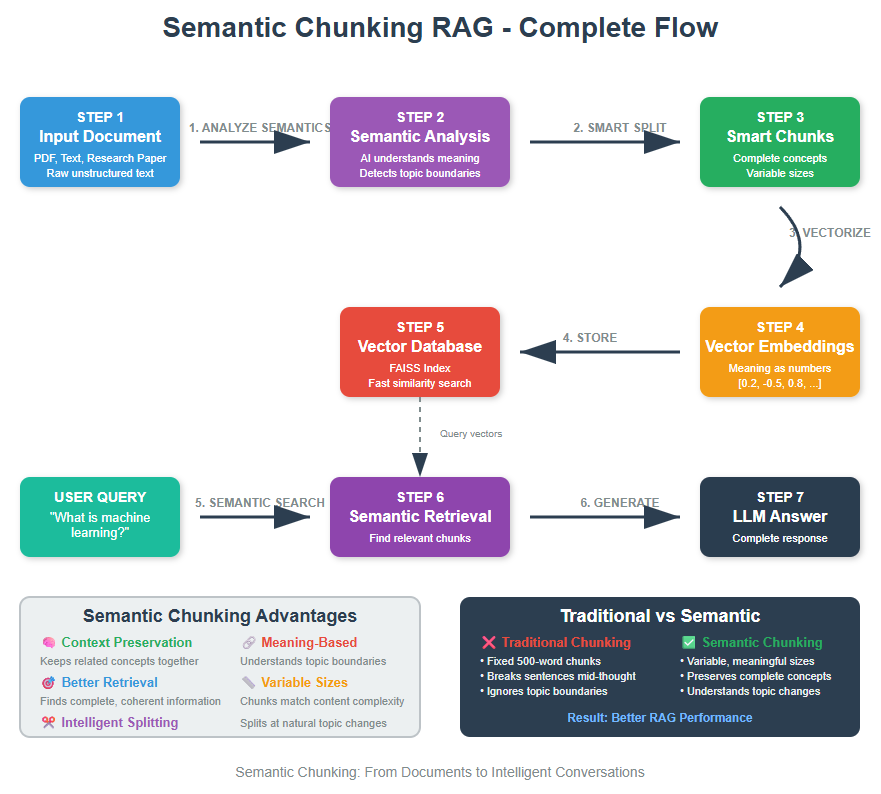
Traditional chunking methods split text based on simple rules like every 500 characters, every 1000 words, at paragraph breaks etc.
The problem? These methods don’t understand meaning. They might split right in the middle of an important explanation about a topic, separating the problem description from its solution.
What happens when we use traditional chunking:
- Sentences get cut in half
- Related concepts get separated into different chunks
- Context gets lost between chunks
- AI retrieval systems return incomplete or confusing results
What semantic chunking does differently:
- Understands when one topic ends and another begins
- Uses AI embeddings to “read” the meaning of text
- Splits documents at natural breakpoints where context shifts
- Keeps related concepts together in the same chunk
This means when your AI system searches for information about “Hybrid cloud benefits”, it gets complete, coherent chunks instead of fragmented pieces.
Setting Up Your Environment
Let’s get your workspace ready. Think of this as gathering all the tools you need before starting a project.
bash
conda create -p rag python==3.12
conda activate rag
pip install ipykernel
pip install langchain langchain-experimental langchain-openai langchain-community
pip install faiss-cpu pypdf python-dotenv
Now let’s import everything that we need
python
import os
from dotenv import load_dotenv
from pypdf import PdfReader

# The required langchain modules
from langchain_experimental.text_splitter import SemanticChunker
from langchain_openai import OpenAIEmbeddings, ChatOpenAI
from langchain_community.vectorstores import FAISS
from langchain.prompts import ChatPromptTemplate
from langchain.schema import Document
from langchain_core.output_parsers import StrOutputParser

# Load your environment variables
load_dotenv()
os.environ["OPENAI_API_KEY"] = os.getenv('OPENAI_API_KEY')
Quick note: Make sure you have a .env file with your OpenAI API key. It should look like this:
python
OPENAI_API_KEY=your_api_key_here
3. Loading and Processing Your Documents
Every great AI system starts with good data. Let’s learn how to properly extract and clean text from PDF documents.
You can download the pdf here.
python
# Load your PDF document
pdf_file_path = "Cloud Computing.pdf" # Replace with your actual file path

print(f"Loading PDF from: {pdf_file_path}")

# Open and read the PDF file
with open(pdf_file_path, 'rb') as file:
pdf_reader = PdfReader(file)
total_pages = len(pdf_reader.pages)
print(f"PDF contains {total_pages} pages")

# Extract text from all pages
raw_text = ""
for page_num in range(total_pages):
page = pdf_reader.pages[page_num]
page_text = page.extract_text()
raw_text += page_text + "\n"

print(f"PDF processing completed!")
print(f"Total extracted text length: {len(raw_text):,} characters")
Loading PDF from: Cloud Computing.pdf
PDF contains 74 pages
PDF processing completed!
Total extracted text length: 197,960 characters
This code opens your PDF, reads each page, and extracts all the text. Now let’s clean up the extracted text
python
import re

print("Cleaning extracted text...")

# Replace multiple spaces with single space
cleaned_text = re.sub(r' +', ' ', raw_text)

# Replace multiple newlines with double newline (paragraph breaks)
cleaned_text = re.sub(r'\n+', '\n\n', cleaned_text)

# Remove leading/trailing whitespace from each line
lines = [line.strip() for line in cleaned_text.split('\n')]
final_text = '\n'.join(lines)

print(f"Text cleaning completed. Final length: {len(final_text):,} characters")
Cleaning extracted text…
Text cleaning completed. Final length: 200,426 characters
This cleaning step is crucial. Raw PDF text often has formatting issues, extra spaces, and inconsistent line breaks. Clean text leads to better chunking results.
4. Understanding Semantic Chunking Methods
Before we create our chunker, let me explain the three different ways it can decide where to split text. Think of these as different “sensitivity levels” for detecting topic changes.
The Three Breakpoint Methods
- Percentile Method (Most Common) : Looks at all the differences between sentences and splits when the difference is larger than X% of all differences
- Standard Deviation Method : Splits when the difference is more than X standard deviations from the average
- Interquartile Method : Uses statistical quartiles to find natural breakpoints
For most use cases, I recommend starting with the percentile method at 90% threshold. It’s conservative and prevents over-splitting.
5. Creating Your Semantic Chunker
Now let’s create our intelligent chunker.
python
print("Creating semantic chunker...")

# Initialize OpenAI embeddings for understanding text meaning
embeddings_model = OpenAIEmbeddings()

# Create the semantic chunker with percentile method
chunker = SemanticChunker(
embeddings_model,
breakpoint_threshold_type='percentile',
breakpoint_threshold_amount=90
)

print("Semantic chunker created successfully!")
Creating semantic chunker…
Semantic chunker created successfully!
Here the chunker converts each sentence to a vector (embedding) that represents its meaning and then compares adjacent sentences to see how semantically different they are.
When it finds a big difference (above our 90% threshold), it creates a split. The result is chunks that contain complete thoughts and related concepts.
Why 90% threshold? This means we only split when the semantic difference between sentences is in the top 10% of all differences. It’s conservative – we only split when there’s a really significant topic change.
6. Performing the Semantic Split
Let’s put our chunker to work and see what it creates
python
print("Starting semantic chunking process...")
print(f"Original text length: {len(final_text)} characters")

# Create semantic chunks
document_chunks = chunker.create_documents([final_text])

print(f"Semantic chunking completed!")
print(f"Number of chunks created: {len(document_chunks)}")
Starting semantic chunking process…
Original text length: 200426 characters
Semantic chunking completed!
Number of chunks created: 135
Now let’s analyze what we created
python
# Preview few chunks
print(f"\nPreviewing random 3 chunks:")
print("=" * 60)

for i, chunk in enumerate(document_chunks[20:23]):
print(f"\nCHUNK {i + 1} (Length: {len(chunk.page_content)} characters):")
print("-" * 40)
preview_text = chunk.page_content[:200] + "..." if len(chunk.page_content) > 200 else chunk.page_content
print(preview_text)
print("-" * 40)
Previewing random 3 chunks:
CHUNK 1 (Length: 1071 characters):
Data protection in cloud environments involves encryption, access controls, and compliance with
various regulatory requirements. Organizations must understand how their data is stored,
processed, an…
CHUNK 2 (Length: 519 characters):
CDNs are often integrated with cloud services to
provide global content distribution. Virtual private clouds (VPCs) provide isolated network environments within public cloud
infrastructure, allowing…
CHUNK 3 (Length: 196 characters):
These fundamental concepts provide the foundation for understanding more advanced cloud
computing topics and enable meaningful discussion of cloud strategies, architectures, and
implementations.
This gives you insights into how well the chunking worked. You should see:
- Varied chunk lengths (not uniform like traditional methods)
- Complete concepts within each chunk
- Natural topic transitions between chunks
7. Building Your Intelligent Vector Database
Now we need to make our chunks searchable. A vector database is like a smart library catalog that understands meaning, not just keywords and so we use FAISS(Facebook AI Similarity Search) for this.
python
print("Creating vector database...")
print(f"Processing {len(document_chunks)} chunks")

# Initialize embeddings model (same as used for chunking)
embeddings_model = OpenAIEmbeddings()

# Create FAISS vector store
print("Generating embeddings and building FAISS index...")
vector_database = FAISS.from_documents(document_chunks, embeddings_model)

print("Vector database created successfully!")
print(f"Database contains {len(document_chunks)} searchable chunks")
Creating vector database…
Processing 135 chunks
Generating embeddings and building FAISS index…
Vector database created successfully!
Database contains 135 searchable chunks
FAISS is like a super-fast librarian that can instantly find the most similar documents to any query. It uses mathematical similarity (cosine similarity) to find matches.
8. Creating Smart Retrievers
The retriever is your intelligent assistant that finds the most relevant chunks for any question. Let’s build one for our system.
python
print("Creating basic similarity retriever...")

# Create retriever that returns top 3 most relevant chunks
basic_retriever = vector_database.as_retriever(
search_kwargs={"k": 3}
)

print("Basic retriever created - returns top 3 similar chunks")
Creating basic similarity retriever…
Basic retriever created – returns top 3 similar chunks
This retriever uses cosine similarity to find the chunks most similar to your query.
9. Testing Your Retrieval System
Let’s test our system to make sure it’s finding relevant information correctly.
python
def search_and_display_results(retriever, query, retriever_name):
"""Test a retriever with a query and display results"""
print(f"\nTesting {retriever_name}")
print(f"Query: '{query}'")
print("=" * 60)

try:
# Retrieve relevant chunks
results = retriever.invoke(query)

print(f"Found {len(results)} relevant chunks:\n")

for i, doc in enumerate(results, 1):
print(f"CHUNK {i}:")
print("-" * 40)
preview = doc.page_content[:250] + "..." if len(doc.page_content) > 250 else doc.page_content
print(preview)
print(f"\nChunk length: {len(doc.page_content)} characters")
print("-" * 40)
print()

return [doc.page_content for doc in results]

except Exception as e:
print(f"Error during retrieval: {str(e)}")
return []

test_query = "What are the main concepts in Cloud Computing?"

# Test basic retriever
basic_results = search_and_display_results(basic_retriever, test_query, "Basic Similarity Retriever")
Testing Basic Similarity Retriever
Query: ‘What are the main concepts in Cloud Computing?’
Found 3 relevant chunks:
CHUNK 1:
These fundamental concepts provide the foundation for understanding more advanced cloud
computing topics and enable meaningful discussion of cloud strategies, architectures, and
implementations.
Chunk length: 196 characters
CHUNK 2:
Cost optimization in cloud computing involves selecting appropriate service levels, right-sizing
resources, using reserved instances for predictable workloads, and implementing automated scaling
to avoid over-provisioning. Distributed Systems Conce…
Chunk length: 997 characters
CHUNK 3:
This period
demonstrated both the resilience and importance of cloud computing for business continuity. This historical perspective shows that cloud computing has evolved from theoretical concepts to
practical reality through continuous innovation,…
Chunk length: 1329 characters
This test shows you exactly what chunks your system finds for a given query. You should see:
- Relevant chunks that actually contain information about your query
- Complete concepts (not cut-off sentences)
- Contextual information that makes sense together
10. Integrating with Language Models for Answer Generation
Now let’s add the final piece – generating comprehensive answers using the retrieved chunks.
python
print("Setting up answer generation system...")

# Initialize our language model
llm = ChatOpenAI(model="gpt-4", temperature=0.2)

# Create a prompt template for answer generation
answer_prompt = ChatPromptTemplate.from_messages([
("system", """You are a helpful tutor. Use only the provided context to answer questions clearly and comprehensively.
If the context doesn't contain enough information, say so. Always base your answer on the given context."""),
("human", """Context:{context}

Question: {question}

Please provide a clear, comprehensive answer based on the context above:""")
])

print("Answer generation system ready!")
Setting up answer generation system…
Answer generation system ready!
Now let’s create our complete RAG pipeline:
python
# Create the complete RAG chain using LCEL
rag_chain = (
{
"context": basic_retriever,
"question": lambda x: x
}
| answer_prompt
| llm
| StrOutputParser()
)

print("Complete RAG pipeline created!")
Complete RAG pipeline created!
This LCEL chain:
- Takes your question
- Uses the retriever to find relevant chunks (context)
- Combines question + context into the prompt template
- Sends to the language model for answer generation
- Returns a clean string response
11. Testing Your Complete RAG System
Let’s test our complete system with real questions:
python
def ask_question(question):
"""Ask a question to our RAG system and get an answer"""
print(f"\nQuestion: {question}")
print("=" * 60)

try:
answer = rag_chain.invoke(question)
print("Answer:")
print(answer)
return answer
except Exception as e:
print(f"Error generating answer: {str(e)}")
return None

# Test with various questions
questions = [
"What is virtualization?",
"How to optimize cloud costs?",
"Define IaaS"
]

for question in questions:
ask_question(question)
print("\n" + "="*80 + "\n")
Question: What is virtualization?
Answer:
Virtualization is a technology that creates virtual versions of physical computing resources, enabling multiple virtual machines to run on a single physical server while maintaining isolation between them. This abstraction layer allows cloud providers to maximize resource utilization, provide multi-tenant services, and offer flexible resource allocation to customers. The hypervisor, also known as a virtual machine monitor (VMM), is the software layer that enables virtualization by creating and managing virtual machines. Hypervisors abstract the underlying physical hardware and present virtual hardware interfaces to guest operating systems, enabling multiple operating systems to run concurrently on the same physical machine. There are two types of hypervisors: Type 1 hypervisors run directly on the physical hardware without requiring a host operating system, providing better performance and security, while Type 2 hypervisors run on top of a conventional operating system, providing easier management and flexibility. Hardware-assisted virtualization capabilities built into modern processors provide performance improvements and security enhancements for virtualized environments.
================================================================================
Question: How to optimize cloud costs?
Answer:
Optimizing cloud costs can be achieved through several best practices.
- Regular Cost Reviews: Conducting regular cost reviews can help identify optimization opportunities, validate current spending patterns, and ensure that cost management strategies remain effective. These reviews should involve both technical and business stakeholders.
Proactive Monitoring: This prevents cost surprises by providing early warning of unusual spending patterns or resource usage spikes. Monitoring should include both automated alerts and regular manual review of cost trends and patterns.
Education and Training: Developers, administrators, and business users should understand how their decisions affect cloud costs. This education should cover both technical optimization techniques and business implications of cloud spending decisions.
Experimentation and Testing: Organizations should understand the cost implications of different architectural choices, pricing options, and optimization strategies. Small-scale experiments can provide valuable insights before implementing changes at scale.
Documentation and Knowledge Sharing: Cost optimization insights and strategies should be preserved and shared across the organization. This ensures that everyone is aware of the best practices and can contribute to cost optimization.
In addition, organizations should balance cost optimization with other business requirements and establish clear guidelines for acceptable trade-offs. The complexity of cloud pricing can make it difficult to understand and optimize costs, particularly for organizations using multiple cloud providers or services. This challenge requires ongoing education and potentially specialized tools or expertise.
================================================================================
Question: Define IaaS
Answer:
Infrastructure as a Service (IaaS) represents the most fundamental cloud service model, providing virtualized computing resources over the Internet. IaaS delivers basic computing infrastructure including virtual machines, networks, and storage as on-demand services, allowing customers to avoid the expense and complexity of buying and managing physical servers. In the IaaS model, cloud providers manage the underlying physical infrastructure including servers, storage devices, networking equipment, and data centers. Customers are responsible for managing operating systems, applications, runtime environments, and data. This model provides maximum flexibility and control while eliminating the need for capital investment in physical infrastructure. Key characteristics of IaaS include the ability to provision and de-provision resources on demand, pay-per-use pricing models, and access to enterprise-grade infrastructure without the associated capital costs. IaaS enables organizations to scale resources up or down based on demand and experiment with new technologies without significant upfront investment.
================================================================================
12. Comparing Traditional vs Semantic Chunking
Let’s see the difference between traditional and semantic chunking side by side
python
from langchain.text_splitter import RecursiveCharacterTextSplitter

print("Creating traditional chunker for comparison...")

# Create traditional chunker
traditional_chunker = RecursiveCharacterTextSplitter(
chunk_size=1000,
chunk_overlap=100,
separators=["\n\n", "\n", " ", ""]
)

# Split the same text using traditional method
traditional_chunks = traditional_chunker.create_documents([final_text])

print(f"Traditional chunking results:")
print(f"Number of chunks: {len(traditional_chunks)}")

traditional_lengths = [len(chunk.page_content) for chunk in traditional_chunks]
print(f"Average chunk length: {sum(traditional_lengths) / len(traditional_lengths):.0f} characters")

print(f"\nSemantic chunking results:")
print(f"Number of chunks: {len(document_chunks)}")
semantic_lengths = [len(chunk.page_content) for chunk in document_chunks]
print(f"Average chunk length: {sum(semantic_lengths) / len(semantic_lengths):.0f} characters")
Creating traditional chunker for comparison…
Traditional chunking results:
Number of chunks: 228
Average chunk length: 950 characters
Semantic chunking results:
Number of chunks: 135
Average chunk length: 1478 characters
Now let’s see how both methods perform with the same query by testing retrieval
python
print("Creating vector stores for both chunking methods...")

# Create traditional vector store
traditional_vector_store = FAISS.from_documents(traditional_chunks, embeddings_model)
traditional_retriever = traditional_vector_store.as_retriever(search_kwargs={"k": 3})

# We already have our semantic vector store and retriever
semantic_retriever = basic_retriever

print("Vector stores created for both methods!")

def compare_retrieval_methods(query, traditional_ret, semantic_ret):
"""Compare traditional vs semantic chunking retrieval results"""

print(f"\n🔍 QUERY: '{query}'")
print("=" * 80)

# Get results from traditional chunking
print("\n📊 TRADITIONAL CHUNKING RESULTS:")
print("-" * 50)
traditional_results = traditional_ret.invoke(query)

for i, doc in enumerate(traditional_results, 1):
print(f"\nTraditional Chunk {i} ({len(doc.page_content)} chars):")
print("─" * 30)
preview = doc.page_content[:300] + "..." if len(doc.page_content) > 300 else doc.page_content
print(preview)

# Get results from semantic chunking
print(f"\n🧠 SEMANTIC CHUNKING RESULTS:")
print("-" * 50)
semantic_results = semantic_ret.invoke(query)

for i, doc in enumerate(semantic_results, 1):
print(f"\nSemantic Chunk {i} ({len(doc.page_content)} chars):")
print("─" * 30)
preview = doc.page_content[:300] + "..." if len(doc.page_content) > 300 else doc.page_content
print(preview)

return traditional_results, semantic_results

# Test with a specific query
test_query = "What are the main concepts in Cloud Computing?"
trad_results, sem_results = compare_retrieval_methods(
test_query,
traditional_retriever,
semantic_retriever
)
Creating vector stores for both chunking methods…
Vector stores created for both methods!
🔍 QUERY: ‘What are the main concepts in Cloud Computing?’
📊 TRADITIONAL CHUNKING RESULTS:
Traditional Chunk 1 (981 chars):
──────────────────────────────
These concepts form the foundation upon which all cloud services are built and provide the
vocabulary necessary for meaningful discussion of cloud computing topics.
Essential Characteristics of Cloud Computing
The National Institute of Standards and Technology (NIST) has established a widely acce…
Traditional Chunk 2 (938 chars):
──────────────────────────────
Comprehensive Guide to Cloud Computing
Table of Contents
- Introduction to Cloud Computing
Historical Development and Evolution
Fundamental Concepts and Definitions
Cloud Service Models
Cloud Deployment Models
Core Technologies and Infrastructure
Virtualization and Contain…
Traditional Chunk 3 (975 chars):
──────────────────────────────
from multiple sources and understanding of cloud networking concepts and services.
Understanding cloud networking concepts and technologies is essential for designing,
implementing, and managing effective cloud solutions. The complexity and flexibility of cloud
networking provide powerful capabil…
🧠 SEMANTIC CHUNKING RESULTS:
Semantic Chunk 1 (196 chars):
──────────────────────────────
These fundamental concepts provide the foundation for understanding more advanced cloud
computing topics and enable meaningful discussion of cloud strategies, architectures, and
implementations.
Semantic Chunk 2 (997 chars):
──────────────────────────────
Cost optimization in cloud computing involves selecting appropriate service levels, right-sizing
resources, using reserved instances for predictable workloads, and implementing automated scaling
to avoid over-provisioning. Distributed Systems Concepts
Cloud computing relies heavily on distributed…
Semantic Chunk 3 (1329 chars):
──────────────────────────────
This period
demonstrated both the resilience and importance of cloud computing for business continuity. This historical perspective shows that cloud computing has evolved from theoretical concepts to
practical reality through continuous innovation, market forces, and changing user needs. Understan…
This is the core of how Semantic Chunking for RAG works – find relevant information based on semantic similarity between the query and document chunks, then use it to generate accurate answers!
Free Course
Master Core Python — Your First Step into AI/ML
Build a strong Python foundation with hands-on exercises designed for aspiring Data Scientists and AI/ML Engineers.
Start Free Course →Trusted by 50,000+ learners

Related Course
Master Gen AI — Hands-On
Join 5,000+ students at edu.machinelearningplus.com
Explore Course


