
machine learning +
LLM Temperature, Top-P, and Top-K Explained — With Python Simulations
HyPE-RAG: How Hypothetical Prompt Embeddings Solve Question Matching in Retrieval Systems
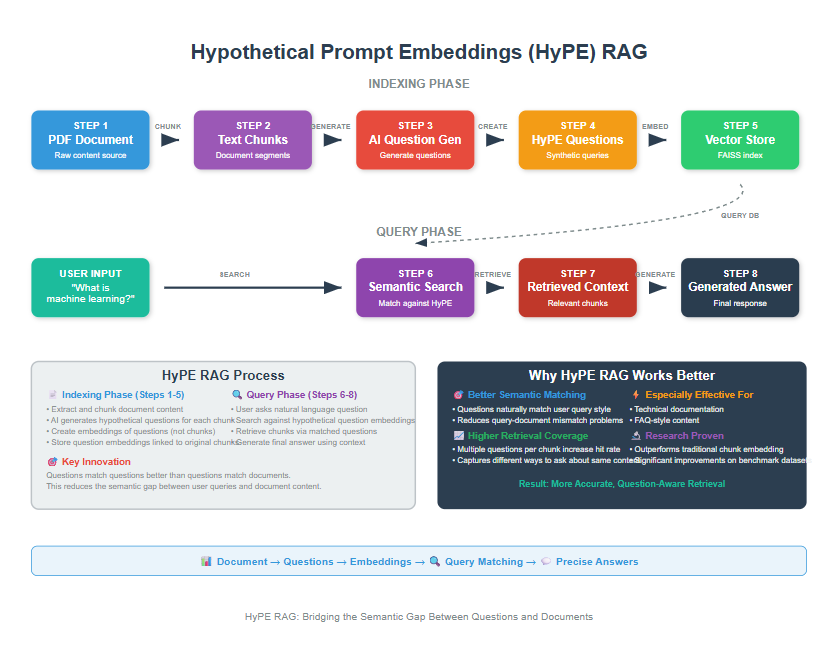
HyPE (Hypothetical Prompt Embeddings) is an advanced RAG enhancement technique that precomputes hypothetical questions for each document chunk during indexing rather than generating content at query time.
HyPE (Hypothetical Prompt Embeddings) is an advanced RAG enhancement technique that precomputes hypothetical questions for each document chunk during indexing rather than generating content at query time.
The questions are created in such a way that the answers are already present in the document.
By transforming retrieval into question-question matching, HyPE reduces query-time latency while improving context precision compared to traditional approaches.
You’ve probably experienced the frustration of RAG systems that struggle to bridge the gap between how you ask questions and how information is stored in documents.
This happens because there’s a fundamental mismatch between the style of user queries and the way information is written in documents.
HyPE solves this by flipping the traditional approach on its head.
Instead of trying to match your question to document content at search time (which is slow and often inaccurate), HyPE pregenerates the kinds of questions each document chunk could answer, then matches your question directly to those hypothetical questions.
1. Understanding the Core Problem
Traditional RAG systems have a fundamental flaw: query-document style mismatch. Let me show you what I mean.
When you ask: “What optimization techniques improve neural network training?”
Your document have something like: “Stochastic gradient descent with momentum accelerates convergence by accumulating velocity vectors in the direction of persistent gradients…”
See the disconnect?
Your query is phrased like a question. Your document is written like an academic explanation. Traditional RAG tries to match these directly using embeddings, which could miss the mark, because, we are computing similarity between a question and an answer.
It might be a better idea to compute the similarity between a question and another question. Yes?
That’s exactly what HyPE is based on.
How HyPE Solves This
HyPE transforms the problem from “question → document” matching to “question → question” matching. Here’s the process:
- During indexing: Generate hypothetical questions for each document chunk
- Store questions: Index these questions instead of raw text chunks
- At query time: Match your question to similar pre-generated questions
- Retrieve context: Return the original chunk that the matched question came from
This approach works because questions have similar linguistic patterns, making them much easier to match semantically.
2. Setting Up Your Environment
Before we dive into the code, let’s get everything set up. I’ll assume you have Python and VS Code ready to go.
Before we start coding, let’s get all our tools ready. First, let’s install the packages we need:
bash
conda create rag2 python==3.12
conda activate rag2
pip install ipykernel
pip install langchain openai faiss-cpu python-dotenv typing
Now let’s import everything:
python
# Core libraries for document processing and AI
import os
import sys
import re
from typing import List, Tuple

# Environment management
from dotenv import load_dotenv

# Vector search and storage
import faiss
from langchain_community.docstore.in_memory import InMemoryDocstore
from langchain_community.vectorstores import FAISS

# LangChain components for RAG pipeline
from langchain_community.document_loaders import PyPDFLoader
from langchain.text_splitter import RecursiveCharacterTextSplitter
from langchain_openai import ChatOpenAI, OpenAIEmbeddings
from langchain.prompts import PromptTemplate
from langchain.schema.output_parser import StrOutputParser
from langchain.schema import Document, HumanMessage

# Load environment variables
load_dotenv()
os.environ["OPENAI_API_KEY"] = os.getenv('OPENAI_API_KEY')

print("Environment setup complete!")
python
Environment setup complete!
PyPDFLoader handles PDF extraction, RecursiveCharacterTextSplitter breaks documents into chunks intelligently, and FAISS provides lightning-fast vector search.
Make sure you have a .env file with your OpenAI API key:
python
OPENAI_API_KEY=your_api_key_here
Let’s set up our configuration parameters.
You can get the pdf used in the code here
python
# Configuration settings
PDF_PATH = "Robotics.pdf"  # Replace with your PDF path
LANGUAGE_MODEL = "gpt-4o-mini"  # For generating hypothetical questions
EMBEDDING_MODEL = "text-embedding-3-small"  # For creating embeddings

# Text chunking parameters
CHUNK_SIZE = 1000      # Larger chunks work well with HyPE
CHUNK_OVERLAP = 200    # Prevents information loss at boundaries
TOP_K_RESULTS = 3      # Number of chunks to retrieve

print("Configuration set up complete!")
python
Configuration set up complete!
Why These Settings Matter
We use larger chunks with HyPE because we generate multiple questions per chunk. This ensures we don’t lose retrieval precision while maintaining good context.
3. Loading and Chunking Your Documents
Every good RAG system starts with understanding your data. Let’s load a PDF and break it into manageable pieces.
python
def load_pdf_document(file_path):
    """
    Load a PDF and return all pages as documents
    """
    try:
        loader = PyPDFLoader(file_path)
        documents = loader.load()
        print(f"Loaded {len(documents)} pages from PDF")
        return documents
    except Exception as e:
        print(f"Error loading PDF: {e}")
        return []
Now let’s create our text splitter. This is crucial because the quality of your chunks directly affects the quality of generated questions.
python
def create_document_chunks(documents, chunk_size=1000, chunk_overlap=200):
    """
    Split documents into overlapping chunks for processing
    """
    text_splitter = RecursiveCharacterTextSplitter(
        chunk_size=chunk_size,
        chunk_overlap=chunk_overlap,
        length_function=len  # Use character count for splitting
    )

    chunks = text_splitter.split_documents(documents)

    # Clean up the text
    for chunk in chunks:
        chunk.page_content = chunk.page_content.replace('\t', ' ')
        chunk.page_content = chunk.page_content.replace('\n\n\n', '\n\n')
        chunk.page_content = chunk.page_content.strip()

    print(f"Created {len(chunks)} chunks")
    print(f"Average chunk size: {sum(len(chunk.page_content) for chunk in chunks) // len(chunks)} characters")

    return chunks
Let’s put these together and load our document:
python
# Load and chunk the document
documents = load_pdf_document(PDF_PATH)
if documents:
    chunks = create_document_chunks(documents, CHUNK_SIZE, CHUNK_OVERLAP)
else:
    print("Failed to load document. Please check your PDF path.")
python
Loaded 57 pages from PDF
Created 211 chunks
Average chunk size: 842 characters
RecursiveCharacterTextSplitter tries to split on paragraph breaks first, then sentences, then words. This preserves context better than naive character splitting. The overlap ensures important information doesn’t get lost at chunk boundaries.
4. The Heart of HyPE: Generating Hypothetical Questions
This is where the hypothetical generation happens. Instead of storing raw text, we generate questions that users might ask about each chunk.
python
def generate_questions_for_chunk(chunk_text, model_name="gpt-4o-mini"):
    """
    Generate hypothetical questions for a text chunk
    """
    llm = ChatOpenAI(temperature=0, model_name=model_name)

    question_prompt = PromptTemplate.from_template(
        """Analyze this text and generate 3-5 essential questions that users might ask about this content.

        Requirements:
        - Each question should capture a key concept or fact from the text
        - Questions should be varied (factual, conceptual, comparative)
        - Write each question on a separate line
        - Don't include numbering or bullet points
        - Make questions natural and conversational

        Text:
        {chunk_text}

        Questions:"""
    )

    question_chain = question_prompt | llm | StrOutputParser()

    try:
        response = question_chain.invoke({"chunk_text": chunk_text})

        # Parse questions from response
        questions = [
            q.strip()
            for q in response.replace("\n\n", "\n").split("\n")
            if q.strip() and len(q.strip()) > 10
        ]

        return questions

    except Exception as e:
        print(f"❌ Error generating questions: {e}")
        return ["What information is contained in this text about the main topic?"]
Why this approach works: We’re giving GPT-4 very specific instructions to generate diverse, natural questions. The AI analyzes the text and creates questions that capture different aspects of the content – factual details, conceptual explanations, and comparisons.
Now let’s create a function to convert questions into embeddings:
python
def create_question_embeddings(questions, embedding_model="text-embedding-3-small"):
    """
    Convert questions into embedding vectors
    """
    if not questions:
        return []

    embedder = OpenAIEmbeddings(model=embedding_model)

    try:
        embeddings = embedder.embed_documents(questions)
        return embeddings
    except Exception as e:
        print(f"❌ Error creating embeddings: {e}")
        return []
Embeddings convert text into numerical vectors where similar meanings have similar vectors. This allows us to do mathematical comparisons to find the most relevant questions.
5. Processing Chunks Sequentially
Now we’ll process each chunk one by one to generate questions and embeddings. This approach is simpler to understand and debug, though it takes a bit longer with large documents.
python
def process_single_chunk(chunk_text, lang_model, embed_model):
    """
    Process a single chunk to generate questions and embeddings
    """
    # Generate hypothetical questions
    questions = generate_questions_for_chunk(chunk_text, lang_model)

    if not questions:
        print(f"⚠️ No questions generated for chunk: {chunk_text[:100]}...")
        return chunk_text, []

    # Convert questions to embeddings
    embeddings = create_question_embeddings(questions, embed_model)

    if not embeddings:
        print(f"⚠️ No embeddings created for chunk: {chunk_text[:100]}...")
        return chunk_text, []

    return chunk_text, embeddings
This function handles the complete processing pipeline for a single chunk. It’s straightforward and easy to follow – generate questions, then create embeddings for those questions.
For large documents, you might want to explore parallel processing later, but this approach works great for learning and most practical applications.
6. Building the HyPE Vector Store
Now we create our searchable index. This is where we store all the question embeddings and link them back to their original chunks.
python
def build_hype_vector_store(chunks, language_model, embedding_model):
    """
    Build a FAISS vector store using Hypothetical Prompt Embeddings
    """
    print(f"🔨 Building HyPE vector store from {len(chunks)} chunks...")

    vector_store = None
    processed_count = 0

    # Process chunks one by one
    for i, chunk in enumerate(chunks):
        try:

            chunk_text, embeddings = process_single_chunk(
                chunk.page_content, language_model, embedding_model
            )

            if not embeddings:
                continue

            # Initialize vector store on first successful result
            if vector_store is None:
                print(f"Initializing FAISS index with {len(embeddings[0])}-dimensional vectors")

                vector_store = FAISS(
                    embedding_function=OpenAIEmbeddings(model=embedding_model),
                    index=faiss.IndexFlatL2(len(embeddings[0])),
                    docstore=InMemoryDocstore(),
                    index_to_docstore_id={}
                )

            # Add each embedding-chunk pair to the store
            embedding_chunk_pairs = [(chunk_text, embedding) for embedding in embeddings]
            vector_store.add_embeddings(embedding_chunk_pairs)

            processed_count += len(embeddings)

        except Exception as e:
            print(f"❌ Error processing chunk {i+1}: {e}")
            continue

    print(f"Vector store built with {processed_count} embeddings from {len(chunks)} chunks")
    print(f"Average embeddings per chunk: {processed_count / len(chunks):.1f}")

    return vector_store
For each chunk, we generate multiple questions and create embeddings for them.
Instead of one embedding per chunk, we have multiple question embeddings all pointing to the same original text. This dramatically improves our chances of finding relevant content.
7. Creating the Complete HyPE System
Let’s put everything together into a simple function that handles the entire pipeline:
python
def create_hype_rag_system(pdf_path, chunk_size=1000, chunk_overlap=200):
    """
    Create a complete HyPE RAG system from a PDF document
    """
    print("Starting HyPE RAG system creation...")

    # Step 1: Load and chunk the document
    documents = load_pdf_document(pdf_path)
    if not documents:
        return None, None

    chunks = create_document_chunks(documents, chunk_size, chunk_overlap)

    # Step 2: Build the vector store with HyPE
    vector_store = build_hype_vector_store(chunks, LANGUAGE_MODEL, EMBEDDING_MODEL)

    if not vector_store:
        print("Failed to create vector store")
        return None, None

    # Step 3: Create a retriever
    retriever = vector_store.as_retriever(
        search_kwargs={"k": TOP_K_RESULTS}
    )

    print("HyPE RAG system ready!")
    return retriever, vector_store
This function orchestrates the entire process. It’s your one-stop function for creating a HyPE RAG system from any PDF.
8. Testing Your HyPE System
Let’s test our system with real queries to see how well it performs
python
def test_hype_retrieval(retriever, query):
    """
    Test the HyPE retriever with a sample query
    """
    print(f"🔍 Testing query: '{query}'")
    print("-" * 60)

    try:
        # Retrieve relevant documents
        docs = retriever.invoke(query)

        print(f"📄 Retrieved {len(docs)} relevant chunks:")

        for i, doc in enumerate(docs, 1):
            print(f"\nChunk {i}:")
            print("-" * 30)
            # Show preview for readability
            preview = doc.page_content[:300] + "..." if len(doc.page_content) > 300 else doc.page_content
            print(preview)

        return docs

    except Exception as e:
        print(f"❌ Error during retrieval: {e}")
        return []
Let’s create and test our system:
python
# Create the HyPE system
retriever, vector_store = create_hype_rag_system(PDF_PATH)

if retriever:
    # Test with sample queries
    test_queries = [
        "How do sensors enable robots to perceive their environment?",
        "What makes actuators the muscles of robotic systems?",
        "What role does artificial intelligence play in modern robotics?"
    ]

    for query in test_queries:
        docs = test_hype_retrieval(retriever, query)
        print("=" * 80)
python
Starting HyPE RAG system creation...
Loaded 57 pages from PDF
Created 211 chunks
Average chunk size: 842 characters
🔨 Building HyPE vector store from 211 chunks...
Initializing FAISS index with 1536-dimensional vectors
Vector store built with 1055 embeddings from 211 chunks
Average embeddings per chunk: 5.0
HyPE RAG system ready!
🔍 Testing query: 'How do sensors enable robots to perceive their environment?'
------------------------------------------------------------
📄 Retrieved 3 relevant chunks:

Chunk 1:
------------------------------
autonomy, with robots becoming capable of making more complex decisions without human
intervention. Second, robots are becoming more collaborative, working alongside humans rather
than replacing them entirely. Third, there is increasing emphasis on adaptability, with robots able to
function in unstr...

Chunk 2:
------------------------------
Bio-inspired materials derived from natural systems are providing new capabilities for robotics.
Gecko-inspired adhesives enable climbing robots, while shark-skin-inspired surfaces can reduce
drag for underwater robots. Self-healing materials could enable robots that can repair themselves
after dama...

Chunk 3:
------------------------------
Sensors provide robots with information about their internal state and external environment,
enabling closed-loop control and autonomous behavior. The quality and variety of sensory
information directly impact robot performance and capabilities.
Position sensors measure the angular or linear positio...
================================================================================
🔍 Testing query: 'What makes actuators the muscles of robotic systems?'
------------------------------------------------------------
📄 Retrieved 3 relevant chunks:

Chunk 1:
------------------------------
The continued advancement of sensor technology and perception algorithms enables increasingly
capable robotic systems. Understanding these technologies and their integration is essential for
developing robots that can operate effectively in complex, unstructured environments alongside
humans.
Chapte...

Chunk 2:
------------------------------
The primary function of actuators in robotics is to provide controlled motion at robot joints and
end-effectors. This motion must be precise, repeatable, and responsive to control signals while
providing adequate force or torque to accomplish required tasks. The actuator system must also
integrate s...

Chunk 3:
------------------------------
joint level where individual actuators must be controlled to achieve desired positions, velocities, or
forces.
PID (Proportional-Integral-Derivative) controllers are the most commonly used control algorithm in
robotics due to their simplicity, effectiveness, and well-understood behavior. The proport...
================================================================================
🔍 Testing query: 'What role does artificial intelligence play in modern robotics?'
------------------------------------------------------------
📄 Retrieved 3 relevant chunks:

Chunk 1:
------------------------------
what robots can do.
The integration of machine learning and artificial intelligence has enabled robots to adapt and learn
from their experiences. Cloud robotics has allowed robots to share knowledge and computational
resources, while advances in human-robot interaction have made robots more intuitiv...

Chunk 2:
------------------------------
While industrial robotics focused on manufacturing applications, the 1990s and 2000s saw growing
interest in service robotics. These robots were designed to work alongside humans in less
structured environments, such as hospitals, offices, and homes.
Notable developments included the introduction of...

Chunk 3:
------------------------------
autonomy, with robots becoming capable of making more complex decisions without human
intervention. Second, robots are becoming more collaborative, working alongside humans rather
than replacing them entirely. Third, there is increasing emphasis on adaptability, with robots able to
function in unstr...
================================================================================
9. Building the Answer Generation Pipeline
Now let’s add the final piece – generating comprehensive answers using our retrieved context
python
def generate_answer_with_context(query, retriever, model_name="gpt-4o-mini"):
    """
    Generate an answer using retrieved context from HyPE
    """
    print(f"💬 Generating answer for: '{query}'")

    # Retrieve relevant context
    context_docs = retriever.invoke(query)

    # Combine unique contexts
    unique_contexts = []
    seen = set()
    for doc in context_docs:
        if doc.page_content not in seen:
            unique_contexts.append(doc.page_content)
            seen.add(doc.page_content)

    combined_context = "\n\n".join(unique_contexts)

    # Create answer generation prompt
    answer_prompt = f"""Based on the following context from a document, provide a comprehensive and accurate answer to the question.

    Context:
    {combined_context}

    Question: {query}

    Please provide a detailed answer that:
    1. Directly answers the question
    2. Uses specific information from the context
    3. Explains key concepts clearly
    4. Maintains accuracy

    Answer:"""

    # Generate answer
    llm = ChatOpenAI(temperature=0, model_name=model_name)

    try:
        response = llm.invoke([HumanMessage(content=answer_prompt)])
        return response.content
    except Exception as e:
        print(f"❌ Error generating answer: {e}")
        return "Sorry, I couldn't generate an answer due to an error."
Now let’s test the complete system
python
def test_complete_hype_system(retriever, query):
    """
    Test the complete HyPE RAG system with Q&A
    """
    print(" Testing Complete HyPE RAG System")
    print("=" * 60)

    # Generate answer
    answer = generate_answer_with_context(query, retriever)

    print(f" Question: {query}")
    print("-" * 40)
    print(f" Answer: {answer}")
    print("=" * 60)

    return answer

# Test the complete system
test_query = "How do control systems coordinate robot movement and decision-making?"
answer = test_complete_hype_system(retriever, test_query)
python
 Testing Complete HyPE RAG System
============================================================
💬 Generating answer for: 'How do control systems coordinate robot movement and decision-making?'
 Question: How do control systems coordinate robot movement and decision-making?
----------------------------------------
 Answer: Control systems coordinate robot movement and decision-making by acting as the central processing unit that integrates sensory information, executes control algorithms, and commands actuators to achieve desired behaviors. The control system processes data from various sensors, such as proximity sensors, environmental sensors, and inertial measurement units (IMUs), to gather information about the robot's surroundings and its own state.

1. **Processing Sensory Information**: The control system receives input from sensors that detect the presence of objects, monitor environmental conditions, and measure the robot's orientation and movement. For instance, proximity sensors help in obstacle avoidance and object detection, while IMUs provide critical data on linear acceleration and angular velocity, which are essential for understanding the robot's position and movement in three-dimensional space.

2. **Executing Control Algorithms**: Once the sensory data is processed, the control system employs various control algorithms to translate high-level commands into actionable signals for the actuators. These algorithms can include:
   - **PID Controllers**: For basic position control, ensuring that the robot moves to a desired position accurately.
   - **Adaptive Controllers**: These adjust their parameters in real-time to maintain performance as conditions change, which is crucial for robots operating in dynamic environments or handling varying payloads.
   - **Model Predictive Control (MPC)**: This advanced approach uses mathematical models to predict future behavior and optimize control actions over a finite time horizon, allowing the robot to handle constraints and achieve optimal performance.

3. **Commanding Actuators**: After processing the sensory information and applying the appropriate control algorithms, the control system sends commands to the actuators. These actuators are responsible for executing the physical movements of the robot, such as moving limbs, wheels, or other components necessary for the robot to perform its tasks.

4. **Real-Time Operation**: The control system often operates on real-time operating systems to ensure that response times are predictable. This is vital for coordinating movements and making decisions quickly, especially in environments where rapid responses are necessary to avoid obstacles or adapt to changing conditions.

In summary, control systems coordinate robot movement and decision-making by integrating sensory data, applying control algorithms to interpret that data, and commanding actuators to execute movements, all while ensuring real-time responsiveness to maintain effective operation in various environments.
============================================================
The key insight is simple but powerful: questions have similar linguistic patterns, making them much easier to match than question-to-document pairs.
Try HyPE with your next RAG project. You’ll likely see significant improvements in retrieval quality, especially with complex or technical documents.
Free Course
Master Core Python — Your First Step into AI/ML
Build a strong Python foundation with hands-on exercises designed for aspiring Data Scientists and AI/ML Engineers.
Start Free Course →Trusted by 50,000+ learners

Related Course
Master Gen AI — Hands-On
Join 5,000+ students at edu.machinelearningplus.com
Explore Course


